Code Execution — AI Writes and Runs Code
Code Execution — AI Writes and Runs Code — easy-to-understand guide based on official docs
Imagine asking a helper to organize your messy desk—and instead of just listing what’s there, they sort everything into labeled folders before you even blink. That’s exactly what execute_code does for AI: it turns a chatty assistant into a doer.
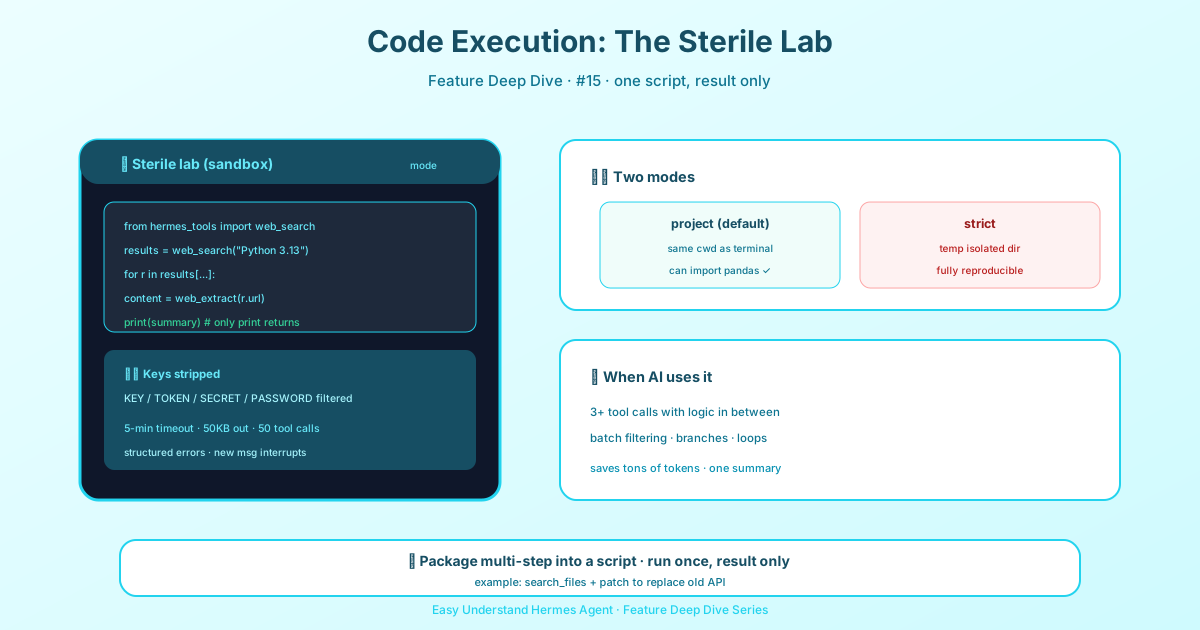
What Is execute_code?
In plain terms, execute_code lets the AI write a Python script and run it on the spot. Tasks that used to take five back-and-forth messages—like pulling data, analyzing it, and generating a report—now happen in one shot. Think of it as handing the AI a toolbox: it opens the box, picks the right tool, and gets the job done without asking you for permission at every step.
How It Works (Behind the Scenes)
The magic happens in five quiet steps, invisible to you:
- AI writes the script – It starts with
from hermes_tools import ...and writes a short Python program. - Tool module is generated – Hermes creates a
hermes_tools.pyfile containing all available helper functions. - A private channel opens – Hermes sets up a Unix domain socket so the script can call back to the main system.
- Script runs in isolation – The code executes in a separate subprocess, like a small private room, with every tool call sent back through the channel.
- Only results are shown – Only the script’s
print()output reaches you. All the intermediate tool calls stay hidden.
Here’s a tiny example of what the AI might write:
from hermes_tools import search_web, summarize_text

results = search_web("2024 AI trends")
summary = summarize_text(results)
print(f"Summary: {summary}")
Why You’ll Love It
- Saves time – A five-step conversation becomes a single step.
- No noise – The AI might search ten times or call three tools, but you only see the final answer.
- More reliable – Scripts are deterministic. They don’t drift off-topic like free-form chat can.
Real-World Uses
- Batch processing – Ask the AI to read 100 files, extract key info, and compile a table.
- Multi-step analysis – Pull data from a database → clean it → plot a chart → write a summary, all in one go.
- Automated testing – Have the AI write a test script, run it, and report which features are broken.
Pro Tip
To trigger this feature, just say “use code execution” or “write a script to handle it.” For example: “Use code execution to count all words in every document in this folder.”
Remember: AI writes the code, runs the code, and you just read the results. It’s like having a super-efficient assistant who says, “Done—here’s what you need,” without bothering you with the messy middle.
Final Takeaway
execute_code upgrades AI from a talker to a doer. It writes scripts, runs them, and reports back—turning complex workflows into one-click tasks. Next time you face a multi-step job, try saying “use code execution.” You’ll be surprised how much an AI can actually get done.
State Between Calls
On the local terminal backend, execute_code does not start a fresh interpreter for every call. Each session owns a persistent Python kernel, so variables, imports, and loaded data from one call are available in the next—the agent can load a dataset once and query it across several turns. A kernel ends when a cell times out or is interrupted, when the agent passes reset: true, or after code_execution.kernel_idle_timeout idle seconds (default 1800) or when more than code_execution.max_session_kernels (default 4) are alive and the oldest is evicted. Remote backends (Docker, SSH, Modal) run a remote session kernel with the same contract, and if the kernel cannot be spawned, Hermes falls back to running each call as a standalone script and says so in the result.
Keep reading: Hermes LSP diagnostics — To catch mistakes before a script ever runs, Hermes LSP diagnostics flags them while you type.
📖 Official Docs
This article is based on the official Hermes Agent documentation:Official docs › user-guide/git-worktrees