Persistent Goals — The AI's Long-Term To-Do List
What are Hermes goals and how to use them — turn big tasks into persistent multi-step plans your agent remembers.
Persistent Goals — The AI’s Long-Term To-Do List
Have you ever had this experience: you ask the AI to help you fix some code, it fixes one spot and stops to wait for your reply; you say “continue,” it fixes another spot, and stops again. Back and forth for several rounds, and you’re sitting there like a broken record, endlessly typing “keep going.”
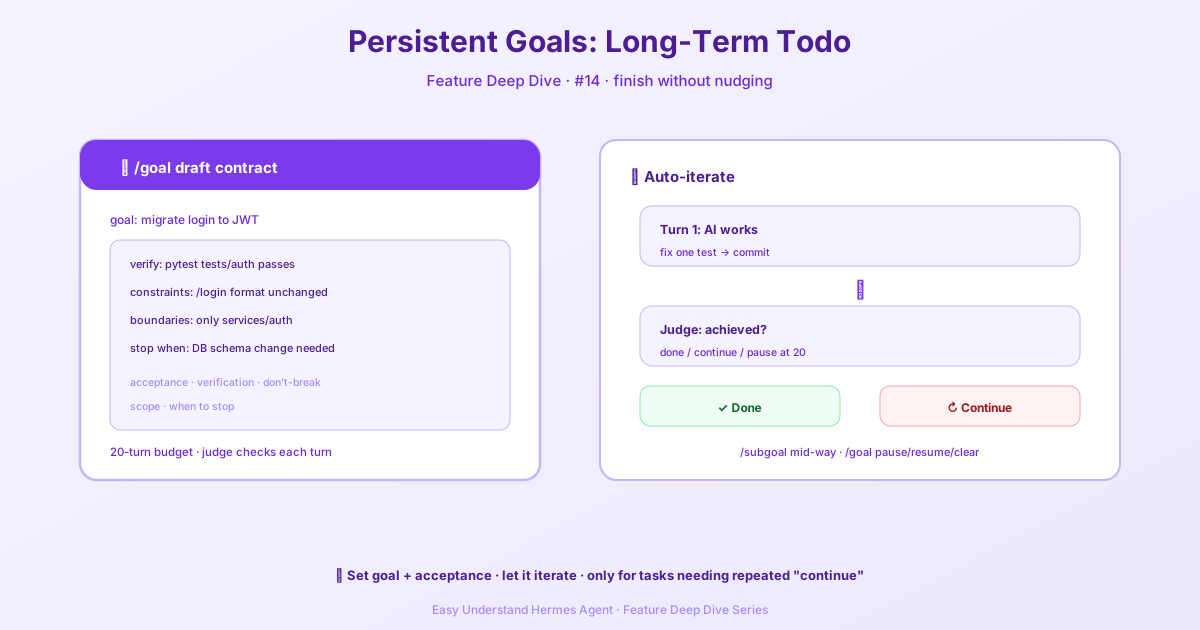
Hermes’s /goal exists to solve exactly this problem. It hangs a long-term to-do on the AI — a goal that persists across multiple rounds of conversation. After each round, a lightweight “judge model” checks whether the goal has been achieved; if not, Hermes automatically feeds a “continue” prompt back into the same session and keeps working, until the goal is complete, you manually pause/clear it, or the turn budget runs out.
Official docs: https://hermes-agent.nousresearch.com/docs/ (see the Persistent Goals section)
An analogy
A normal conversation is like ordering takeout: you place the order, the driver delivers it, transaction over.
/goal is like renovating a house: you tell the foreman “renovate the kitchen,” and he’ll push it forward round by round on his own — tear out the old, run the wiring, lay the tiles, do the final inspection — without you having to shout “continue” after every single step. Only when everything is done, or when something comes up that requires your decision, does he come find you.
When to use it
It’s great for tasks that need the AI to iterate on its own, such as:
- “Fix all the lint errors in
src/and confirmruff checkpasses” - “Port feature X from repo Y, with tests, and get CI green”
- “Figure out why the session ID drifts during compaction, and write a report”
If a task can be done in a single round, you don’t need /goal. Any task where you’d catch yourself saying “keep going” three times is where it shines.
Quick start
/goal Fix all the failing tests in tests/hermes_cli/ and make sure scripts/run_tests.sh passes in that directoryYou’ll see a flow like this:
- Goal accepted —
⊙ Goal set (20-turn budget): <your goal> - Round 1 kicks off — Hermes starts working just like it received a normal message
- The judge steps in — after each round, the judge model decides
done,continue, orblocked - Loop if needed — if it decides
continue, you’ll see↻ Continuing toward goal (1/20): <the judge's reasoning>, and Hermes automatically moves on to the next step - Termination — eventually you’ll see
✓ Goal achievedor⏸ Goal paused
Common commands
| Command | What it does |
|---|---|
/goal <text> |
Set (or replace) a long-term goal and immediately start the first round |
/goal draft <text> |
Have Hermes expand your plain-language description into a structured “completion contract” before setting it |
/goal show |
View the current goal’s completion contract |
/goal status |
View the goal’s status and turns used |
/goal pause |
Pause the auto-loop but keep the goal |
/goal resume |
Resume the loop (turn count resets to zero) |
/goal clear |
Completely clear the goal |
Making “done” clearer: the completion contract
Just writing /goal <text> works, but the vaguer the goal, the more confused the judge — it can only check what you tell it to check.
So Hermes supports an optional completion contract with five fields (all optional):
outcome: the final state that must hold when doneverification: the specific tests/commands/artifacts that prove it holdsconstraints: things that must not be broken or regressedboundaries: which files, directories, and tools are involvedstop_when: when it should stop and ask you
There are two ways to set it. Having Hermes draft it for you is recommended:
/goal draft Migrate the auth service from session cookies to JWTIt’ll use a helper model to expand your words into a full contract and show it to you for review. Or write it inline yourself:
/goal Migrate auth to JWT
verify: pytest tests/auth passes
constraints: keep the /login response structure unchanged
boundaries: only touch services/auth and its tests
stop when: a database schema migration is needed
Adding conditions mid-flight: /subgoal
Halfway through a goal, you suddenly want to add a requirement? No need to restart the loop — just use /subgoal <text> to append an acceptance criterion. The judge gets rewritten, and completion now requires the original goal plus every subgoal to all be satisfied.
For example, if you told it to “fix the failing tests” and midway realize you also want it to “add a regression test for the bug it just fixed,” just:
/subgoal Add a regression testQuality gates: making “done” mechanically verifiable
The contract makes the judge stricter, but the judge is still ultimately an LLM reading text. Quality gates are harder-core — a shell command that must exit with code 0, or it absolutely doesn’t count as done:
/goal Fix those flaky session tests
/goal gate add scripts/run_tests.sh tests/hermes_cli/test_goals.py
Each round goes: run the gate first, then call the judge. If the gate fails, the judge isn’t called (a red light is ironclad proof), and the gate’s output becomes the continue prompt, letting the AI iterate against the real error. Each gate retries 3 times by default with a 5-minute timeout, and once exhausted, the goal auto-pauses.
Summary
/goal turns “you repeatedly nagging the AI” into “the AI keeping its own eye on a long-term to-do and pushing forward.” Paired with a completion contract (spelling out what counts as done) and quality gates (proving completion with commands), you can let it run with peace of mind and go do your own thing.
📖 Official Docs
This article is based on the official Hermes Agent documentation:Official docs › user-guide/features/goals