Kanban — Multi-Agent Collaboration Board
Kanban — Multi-Agent Collaboration Board — easy-to-understand guide based on official docs
Kanban — Multi-Agent Collaboration Board
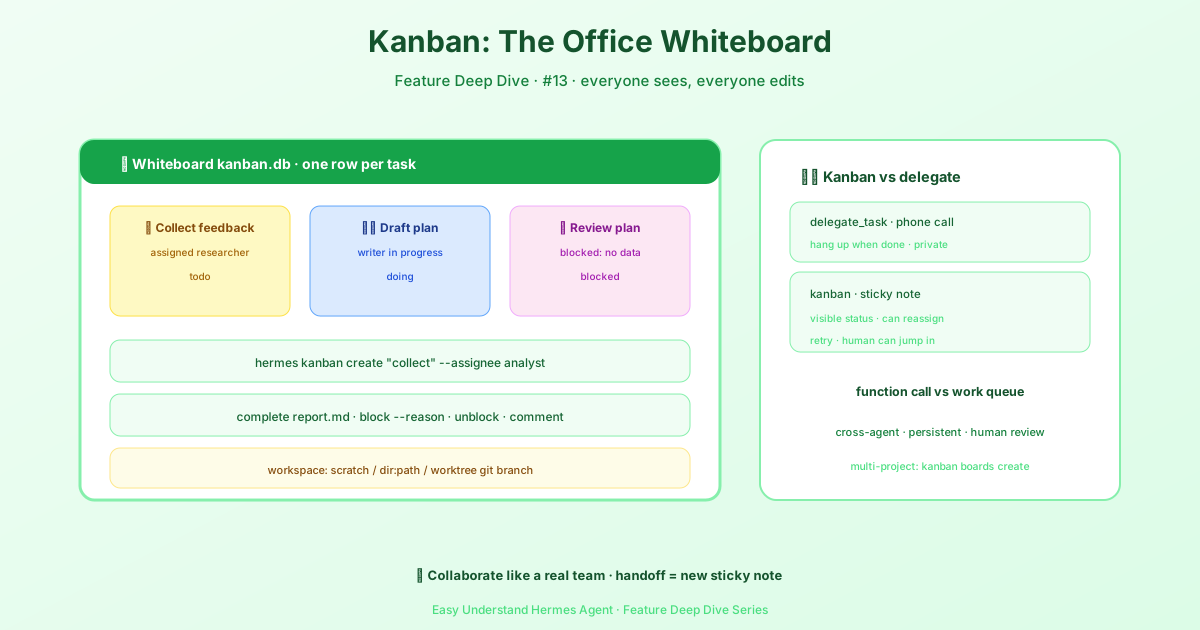
Hey friends! Today let’s talk about a really cool feature in Hermes — the Kanban board. Think of it as a team whiteboard covered in sticky notes, where each note is a task. Multiple agents can work together on this board, staying out of each other’s way while keeping everything organized.
What Is Kanban?
Simply put, Kanban is a “command center” that lets multiple agents each handle their own tasks in parallel. You don’t need to manually dispatch them one by one — the board automatically assigns tasks to the right agents. Whoever’s free takes the next one, and whoever’s good at something does that thing.
Every task on the board is a row in ~/.hermes/kanban.db. Every handoff is a row that anyone can read and write. Every worker is a full operating system process with its own identity — so it’s built to survive restarts, crashes, and human intervention, unlike in-process sub-agents where one crash takes everything down.
How Do You Use Kanban?
In Hermes, the core of Kanban is the task card. Each card represents a to-do item, and you can set:
- Title and description — tell the agent what to do
- Priority — which tasks come first
- Tags — for easy categorization and searching
- Deadline — give the agent a due date
The board groups these cards by status, like “To Do,” “In Progress,” and “Done.” Once agents claim a card, the status updates automatically, so you can see the whole project’s progress at a glance.
How Do Multiple Agents Collaborate?
This is the main event! Each task on the board can specify which agent should execute it. You can:
- Assign by skill — coding tasks go to the code agent, copywriting goes to the writing agent
- Balance the load — give work to whoever’s free, so one agent isn’t swamped while another sits idle
- Set up dependencies — when task A finishes, task B triggers automatically
Kanban also supports inter-task communication — when an agent finishes a task, it can write the results to the card, and the next agent reads the card content and continues. It’s like an assembly line, one link after another.
Watch out for this trap: Don’t link a “support card” to the very card it’s supposed to unblock. Say a worker is stuck on
t_parent, so you create a support card to fill in what’s missing. At that point, do NOT runkanban_link(t_parent, t_support)— that link makes the support card a child of the stuck parent, so it ends up blocked by the very card it was meant to unblock, and both cards are stuck forever. The right move is to reference the parent card’s id in the support card’s body. Whenlink/kanban_linkdemotes areadychild card, it reportsgated: trueand logs adependency_waitevent (same thing whenkanban_createwithparentsparks a new card), so this kind of deadlock is visible on the board; usehermes kanban unlink <parent> <child>to break it.Also, adding a link to a child task that’s already running will be rejected, because it can no longer block work that’s already been claimed. The only exception is when an active worker immediately links its own card before a dependency-blocked handoff (in that case it holds the run ownership granted by the scheduler).
Kanban + Model Configuration
Remember the model configuration we talked about earlier? Agents on the board use your primary model by default, but you can also assign a secondary model to specific tasks — like using a cheap small model for text summaries, or a vision model for analyzing images. This saves money and boosts efficiency.
Quick tip: Unattended tasks like Kanban ones default to “fail safe” — if a model requires your confirmation for data training authorization, the Kanban task will simply skip it rather than agreeing on your behalf. If you’re sure it’s fine, you can pre-authorize with this command:
hermes config set security.allow_data_training_tiers_noninteractive true
You Get a Warning When the Iteration Budget Is Almost Used Up
Workers managed by the dispatcher get a checkpoint reminder when their iteration budget hits about 90%. This reminder is attached to a new tool-call result, and there’s usually still one more tool call available at that point. You can use agent.budget_warning_ratio to make the warning threshold earlier. When the budget is very small, the warning will be sent no later than the second-to-last iteration; if the whole task only allows one iteration, there’s no warning window at all. This reminder gets written into the session record before the next request.
After receiving the reminder, the worker should first check the task contract before deciding whether to call kanban_complete; if it’s not done yet, it should write a progress comment and keep going. A single commit or diff does NOT automatically mark the task as complete.
To be clear, the hard limits, the no-tool-call final summary, and the consecutive-failure circuit breaker are all unchanged: a worker that truly runs out of budget still goes through bounded retries. This reminder is just a “chance to report” — it doesn’t guarantee the model will listen. Regular conversations and delegated sub-tasks don’t automatically inherit this Kanban checkpoint; their iteration reminders remain optional.
PR Completion Contract
If a task is ultimately supposed to produce a PR, you can declare the completion contract when creating the card: use --completion-contract OWNER/REPO (or if the PR already exists, you can give an exact https://github.com/OWNER/REPO/pull/123 URL). kanban_create also accepts the same completion_contract parameter. If it’s purely local work, use local-only; existing cards and cards without a declaration default to local-only. Note that casually writing a URL in the body doesn’t count — only an explicit declaration counts as a contract.
After the PR is published, pass in metadata.published_pr when completing. The first matching URL gets permanently bound to this card, and retries can’t swap it for another “green” sibling PR. You can see the persisted contract with the CLI’s show --json or with kanban_show.
The shared complete_task boundary covers the worker tool, CLI, review approval, and dashboard completion entry points. It reads the classic branch protection rules and the check contexts required by active rulesets, paginates through the exact head’s check runs and legacy statuses, then re-reads the PR’s head/base. Optional failure/skip telemetry won’t veto required checks that already passed. But missing, pending, failed, cancelled, timed-out, stale, skipped, or neutral required evidence can’t let the card complete; neither can a “pass” with zero check runs, unreadable policy, or a GitHub API error. If the repo has no required checks at all, you have to use the local-only contract. gh must be authenticated and have read access to the repo’s checks and rules; the gate itself does no remote writes.
When rejected, both the card and the workspace are preserved. A persisted pr_acceptance event records the PR URL, SHA, required contexts, check IDs/URLs, classification result, and recovery guidance; last_failure_error tells you what to do next. Fix the failure, re-run infrastructure-type checks, or just wait, then retry completion. If human intervention is needed, use kanban_block. When GitHub returns a generic failure, you can’t tell whether it was a test failure or an artifact upload failure — you have to look at the URL it preserved. Clear infrastructure conclusions and API failures get classified separately. The whole process doesn’t spin up an extra worker.
Kanban in the Real World
- Content factory: one agent writes the draft, another polishes it, a third adds images — assembly-line style
- Code review: finishing code automatically triggers a review agent, and issues found automatically create fix tasks
- Scheduled patrols: have an agent check server status on a schedule every day, and automatically create alert cards on anomalies
Give It a Try
Creating a Kanban board in Hermes is easy — just one command:
hermes kanban create "My first Kanban board"Then add task cards to it, and leave the rest to the agents!
Kanban makes multi-agent collaboration as simple as sticking notes on a board. Go try it out and get your agent team running!
📖 Official Docs
This article is based on the official Hermes Agent documentation:Official docs › user-guide/features/kanban