Subagent Delegation — AI's Clones
Subagent Delegation — AI's Clones — easy-to-understand guide based on official docs
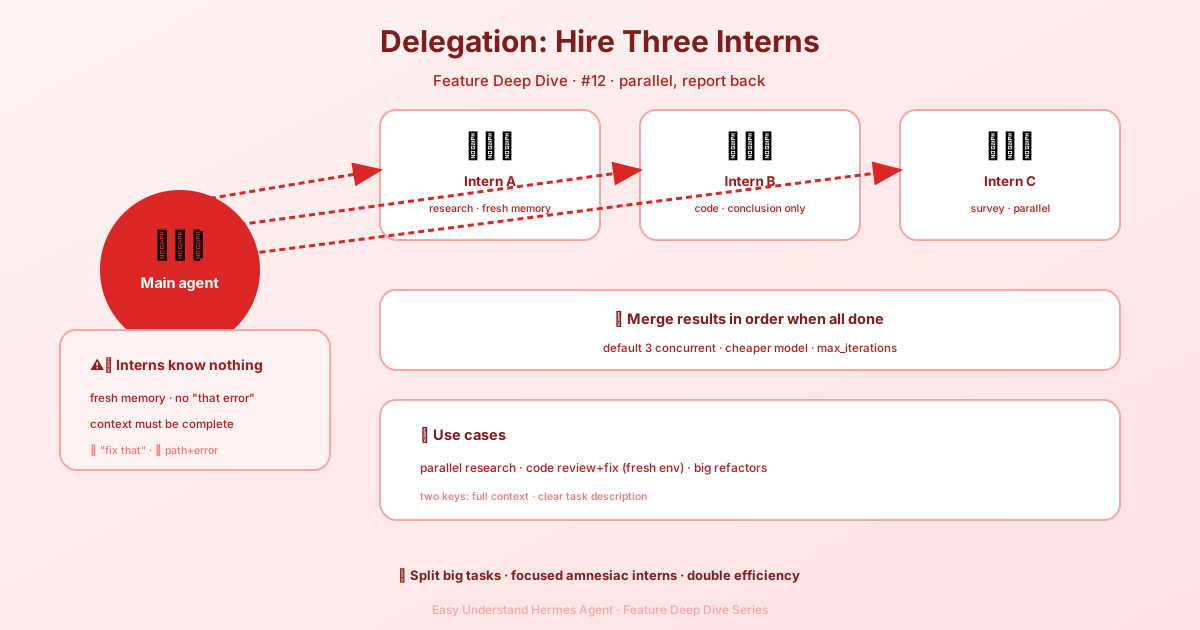
Imagine you’re a project manager juggling three deadlines. You wouldn’t do all the work yourself—you’d brief three assistants, send them off, and collect their reports. That’s exactly what delegate_task does for your AI.
What Is Subagent Delegation?
In plain terms, it lets your main AI spin up several “mini AIs” (subagents), each working in its own isolated sandbox. They don’t share notes, they don’t interrupt each other, and they only hand back a single summary when done. Think of it as giving your AI the power to clone itself.
The Catch: Subagents Have Amnesia
Here’s the most important thing to remember: your subagent knows nothing about your conversation history. It’s a fresh hire on day one. Everything you’ve discussed, every command you’ve run—gone. Its only “onboarding” comes from two fields you provide:
goal: What you want it to accomplishcontext: The background info it needs to get the job done
So you must stuff all necessary details into that call. Otherwise, your subagent will wander around like a headless chicken.
One Task? Send One Assistant
For a single job, the syntax is straightforward:
delegate_task(
    goal="Debug why tests fail",
    context="Error: assertion in test_foo.py line 42"
)
Here, you’re telling the subagent: “Investigate the test failure—the error is at line 42.”
Multiple Tasks? Send a Team
Need several things done at once? Fire off multiple subagents in parallel. By default, up to 10 can work simultaneously (you can adjust this—there’s no hard ceiling):
delegate_task(tasks=[
    {"goal": "Research topic A", "context": "Focus on recent primary sources"},
    {"goal": "Research topic B", "context": "Compare the leading explanations"},
    {"goal": "Fix the build", "context": "Project root: /home/user/project"}
])
Each task becomes its own independent subagent. They work in parallel, never waiting on each other.
Structured Output with output_schema
Each task can carry an optional output_schema, a JSON Schema object the child’s final answer must validate against. The child sees the schema up front as an output contract (“return ONLY the JSON value — no prose, no code fence”); when the answer comes back the parent validates it, and on failure sends the child exactly one bounded correction turn carrying the validation errors verbatim (the schema is not re-pasted). The task’s result then gains schema_valid (true/false) and, on failure, schema_errors.
A contract miss after the retry does not discard the child’s work: the result keeps status: completed with the child’s raw final text in summary, schema_valid: false, the schema_errors, and a schema_note saying the text is unvalidated. The parent extracts what it needs from the raw text instead of re-running a task that may have taken an hour. Prose or a code fence around otherwise-valid JSON (object or array) is tolerated by the validator. Keep schemas forgiving: require only the fields you will actually read. Tasks without an output_schema are unaffected.
Sending Images to a Subagent
Text context isn’t enough when the task is inherently visual—a screenshot the user sent, a design mock, a rendered chart. Each task accepts an optional images list (up to 8 entries; local file paths, http(s) URLs or data:image/... URLs):
delegate_task(tasks=[{
    "goal": "Compare the rendered dashboard against the design mock and list layout deviations",
    "context": "The app runs at http://localhost:3000; the repo is at /home/user/dash.",
    "images": ["/home/user/mocks/dashboard-v2.png",
               "https://cdn.example.com/current-render.png"],
}])
If the child model can see images, they arrive as native multimodal content on its first turn—it sees the actual pixels. If not, the goal gains [Image attached at: <path>] hint lines and the child is told to inspect them with vision_analyze. Forwarding is best-effort: unreadable paths are skipped with a log line, and any failure in the image plumbing falls back to the plain text goal—it can never break a spawn. Images are for things the child must see; put text file paths in context as usual.
Background Mode: The Main AI Stays Busy
Here’s a cool trick: top-level calls run automatically in the background. The main AI fires off the instructions and keeps working on other things. When a subagent finishes, its results come back as a new message. If your main AI is playing “coordinator,” it waits for all subagents to finish, then synthesizes everything into one final report.
Summary & Practical Advice
delegate_task is like giving your AI a cloning machine. It handles multiple independent tasks simultaneously, boosting efficiency dramatically.
Pro tip: Because subagents have amnesia, write your context like you’re emailing a brand-new colleague who knows nothing about your project. Include background details, file paths, error messages, reference links—everything. When in doubt, over-share. That’s the secret to making this tool sing.
Keep reading: git worktrees — Two agents sharing one checkout fight over the same files — git worktrees give each its own.
📖 Official Docs
This article is based on the official Hermes Agent documentation:Official docs › user-guide/features/delegation