Hermes Git Worktrees — Run Parallel Agents
Use git worktrees with Hermes Agent: create a worktree, point Hermes at it, run several agents at once, then clean up.
This is part of the Hermes Agent official tutorial series. View all tutorials
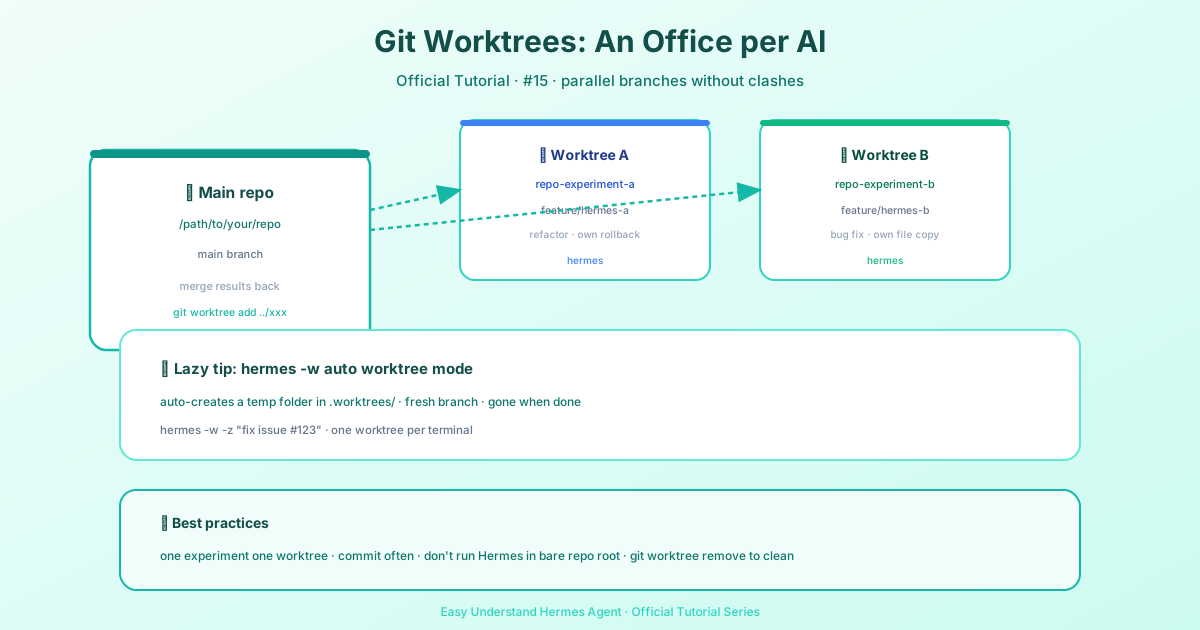
Imagine you have one kitchen but two chefs. If they both cook at the same counter, they’ll bump elbows, spill flour, and ruin each other’s dishes. Git worktrees give each chef their own counter—same kitchen, but separate workspaces. That’s exactly what this feature does for your AI agents.
Why Bother? The Problem with One Checkout
Hermes Agent treats the folder you run it in as the project root. If you launch two agents in the same folder, they share every file. That means:
- Agent A might delete a file Agent B is editing.
- You can’t tell which changes came from which experiment.
- Rollbacks become messy—one agent’s undo could wipe the other’s work.
Worktrees solve this by giving each agent:
- Its own branch (so changes don’t collide)
- Its own working folder (so files don’t clash)
- Its own checkpoint history (so
/rollbackonly affects that agent)
Step 1: Create a Worktree (The Basic Command)
From your main repository (the one with .git/ inside), run:
git worktree add ../my-agent-folder -b my-feature-branchLet’s break that down:
../my-agent-folder– where the new folder will live (outside your main repo)-b my-feature-branch– creates a new branch for this agent
Now you have a fresh, isolated copy of your project.
Step 2: Point Hermes to the Worktree
You can use the worktree in two ways:
Option A: CLI (simplest)
Just cd into the worktree and run Hermes there:
cd ../my-agent-folder
hermes chat
Option B: Messaging gateways (like Slack or Discord)
If you use a gateway, edit ~/.hermes/config.yaml and set terminal.cwd to the worktree path:
terminal:
  cwd: /path/to/my-agent-folder
Now every message that agent receives will work inside that isolated folder.
Step 3: Run Multiple Agents in Parallel
Create as many worktrees as you need:
git worktree add ../agent-experiment-1 -b exp-1
git worktree add ../agent-experiment-2 -b exp-2
Then start one Hermes session in each folder. They’ll never touch each other’s files, and each has its own branch to commit to.
Step 4: Clean Up When Done
When an experiment is finished, remove the worktree:
git worktree remove ../agent-experiment-1
git branch -d exp-1
The first command deletes the folder; the second deletes the branch. Your main repo stays clean.
Key Points to Remember
- Worktrees are cheap – they don’t copy the whole repo, just the files you need.
- Each agent gets its own
/rollbackhistory – no more cross-agent undo disasters. - Use branches wisely – name them clearly (e.g.,
refactor-login,fix-bug-42) so you know what each agent did.
Summary
Git worktrees let you run multiple Hermes agents on the same project without them stepping on each other’s toes. Create a worktree per agent, point Hermes to it, and you’re done. It’s like giving each chef their own cutting board—same kitchen, zero collisions.
Next up: In Tutorial 16, we’ll deploy Hermes with Docker — a self-healing, always-on assistant.
📖 Official Docs
This article is based on the official Hermes Agent documentation:Official docs › user-guide/git-worktrees