Tutorial 14: Profiles — Multiple Agents, One Machine
Tutorial 14: Profiles — Multiple Agents, One Machine — easy-to-understand guide based on official docs
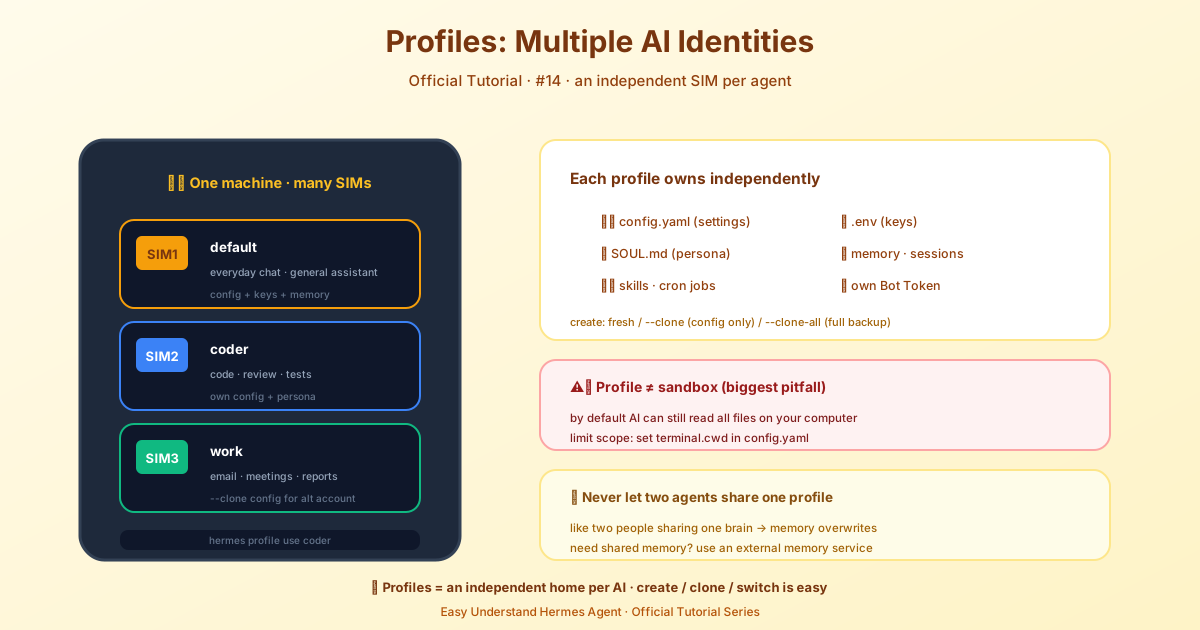
Tutorial 14: Profiles — Multiple Agents, One Machine
So you’ve built one Hermes agent. You’ve taught it your preferences, given it a personality, and let it build up memories and skills. It’s working great.
Now what if you want a second agent? Maybe one for coding, one for research, and one that just handles your personal tasks. Do you have to wipe everything and start over? Absolutely not.
That’s where profiles come in.
What Exactly Is a Profile?
Think of a profile as a completely separate Hermes home. Each profile gets its own directory containing its own config.yaml, .env, SOUL.md, memories, sessions, skills, cron jobs, and state database.
One detail worth knowing: Hermes only treats a directory under ~/.hermes/profiles/ as a profile when it holds one of the identity files (config.yaml, .env, SOUL.md, profile.yaml, auth.json, state.db). A bare leftover directory from logging or cron is ignored by profile list, gateways, and -p.
In plain English: each profile is its own little universe. Your coding agent won’t know what your research agent is doing, and that’s a good thing.
One big warning: Never point two agent processes at the same profile. Both write memory automatically, and each loads the other’s writes into its system prompt at session start — so two writers on one home compound each other’s state until nothing makes sense. Profiles exist to prevent this mess. If you need agents to share memory, use an external memory provider instead.
Profiles, Agents, and Bots
These terms get mixed up, so here’s the short version:
- Profile — the persistent home for an assistant’s config and data. It keeps the same state across conversations and restarts.
- Agent — the running Hermes assistant that uses that config and state. “Hermes Agent” is also the product name.
- Bot Mode bot — a profile shown as a named entry in the desktop’s Bot Mode roster, with an avatar and a persistent Bot Chat. Every Bot is a profile, but not every profile is a Bot: a profile becomes a Bot when Bot Mode stores its roster presentation (title, avatar, section, hidden state) in the profile’s metadata and pins its canonical Bot Chat. Drive a profile only from the CLI, Docker, or a gateway and it stays a plain profile.
- Messaging bot — an account on a platform like Telegram, Discord, or Slack, connected through the gateway. Its bot token identifies that platform account.
- Subagent — a child assistant spawned by
delegate_taskfor a task, with a fresh conversation. A separate conversation is not the same as a separate profile.
The Magic Trick: Profiles Become Commands
Here’s the coolest part. When you create a profile called coder, you immediately get a coder command on your system.
hermes profile create coder
coder setup
coder chat
That’s it. coder is now its own agent with its own config, memory, and state. You didn’t have to set up anything manually.
Creating Your First Profile
The quickest way to get started is to create a blank profile and run setup inside it:
hermes profile create mybot
mybot setup
This wires up your API keys, model, and gateway tokens. For an even faster start, run hermes setup --portal inside the new profile to wire up models and tools at once.
If you’re planning to use this profile as a kanban worker, add a description so the orchestrator knows what it’s good at:
hermes profile create researcher --description "Reads source code and external docs, writes findings."You can also set or auto-generate the description later with hermes profile describe.
Cloning: Copying What You Already Have
Don’t want to start from scratch? You have options.
Clone config only — copies your settings, API keys, skills, and the curated memory files memories/MEMORY.md and memories/USER.md, but starts fresh on sessions and cron jobs:
hermes profile create work --cloneIf the source profile has run hermes import-agent, its import-sync.json manifest is left behind, so the clone gets a one-off copy of those imported skills and memories and stops there. Add --sync-imports to carry the manifest over and keep pulling changes from the same external Claude Code / Codex trees:
hermes profile create work --clone --sync-imports
hermes -p work import-agent --sync
This is opt-in and one-directional, and it links the clone to the external agent trees only — never to the source profile. Both profiles stay independent islands.
Clone everything — a complete working snapshot including memories, skills, and plugins, but not cron jobs or per-profile history:
hermes profile create backup --clone-allWhen cloning from the default profile, the local-model runtime trees (models/, runtimes/, node/) are skipped too, since they’re re-fetched on demand.
Clone from a specific profile — pick your source directly:
hermes profile create work --clone-from coderCombine them for a full copy:
hermes profile create work-backup --clone-from coder --clone-allNote that OAuth logins (Anthropic, OpenAI Codex, xAI) are never copied, since their single-use refresh tokens would be revoked for every other copy the moment one profile refreshed them. Static API keys are copied as usual. To give a profile its own OAuth login, sign it in directly with hermes -p <name> auth add <provider> (or hermes -p <name> model).
Every Profile Owns Its Credentials
A named profile resolves providers from its own auth.json and .env only. It never inherits the root profile’s logins or API keys, and a token refresh inside a profile never writes back to the root store. A profile with no provider of its own is asked to set one up (hermes -p <name> model, or hermes -p <name> auth add <provider>) rather than silently acting as the owner. hermes update lists every profile that has no provider of its own, so a bot never goes quiet unannounced.
Messaging Channels Are Never Cloned
Every clone copies the source without its messaging channels — bot tokens and allowlists, the platforms: / telegram: / discord: sections of config.yaml, and per-bot state. A bot can only belong to one profile, so two gateways holding the same token would fight over its long-poll. Configure the new profile’s own bots with hermes -p <name> setup, or pass --clone-channels to keep the source’s bots anyway:
hermes profile create twin --clone --clone-channels--clone-channels is refused when a running multiplexed gateway already serves the source, and it’s an error without a clone flag. Otherwise it prints a warning naming the platforms now shared with the source. hermes profile list prints the same warning for any existing profile whose bot credential is byte-identical to the default’s, so older clones surface before they bite.
Using Profiles Day-to-Day
Every profile gets a command alias, so you can do things like:
coder chat
coder doctor
coder skills list
coder config set model.default anthropic/claude-sonnet-4
You can also use the -p flag with any hermes command:
hermes -p coder chat
hermes --profile=coder doctor
hermes chat -p coder -q "hello"    # works in any position
Setting a Sticky Default
If you mostly work with one profile, make it your default:
hermes profile use coder
hermes chat    # now targets coder
Switch back anytime with hermes profile use default. Think of it like kubectl config use-context.
Knowing Where You Are
The CLI always tells you which profile is active. Your prompt changes to coder ❯, the startup banner shows Profile: coder, and hermes profile shows your current name, path, model, and gateway status.
Profiles vs Workspaces vs Sandboxes
These get confused a lot, so let’s clear it up:
- Profile = Hermes’s own state directory (config, memory, sessions)
- Workspace = where terminal commands start (controlled by
terminal.cwd) - Sandbox = limits filesystem access
Important: profiles do not sandbox your agent. On the default local terminal backend, your agent still has the same filesystem access as your user account. A profile keeps its state separate, but it doesn’t lock down file access.
Wrapping Up
Profiles let you run multiple independent agents on one machine without any state bleeding between them. Create a profile, get a command, and you’re off to the races. Whether you’re running a coding assistant, a research bot, or a personal helper, each one gets its own clean home.
Next time you need a second agent, you know what to do. Just hermes profile create and go.
📖 Official Docs
This article is based on the official Hermes Agent documentation:Official docs › user-guide/profiles