一人多分身——Profiles 配置档案详解
Hermes Agent 官方教程第十四篇:Profiles 配置档案,一台机器上跑多个独立 AI 助手。
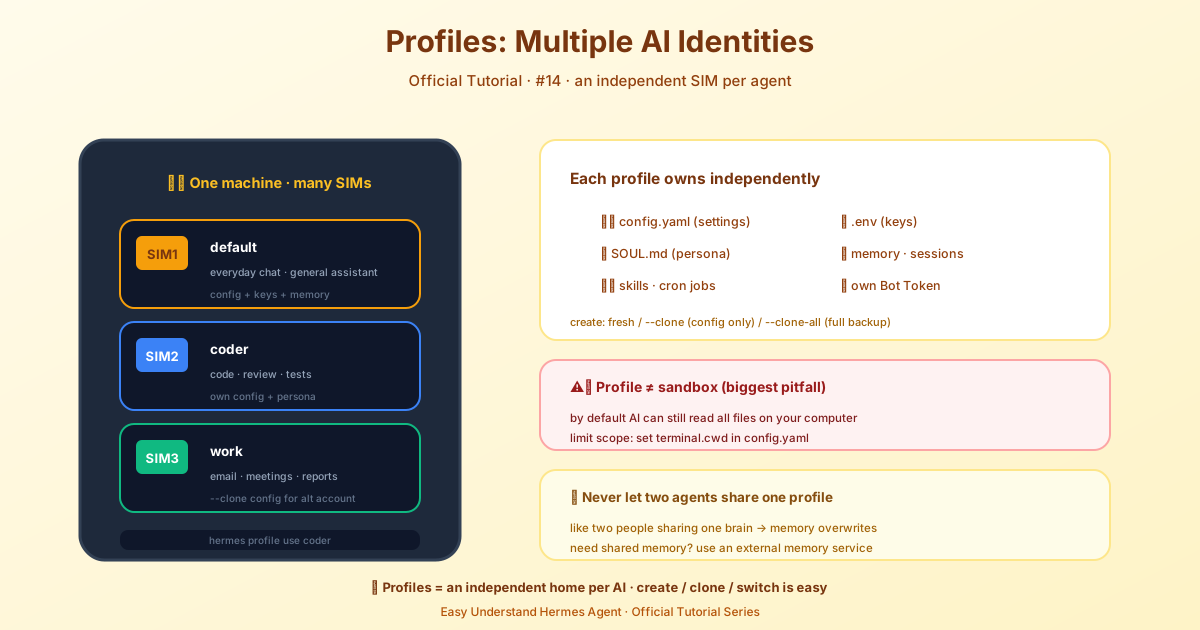
一人多分身——Profiles 設定檔詳解
你有沒有想過,讓同一個 Hermes 同時扮演好幾個角色?比如一個是寫程式的助手,一個是幫你查資料的私人秘書,還有一個是陪你閒聊的聊天機器人?要是全擠在一個「家」裡,那不亂套了嘛——記憶混在一起,設定互相打架,今天改這個明天動那個,最後誰都不是你想要的樣兒。
Profiles(設定檔) 就是用來解決這個問題的。簡單說,每個 Profile 就是給 Hermes 單獨開了一個「小房間」,裡面有自己獨立的 config.yaml、.env、SOUL.md、記憶、會話、技能、定時任務,甚至閘道狀態。各過各的日子,互不干擾。
⚠️ 千萬別讓兩個 agent 行程共用同一個 Profile! 兩邊都會自動寫記憶,然後互相把對方寫的東西載入進自己的系統提示詞裡,最後狀態亂成一鍋粥。需要共享記憶?請用外部記憶服務,別硬擠一個屋。
快速上手:建一個「coder」分身
hermes profile create coder   # 建立 profile,同時產生 coder 指令
coder setup                   # 設定 API key 和模型
coder chat                    # 開聊!
就這麼簡單。建立完 coder 之後,它立刻變成了一個獨立指令,coder chat、coder setup、coder gateway start 全都自動可用。
三種建立方式,按需選擇
1. 空白檔案
hermes profile create mybot全新開始,自帶基礎技能。跑一下 mybot setup 設定好 API key 就能用。如果你想讓它以後當看板工人,建立時加個 --description 描述它的專長:
hermes profile create researcher --description "讀原始碼和外部文件,輸出調研結論"2. 只複製設定(--clone)
hermes profile create work --clone把目前 Profile 的 config.yaml、.env、SOUL.md 和技能複製過去。API key、模型、能力都一樣,但會話和記憶是全新的。想換個性格?改 ~/.hermes/profiles/work/SOUL.md 就行。
3. 全量複製(--clone-all)
hermes profile create backup --clone-all設定、API key、性格、記憶、技能、定時任務、外掛——全部複製,相當於一個完整快照。但注意:會話歷史、state.db、備份檔案這些動輒幾十 GB 的東西不會複製。要完整備份請用 hermes profile export 或 hermes backup。
想從指定 Profile 複製?加 --clone-from:
hermes profile create work --clone-from coder
hermes profile create work-backup --clone-from coder --clone-all
日常使用:切換與定位
指令別名:每個 Profile 都會在 ~/.local/bin/ 下產生一個指令,本質就是 hermes -p <名字> 的快捷方式。
-p 參數:想臨時指定用哪個 Profile?任何指令都能加:
hermes -p coder chat
hermes chat -p coder -q "你好"設定預設:像 kubectl config use-context 一樣,用 hermes profile use coder 設個預設,之後直接 hermes chat 就預設走 coder。
認清自己在哪:CLI 會明確提示目前 Profile——提示符變成 coder ❯,啟動橫幅顯示 Profile: coder,hermes profile 能看到詳細資訊。
別搞混:Profile ≠ 工作目錄 ≠ 沙箱
- Profile 管的是 Hermes 自己的狀態(設定、記憶、會話等)
- 工作目錄 是終端指令的起始位置,由
terminal.cwd控制 - 沙箱 限制檔案系統存取——Profile 不提供沙箱!預設
local終端下,agent 和你擁有一樣的檔案存取權限。
所以別指望 Profile 能當安全隔離用,它只是幫你把「人格」分開而已。一人多分身,各幹各的活兒,清爽!
📖 官方文档
本文根据 Hermes Agent 官方文档编写,原文见:官方文档 › user-guide/profiles