Event Hooks: Make Hermes React to What Happens
Event Hooks — Auto-Trigger at Key Moments — easy-to-understand guide based on official docs (updated 2026-08-09)
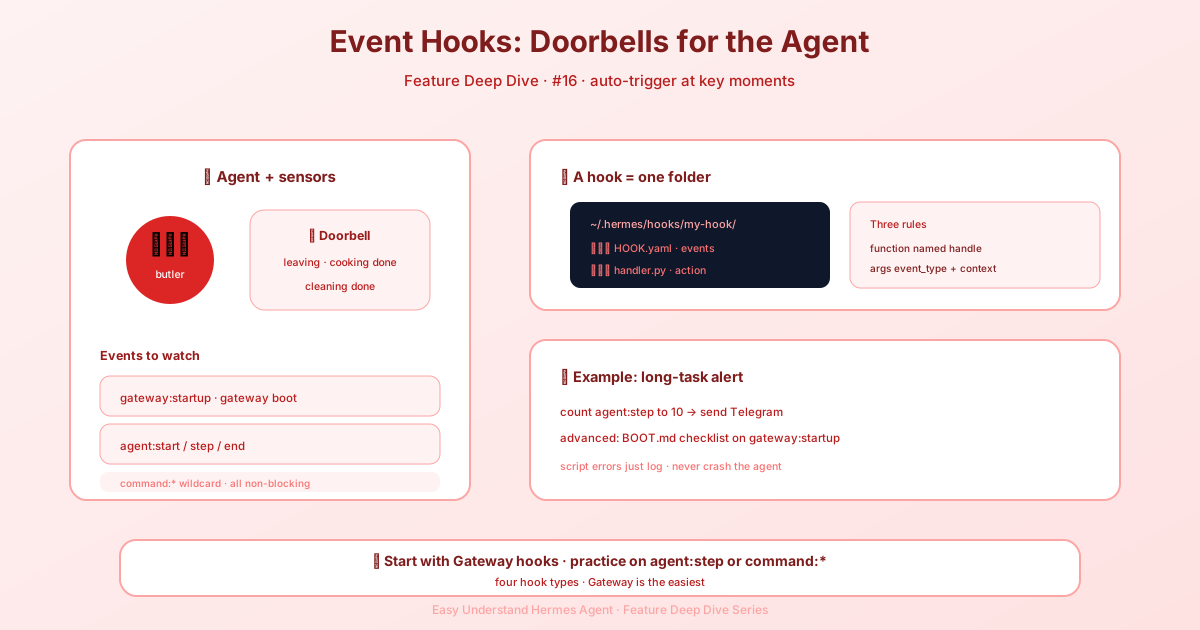
Event Hooks: Make Hermes React to What Happens
If you’ve ever wanted Hermes to ping you when a task finishes, log every command, or send a webhook to your dashboard — event hooks are exactly what you need. Think of them as little “if this happens, do that” triggers that live inside your agent.
In this post, we’ll walk through the four hook systems Hermes offers, starting with the most flexible one: Gateway Event Hooks.
The Four Hook Systems at a Glance
| System | Where it runs | Best for |
|---|---|---|
| Gateway hooks | Gateway only (Telegram, Discord, etc.) | Logging, alerts, webhooks |
| Plugin hooks | CLI + Gateway | Tool interception, metrics, guardrails |
| Shell hooks | CLI + Gateway + Desktop/TUI/dashboard chat | Drop-in scripts for blocking, formatting, context injection |
| Outbound webhooks | CLI + Gateway | Pushing events to external HTTP endpoints |
The great news? If a hook fails, Hermes just logs the error and keeps going. Your agent won’t crash because a hook had a hiccup. Hooks aren’t all passive, though: directive/control hooks can change flow, transforms can replace content, and a shell pre_tool_call hook can block or fail closed.
Gateway Event Hooks: Your First Hook in 5 Minutes
Gateway hooks fire automatically when your agent runs on messaging platforms like Telegram, Discord, Slack, WhatsApp, or Teams. They don’t block the main pipeline — they just observe and react.
Step 1: Create the Hook Folder
Each hook is a directory under ~/.hermes/hooks/ with two files:
~/.hermes/hooks/
└── my-hook/
    ├── HOOK.yaml      # Tells Hermes which events to listen for
    └── handler.py     # Your Python code
Step 2: Declare Events in HOOK.yaml
name: my-hook
description: Log all agent activity to a file
events:
  - agent:start
  - agent:end
  - agent:step
The events list decides when your handler runs. You can subscribe to any combination — even wildcards like command:* to catch every slash command.
Step 3: Write Your Handler
import json
from datetime import datetime
from pathlib import Path

LOG_FILE = Path.home() / ".hermes" / "hooks" / "my-hook" / "activity.log"

async def handle(event_type: str, context: dict):
    """Called for each subscribed event. Must be named 'handle'."""
    entry = {
        "timestamp": datetime.now().isoformat(),
        "event": event_type,
        **context,
    }
    with open(LOG_FILE, "a") as f:
        f.write(json.dumps(entry) + "\n")
Handler rules to remember:
- The function must be named
handle - It receives
event_type(string) andcontext(dict) async defor regulardefboth work- Errors are caught and logged — never crash the agent
Key Events You’ll Want to Know
Here are the most useful events and what they give you:
| Event | When it fires | What you get |
|---|---|---|
gateway:startup |
Gateway starts | List of active platforms |
session:start |
New conversation begins | Platform, user ID, session ID, session key |
session:end |
Session ended (before reset) | Platform, user ID, session key |
session:reset |
User ran /new or /reset |
Platform, user ID, session key |
session:compress |
Context compression completed for a session | Platform, session ID, old session ID, in-place flag, compression count |
agent:start |
Agent starts processing | Platform, user ID, chat ID, thread ID, chat type, session ID, message (truncated to 500 chars) |
agent:step |
Each tool-calling loop iteration | Iteration number, tool names |
agent:end |
Agent finishes | Everything from agent:start plus the response |
reaction:added |
An emoji reaction was added to a message the bot can see (Slack adapter currently) | Platform, reaction, user ID, item user ID, item type, channel ID, message timestamp, team ID, event timestamp, raw event |
reaction:removed |
An emoji reaction was removed from a message the bot can see | Same shape as reaction:added |
command:* |
Any slash command | Command name and arguments |
Pro tip: Use wildcards! A handler registered for command:* fires for command:model, command:reset, and all the rest — one subscription to monitor everything.
Real-World Example: Alert Yourself on Long Tasks
Want a Telegram message when your agent takes more than 10 steps? Here’s the whole hook:
# ~/.hermes/hooks/long-task-alert/HOOK.yaml
name: long-task-alert
description: Alert when agent is taking many steps
events:
  - agent:step
# ~/.hermes/hooks/long-task-alert/handler.py
import os
import httpx
THRESHOLD = 10
BOT_TOKEN = os.getenv("TELEGRAM_BOT_TOKEN")
CHAT_ID = os.getenv("TELEGRAM_HOME_CHANNEL")
async def handle(event_type: str, context: dict):
iteration = context.get("iteration", 0)
if iteration == THRESHOLD and BOT_TOKEN and CHAT_ID:
tools = ", ".join(context.get("tool_names", []))
text = f"⚠️ Agent has been running for {iteration} steps. Last tools: {tools}"
async with httpx.AsyncClient() as client:
await client.post(
f"https://api.telegram.org/bot{BOT_TOKEN}/sendMessage",
json={"chat_id": CHAT_ID, "text": text},
)That’s it. Save the files, restart your gateway, and you’ll get pinged when things run long.
One More Tip: Threaded Replies
If you’re posting follow-up messages into a Telegram forum topic, include message_thread_id=int(thread_id) when chat_type == "forum" and thread_id is non-empty. Otherwise your message might land in the wrong place.
What’s Next?
Gateway hooks are just one of the four systems. In upcoming posts, we’ll dig into plugin hooks (for tool interception), shell hooks (for drop-in scripts), and outbound webhooks (for pushing events to CI, dashboards, or other agents).
For now, try building a simple logger or alert hook. It’s the fastest way to see how much visibility hooks give you into your agent’s inner workings.
📖 Official Docs
This article is based on the official Hermes Agent documentation:Official docs › user-guide/features/hooks