Level Up Your Cron Game: 5 Automation Patterns You Can Use Today
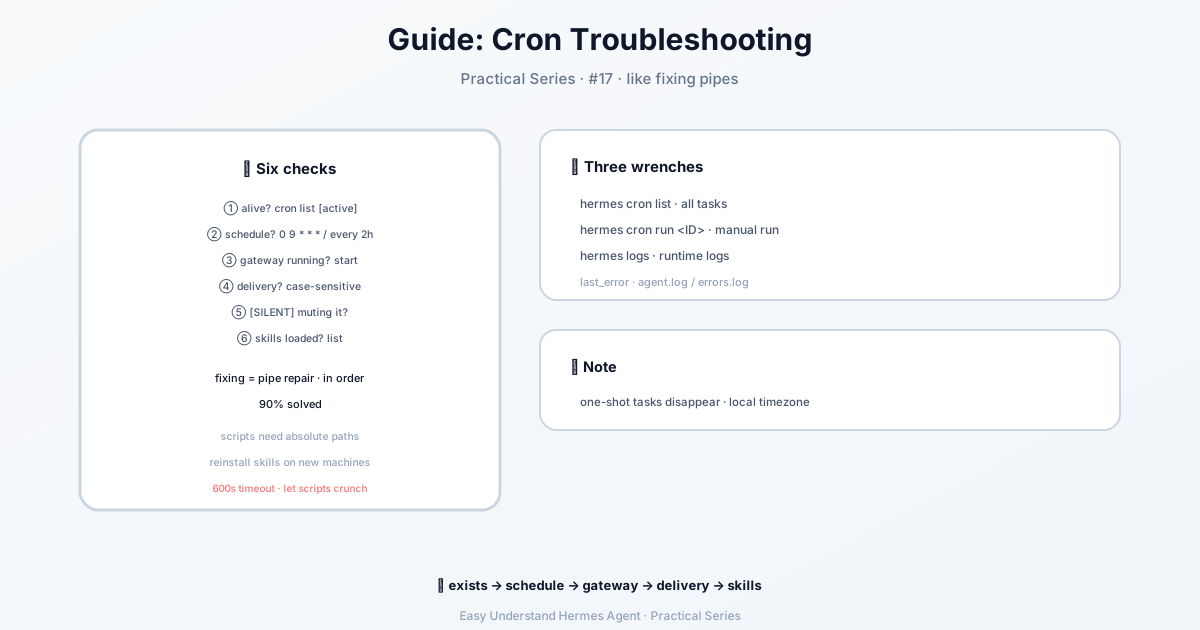
Cron Troubleshooting Guide — easy-to-understand guide based on official docs
Level Up Your Cron Game: 5 Automation Patterns You Can Use Today
Cron jobs are like having a tiny robot assistant that checks things for you while you sleep. The daily briefing bot tutorial showed you the basics — now let’s go deeper with five real-world patterns you can adapt today.
Key concept to remember: Cron jobs run in fresh agent sessions with zero memory of your current chat. Your prompts must be completely self-contained — include everything the agent needs to know.
Skip the LLM When You Don’t Need It
Before we dive in, two zero-token options worth knowing:
- Recurring watchdog (memory alerts, disk alerts, heartbeats): use script-only cron jobs. Same scheduler, no LLM. Just ask Hermes in chat — the
cronjobtool knows when to pickno_agent=Trueand writes the script for you. - One-shot from an existing script (CI step, post-commit hook, deploy script): use
hermes sendto pipe stdout or a file straight to Telegram / Discord / Slack — no cron entry needed.
Pattern 1: Website Change Monitor
Watch any URL and get notified only when something actually changes.
The script parameter is the secret weapon. A Python script runs before each execution, and its stdout becomes context for the agent. The script handles the mechanical work (fetching, diffing); the agent handles the reasoning (is this change interesting?).
Create the monitoring script:
mkdir -p ~/.hermes/scriptsimport hashlib, json, os, urllib.request
URL = "https://example.com/pricing"
STATE_FILE = os.path.expanduser("~/.hermes/scripts/.watch-site-state.json")
# Fetch current content
req = urllib.request.Request(URL, headers={"User-Agent": "Hermes-Monitor/1.0"})
content = urllib.request.urlopen(req, timeout=30).read().decode()
current_hash = hashlib.sha256(content.encode()).hexdigest()
# Load previous state
prev_hash = None
if os.path.exists(STATE_FILE):
with open(STATE_FILE) as f:
prev_hash = json.load(f).get("hash")
# Save current state
with open(STATE_FILE, "w") as f:
json.dump({"hash": current_hash, "url": URL}, f)
# Output for the agent
if prev_hash and prev_hash != current_hash:
print(f"CHANGE DETECTED on {URL}")
print(f"Previous hash: {prev_hash}")
print(f"Current hash: {current_hash}")
print(f"\nCurrent content (first 2000 chars):\n{content[:2000]}")
else:
print("NO_CHANGE")Set up the cron job:
/cron add "every 1h" "If the script output says CHANGE DETECTED, summarize what changed on the page and why it might matter. If it says NO_CHANGE, respond with just [SILENT]." --script ~/.hermes/scripts/watch-site.py --name "Pricing monitor" --deliver telegramThe [SILENT] trick: For monitoring jobs, instruct the agent to respond with only [SILENT] when nothing changed. Cron delivery treats this as the quiet marker — you only get notified when something actually happens. No spam on quiet hours.
Pattern 2: Weekly Report
Compile information from multiple sources into a formatted summary. Runs once a week, delivers to your home channel.
/cron add "0 9 * * 1" "Generate a weekly report covering:

1. Search the web for the top 5 AI news stories from the past week
2. Search GitHub for trending repositories in the 'machine-learning' topic
3. Check Hacker News for the most discussed AI/ML posts

Format as a clean summary with sections for each source. Include links.
Keep it under 500 words — highlight only what matters." --name "Weekly AI digest" --deliver telegram
From the CLI:
hermes cron create "0 9 * * 1" \
  "Generate a weekly report covering the top AI news, trending ML GitHub repos, and most-discussed HN posts. Format with sections, include links, keep under 500 words." \
  --name "Weekly AI digest" \
  --deliver telegram
The 0 9 * * 1 is standard cron syntax: 9:00 AM every Monday.
Pattern 3: GitHub Repository Watcher
Monitor any repo for new issues, PRs, or releases.
/cron add "every 6h" "Check the GitHub repository NousResearch/hermes-agent for:
- New issues opened in the last 6 hours
- New PRs opened or merged in the last 6 hours
- Any new releases

Use the terminal to run gh commands:
  gh issue list --repo NousResearch/hermes-agent --state open --json number,title,author,createdAt --limit 10
  gh pr list --repo NousResearch/hermes-agent --state all --json number,title,author,createdAt,mergedAt --limit 10

Filter to only items from the last 6 hours. If nothing new, respond with [SILENT].
Otherwise, provide a concise summary of the activity." --name "Repo watcher" --deliver discord
Self-contained prompts matter: Notice how the prompt includes the exact gh commands. The cron agent has no conversation history — spell everything out. (Persistent memory does load, so durable preferences saved to MEMORY.md carry over, but don’t rely on it for job-critical details.)
Pattern 4: Data Collection Pipeline
Scrape data at regular intervals, save to files, and detect trends over time. This combines a script (collection) with the agent (analysis).
import json, os, urllib.request
from datetime import datetime

DATA_DIR = os.path.expanduser("~/.hermes/data/prices")
os.makedirs(DATA_DIR, exist_ok=True)

# Fetch current data (example: crypto prices)
url = "https://api.coingecko.com/api/v3/simple/price?ids=bitcoin,ethereum&vs_currencies=usd"
data = json.loads(urllib.request.urlopen(url, timeout=30).read())

# Append to history file
entry = {"timestamp": datetime.now().isoformat(), "prices": data}
history_file = os.path.join(DATA_DIR, "history.jsonl")
with open(history_file, "a") as f:
    f.write(json.dumps(entry) + "\n")

# Output for the agent
print(f"Collected prices at {entry['timestamp']}: BTC ${data['bitcoin']['usd']}, ETH ${data['ethereum']['usd']}")
Then set up the cron job with a prompt that asks the agent to analyze the collected data:
/cron add "every 6h" "Run the script to collect prices, then analyze the history file at ~/.hermes/data/prices/history.jsonl. Compare today's prices with yesterday's. If the change is more than 5%, summarize the trend. Otherwise respond with [SILENT]." --script ~/.hermes/scripts/collect-prices.py --name "Price tracker" --deliver telegramPattern 5: The “Set It and Forget It” Health Check
Combine multiple checks into one job that runs every morning:
/cron add "0 8 * * *" "Run these checks and report any issues:
1. Check disk space with: df -h
2. Check memory with: free -h
3. Check system load with: uptime
4. Check for failed services with: systemctl --failed

If everything looks healthy, respond with [SILENT]. Otherwise, summarize the issues and suggest fixes." --name "Morning health check" --deliver telegram
Start Small, Scale Up
These patterns are building blocks. Mix and match them — use the script trick for any mechanical work, the [SILENT] marker to reduce noise, and always write self-contained prompts. Your future self (and your inbox) will thank you.
For the full feature reference, check out Scheduled Tasks (Cron).
📖 Official Docs
This article is based on the official Hermes Agent documentation:Official docs › guides/automate-with-cron