ยกระดับเกม Cron ของคุณ: 5 รูปแบบการทำงานอัตโนมัติที่ใช้ได้จริงตั้งแต่วันนี้
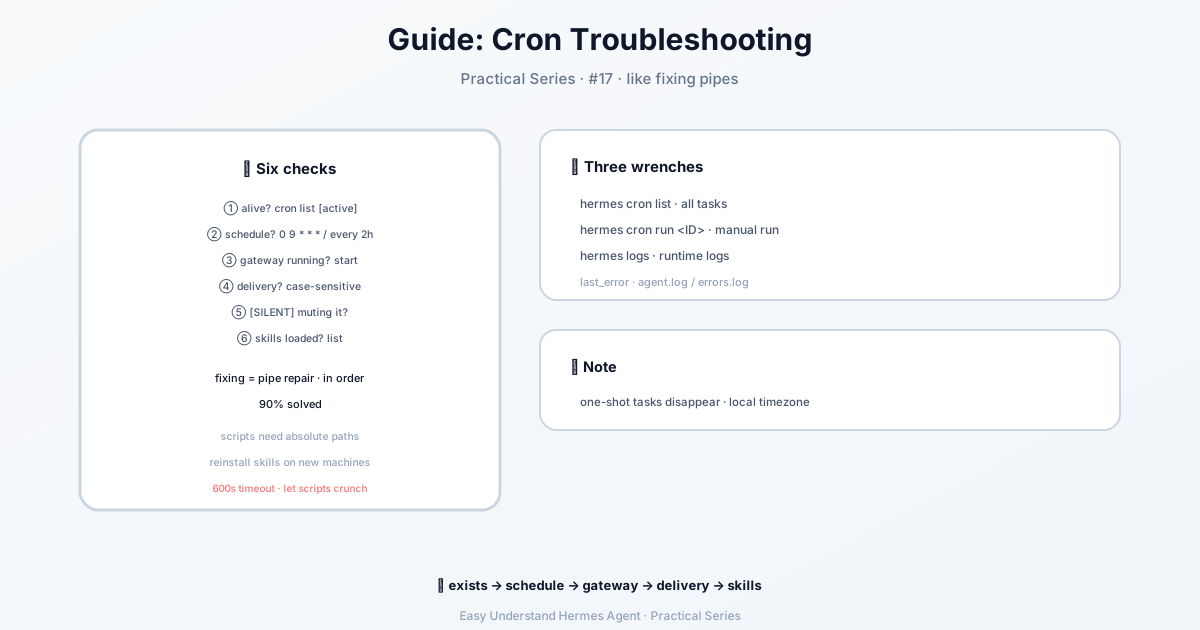
Cron Troubleshooting Guide — easy-to-understand guide based on official docs
ยกระดับเกม Cron ของคุณ: 5 รูปแบบการทำงานอัตโนมัติที่ใช้ได้จริงตั้งแต่วันนี้
คุณตั้งค่า cron job แรกด้วย Hermes Agent เรียบร้อยแล้ว และตอนนี้กำลังติดใจใช่ไหม? แต่รู้หรือไม่ว่ายังมีอะไรอีกมากมายที่คุณทำได้ บทช่วยสอน daily briefing bot เป็นเพียงจุดเริ่มต้นเท่านั้น มาสำรวจรูปแบบการทำงานอัตโนมัติ 5 แบบที่ใช้ได้จริงในโลกแห่งความจริง ที่จะทำให้ชีวิตคุณง่ายขึ้น
กฎทอง: Prompt ที่สมบูรณ์ในตัวเอง
ก่อนจะลงรายละเอียด นี่คือสิ่งที่สำคัญที่สุดที่ต้องจำไว้: cron jobs ทำงานใน session ใหม่ของ agent เสมอ Agent ของคุณไม่มีความทรงจำใดๆ จากการแชทปัจจุบันของคุณ ดังนั้นทุก prompt ต้องสมบูรณ์ในตัวเอง — รวมทุกอย่างที่ agent ต้องรู้ ตั้งแต่บริบทไปจนถึงคำสั่งที่แน่นอน
ข้าม LLM เมื่อไม่จำเป็น
ไม่ใช่ทุกงานอัตโนมัติที่ต้องใช้ language model คุณมีสองตัวเลือกที่ใช้ศูนย์ token:
- Watchdog แบบวนซ้ำ: ถ้าสคริปต์ของคุณสร้างข้อความที่ต้องการอยู่แล้ว (เช่น memory alerts หรือ heartbeats) ให้ใช้ cron jobs แบบ script-only แค่ขอ Hermes ในแชท — tool
cronjobรู้เองว่าเมื่อไหร่ควรใช้no_agent=Trueและเขียนสคริปต์ให้คุณ - One-shot จากสคริปต์ที่รันอยู่: สำหรับ CI steps หรือ deploy hooks ให้ใช้
hermes sendเพื่อส่ง output ตรงไปยัง Telegram หรือ Discord โดยไม่ต้องตั้งค่า cron เลย
รูปแบบที่ 1: ตัวติดตามการเปลี่ยนแปลงเว็บไซต์
อยากรู้เมื่อหน้า pricing เปลี่ยน หรือคู่แข่งอัปเดตเว็บไซต์? รูปแบบนี้ใช้ Python script ทำงานเชิงกล และให้ agent จัดการด้านการวิเคราะห์
ขั้นแรก สร้างสคริปต์สำหรับติดตาม:
mkdir -p ~/.hermes/scriptsimport hashlib, json, os, urllib.request
URL = "https://example.com/pricing"
STATE_FILE = os.path.expanduser("~/.hermes/scripts/.watch-site-state.json")
# Fetch current content
req = urllib.request.Request(URL, headers={"User-Agent": "Hermes-Monitor/1.0"})
content = urllib.request.urlopen(req, timeout=30).read().decode()
current_hash = hashlib.sha256(content.encode()).hexdigest()
# Load previous state
prev_hash = None
if os.path.exists(STATE_FILE):
with open(STATE_FILE) as f:
prev_hash = json.load(f).get("hash")
# Save current state
with open(STATE_FILE, "w") as f:
json.dump({"hash": current_hash, "url": URL}, f)
# Output for the agent
if prev_hash and prev_hash != current_hash:
print(f"CHANGE DETECTED on {URL}")
print(f"Previous hash: {prev_hash}")
print(f"Current hash: {current_hash}")
print(f"\nCurrent content (first 2000 chars):\n{content[:2000]}")
else:
print("NO_CHANGE")จากนั้นตั้งค่า cron job:
/cron add "every 1h" "If the script output says CHANGE DETECTED, summarize what changed on the page and why it might matter. If it says NO_CHANGE, respond with just [SILENT]." --script ~/.hermes/scripts/watch-site.py --name "Pricing monitor" --deliver telegramเคล็ดลับมือโปร: เทคนิค [SILENT] คือทองคำ เมื่อไม่มีอะไรเปลี่ยนแปลง agent จะตอบกลับด้วย [SILENT] เท่านั้น และ cron delivery จะถือว่าเป็นสัญญาณเงียบ คุณจะได้รับการแจ้งเตือนเฉพาะเมื่อมีอะไรเกิดขึ้นจริง — ไม่มีสแปมในช่วงเวลาที่เงียบสงบ
รูปแบบที่ 2: รายงานประจำสัปดาห์
รวบรวมข้อมูลจากหลายแหล่งเป็นสรุปที่จัดรูปแบบอย่างสวยงาม ทำงานทุกวันจันทร์ 9 โมงเช้า:
/cron add "0 9 * * 1" "Generate a weekly report covering:

1. Search the web for the top 5 AI news stories from the past week
2. Search GitHub for trending repositories in the 'machine-learning' topic
3. Check Hacker News for the most discussed AI/ML posts

Format as a clean summary with sections for each source. Include links.
Keep it under 500 words — highlight only what matters." --name "Weekly AI digest" --deliver telegram
จาก CLI จะมีลักษณะแบบนี้:
hermes cron create "0 9 * * 1" \
  "Generate a weekly report covering the top AI news, trending ML GitHub repos, and most-discussed HN posts. Format with sections, include links, keep under 500 words." \
  --name "Weekly AI digest" \
  --deliver telegram
0 9 * * 1 คือนิพจน์ cron มาตรฐาน: 9:00 น. ทุกวันจันทร์
รูปแบบที่ 3: ตัวเฝ้าดู GitHub Repository
คอยจับตาดู repo ใดๆ สำหรับ issues, PRs หรือ releases ใหม่:
/cron add "every 6h" "Check the GitHub repository NousResearch/hermes-agent for:
- New issues opened in the last 6 hours
- New PRs opened or merged in the last 6 hours
- Any new releases

Use the terminal to run gh commands:
  gh issue list --repo NousResearch/hermes-agent --state open --json number,title,author,createdAt --limit 10
  gh pr list --repo NousResearch/hermes-agent --state all --json number,title,author,createdAt,mergedAt --limit 10

Filter to only items from the last 6 hours. If nothing new, respond with [SILENT].
Otherwise, provide a concise summary of the activity." --name "Repo watcher" --deliver discordคำเตือน: สังเกตว่า prompt รวมคำสั่ง gh ที่แน่นอนไว้ด้วย? นั่นเป็นความตั้งใจ เพราะ cron agent ไม่มีประวัติการสนทนา — ต้องระบุทุกอย่างให้ละเอียด (Persistent memory ยังโหลดอยู่ ดังนั้น preferences ที่บันทึกไว้ใน MEMORY.md จะถูกนำมาใช้ แต่ไม่ควรพึ่งพาสำหรับรายละเอียดที่สำคัญต่องาน)
รูปแบบที่ 4: Pipeline การเก็บข้อมูล
ดึงข้อมูลเป็นระยะๆ บันทึกลงไฟล์ และตรวจจับแนวโน้มเมื่อเวลาผ่านไป วิธีนี้รวมสคริปต์สำหรับการเก็บข้อมูลเข้ากับ agent สำหรับการวิเคราะห์:
import json, os, urllib.request
from datetime import datetime

DATA_DIR = os.path.expanduser("~/.hermes/data/prices")
os.makedirs(DATA_DIR, exist_ok=True)

# Fetch current data (example: crypto prices)
url = "https://api.coingecko.com/api/v3/simple/price?ids=bitcoin,ethereum&vs_currencies=usd"
data = json.loads(urllib.request.urlopen(url, timeout=30).read())

# Append to history file
entry = {"timestamp": datetime.now().isoformat(), "prices": data}
history_file = os.path.join(DATA_DIR, "history.jsonl")
with open(history_file, "a") as f:
    f.write(json.dumps(entry) + "\n")

print(f"Collected prices at {entry['timestamp']}: BTC ${data['bitcoin']['usd']}, ETH ${data['ethereum']['usd']}")
จากนั้นตั้งค่า cron job ที่รันสคริปต์และให้ agent วิเคราะห์ข้อมูลที่เก็บได้เพื่อหาแนวโน้ม
รูปแบบที่ 5: Watchdog แบบ Script-Only
สำหรับการแจ้งเตือนที่สคริปต์สร้างข้อความที่ต้องการอยู่แล้ว ให้ข้าม LLM ไปเลย:
/cron add "every 5m" --script ~/.hermes/scripts/check-disk.py --no-agent --deliver slacktool cronjob จะเลือก no_agent=True ให้อัตโนมัติเมื่อเหมาะสม และเขียนสคริปต์ให้คุณ
พร้อมที่จะทำงานอัตโนมัติหรือยัง?
รูปแบบเหล่านี้เป็นเพียงจุดเริ่มต้นเท่านั้น ผสมผสานและจับคู่ได้ตามต้องการ — ใช้สคริปต์สำหรับงานเชิงกล ใช้ agent สำหรับการคิดวิเคราะห์ และใช้ [SILENT] เพื่อให้การแจ้งเตือนของคุณสะอาดตา สำหรับข้อมูลอ้างอิงคุณสมบัติทั้งหมด ดูเอกสาร Scheduled Tasks (Cron) ขอให้สนุกกับการทำงานอัตโนมัติ!
📖 เอกสารทางการ
この記事は Hermes Agent のเอกสารทางการに基づいています:เอกสารทางการ › guides/automate-with-cron