Subscription Proxy — Shared Gateway
Subscription Proxy — Shared Gateway — easy-to-understand guide based on official docs
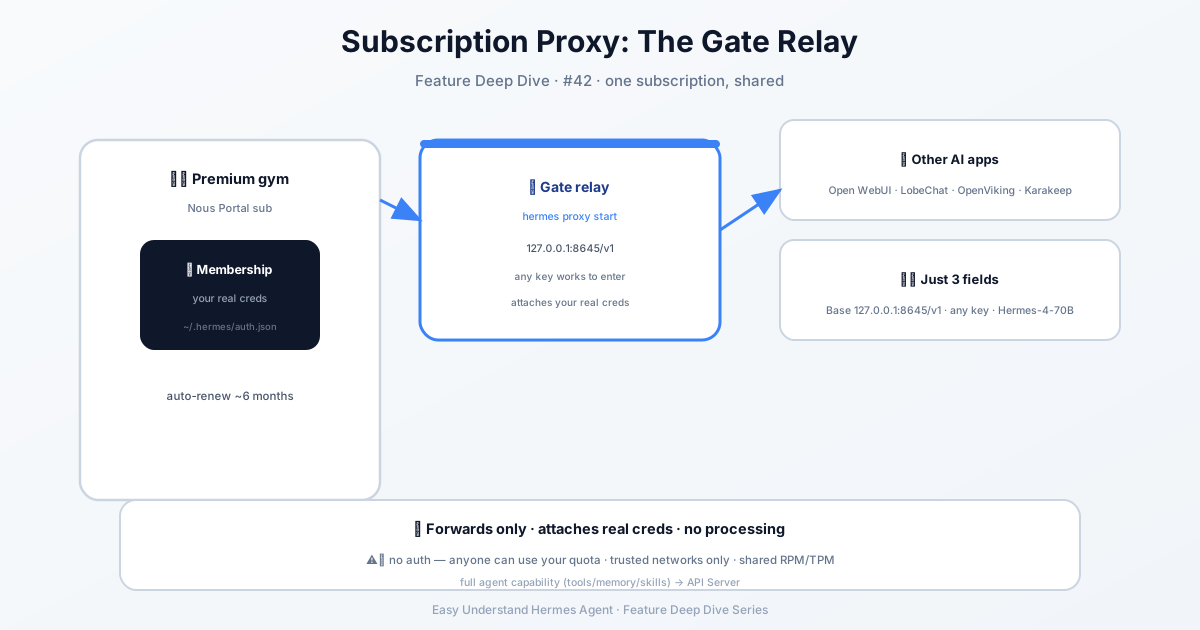
Think of it like a gym membership: you wouldn’t hand your friend your actual card and risk losing it. Instead, you’d get them a guest pass. Subscription Proxy is exactly that guest pass for your AI subscriptions.
The Problem It Solves
Many AI apps — like OpenViking or Open WebUI — speak the OpenAI API format. You could give them your Nous Portal subscription key directly, but that’s risky (they could leak it) and annoying (keys expire). The proxy fixes this by running a tiny local server. Every request from your app goes through it, and the proxy automatically attaches your real credentials. Your apps can use any fake key — the proxy swaps in the real one behind the scenes.
How It Differs from the API Server
| API Server | Subscription Proxy | |
|---|---|---|
| What it provides | Full Hermes agents (tools, memory, skills) | Pure model inference |
| Best for | “Use Hermes as a chat backend” | “Share your Portal subscription with other apps” |
| Auth | Needs your API_SERVER_KEY |
Any bearer token (proxy replaces it) |
| Tool calling | Supported | Not supported (pure pass-through) |
In one sentence: Use the API server when you want an agent; use the proxy when you just want the model.
Three Steps to Get Started
1. Log In Once
hermes portalA browser opens with the Nous Portal authorization page. After you log in, Hermes stores the refresh token in ~/.hermes/auth.json.
2. Start the Proxy
hermes proxy startYou’ll see output like:
Starting Hermes proxy for Nous Portal
  Listening on:  http://127.0.0.1:8645/v1
  Forwarding to: (resolved per-request from your subscription)
  Use any bearer token in the client — the proxy attaches your real credential.
Want it running in the background? Use tmux, nohup, or a systemd service.
3. Configure Your App
Any OpenAI-compatible app just needs three settings:
Base URL:   http://127.0.0.1:8645/v1
API key:    anything (e.g. "sk-unused")
Model:      Hermes-4-70B    # or Hermes-4.3-36B, Hermes-4-405B
The proxy ignores whatever key you type and replaces it with your real Portal credential — and auto-refreshes it before it expires.
Check Status
hermes proxy statusYou want to see ready. If it says not logged in, run hermes portal again. If it says credentials need attention, your refresh token was revoked (usually because you logged out on the Portal website) — just re-login.
Supported Endpoints
The proxy only forwards paths the upstream actually supports; everything else returns a 404 with a clear message:
| Path | Purpose |
|---|---|
/v1/chat/completions |
Chat completions (streaming supported) |
/v1/completions |
Legacy text completions |
/v1/embeddings |
Embedding vectors |
/v1/models |
List available models |
Summary & Practical Tips
The subscription proxy is a safe adapter: it lets other apps share your subscription without ever exposing your real key, and it handles expiration for you. Currently it supports Nous Portal and xAI (Grok), with more providers on the way.
One practical tip: If you use multiple apps, give each one a different fake key (like sk-app1, sk-app2). That way, the proxy logs show exactly which app is making which requests — making debugging much easier. Also, the proxy listens only on 127.0.0.1 by default. Don’t change it to 0.0.0.0, or any device on your network could use your subscription too.
📖 Official Docs
This article is based on the official Hermes Agent documentation:Official docs › user-guide/features/subscription-proxy