Nous Tool Gateway — 300+ Models
Nous Tool Gateway — 300+ Models — easy-to-understand guide based on official docs
Nous Tool Gateway — 300+ Models
Remember the old days of stitching together five different API subscriptions just to make your agent useful? You’d sign up for Firecrawl here, FAL there, OpenAI for audio, Browser Use for browser automation… each with its own billing, rate limits, and quirks. It was a mess.
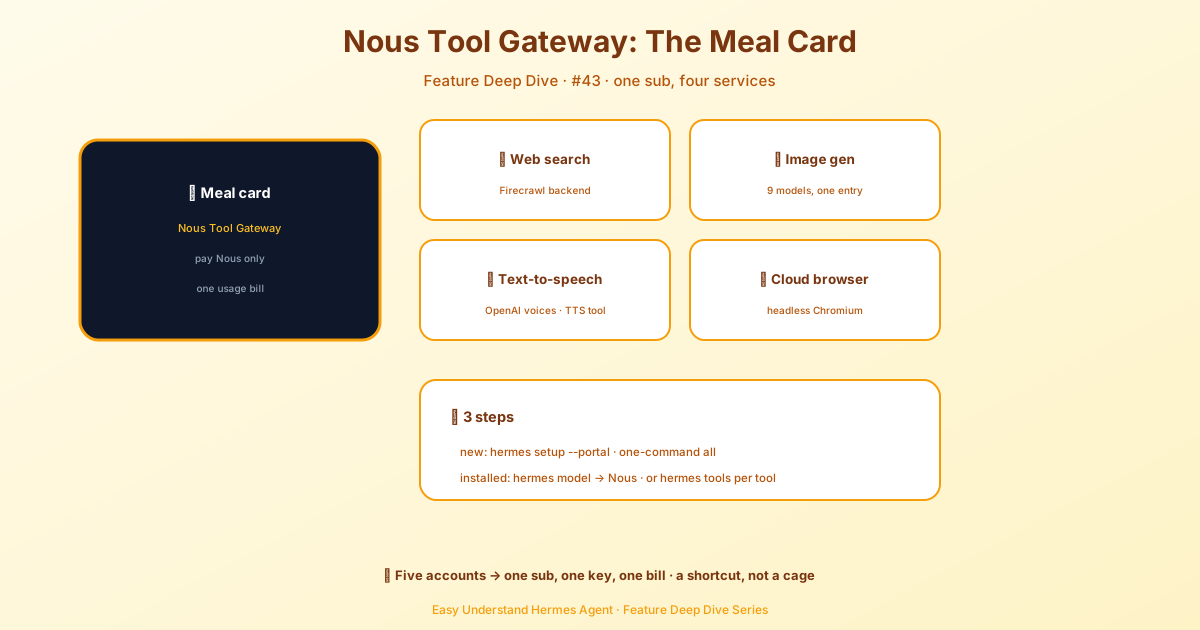
The Tool Gateway fixes that. It’s included with every paid Nous Portal subscription, and it routes Hermes’ tool calls — web search, image generation, text-to-speech, and cloud browser automation — through infrastructure Nous already runs. One subscription. Every tool built in. No extra signups.
What’s inside
Here’s what the gateway gives you:
- Web search & extract — Agent-grade search and full-page extraction via Firecrawl. No rate limits to worry about; the gateway handles scaling.
- Image generation — Nine models under one endpoint: FLUX 2 Klein 9B, FLUX 2 Pro, Z-Image Turbo, Nano Banana Pro (Gemini 3 Pro Image), GPT Image 1.5, GPT Image 2, Ideogram V3, Recraft V4 Pro, and Qwen Image. Pick per-generation with a flag, or let Hermes default to FLUX 2 Klein.
- Text-to-speech — OpenAI TTS voices wired into the
text_to_speechtool. Drop voice notes into Telegram, generate audio for pipelines, narrate anything. - Cloud browser automation — Headless Chromium sessions via Browser Use.
browser_navigate,browser_click,browser_type,browser_vision— all the agent-driving primitives, no Browserbase account required.
All four are pay-as-you-use, billed against your Nous subscription. Mix and match freely — run the gateway for web and images while keeping your own ElevenLabs key for TTS, or route everything through Nous.
Why it exists
Building an agent that can actually do things used to mean juggling multiple API subscriptions. The gateway collapses that into one account:
- One bill. Pay Nous; we handle the rest.
- One signup. No Firecrawl, FAL, Browser Use, or OpenAI audio accounts to manage.
- One key. Your Nous Portal OAuth covers every tool.
- Same quality. Same backends the direct-key route uses — just fronted by us.
Bring your own keys anytime, per-tool, whenever you want. The gateway isn’t a lock-in; it’s a shortcut.
Getting started
Three ways in — pick whichever fits where you are:
hermes setup --portal # Fresh install: Nous OAuth + set Nous as provider + turn on the Tool Gateway in one gohermes model # Switch your inference provider to Nous Portal — Hermes then offers to turn on the gateway for all toolshermes tools # Enable the gateway per-tool — pick "Nous Subscription" for any tool you wanthermes setup --portal and hermes model are the all-at-once paths: log in once, optionally flip every tool to the gateway. hermes tools is the à la carte path — turn on just the tools you want, one at a time.
You don’t have to log in first. With hermes tools, the Nous-managed backends (Web search, Image, Video, TTS, Browser) are always listed, even if you’ve never signed into Nous Portal. Select one and Hermes runs the Portal login right there if you aren’t already authenticated. This path only logs you in and turns on the one tool you picked — it does not switch your inference provider.
Checking what’s active
hermes portal info        # Portal auth + Tool Gateway routing summary
hermes portal tools       # Gateway catalog with current routing per tool
hermes status             # Full system status (Tool Gateway is one section)
hermes portal info shows something like:
◆ Nous Tool Gateway
  Nous Portal     ✓ managed tools available
  Web tools       ✓ active via Nous subscription
  Image gen       ✓ active via Nous subscription
  TTS             ✓ active via Nous subscription
  Browser         ○ active via Browser Use key
Tools marked “active via Nous subscription” go through the gateway. Anything else uses your own keys.
Eligibility and the free pool
The Tool Gateway is a paid-subscription feature. Free-tier accounts can use Portal for inference but don’t include managed tools. Upgrade your plan to unlock the gateway.
Some accounts are also entitled to a free tool pool — a small managed-tool allowance that covers gateway tool calls without a paid subscription. When available, the gateway surfaces it and shows a setup prompt on first use.
Smart defaults
Picking a Nous model (hermes model) offers a per-tool checklist of gateway backends. It respects your existing setup:
- Tools you’ve explicitly pointed at another backend are never offered — your selection can’t be accidentally overwritten.
- Tools configured via environment variables alone are offered unchecked, labeled to keep your own backend.
- Only genuinely unconfigured tools come pre-checked.
- Declines stick: if you submit the checklist with a tool unchecked, it won’t be pre-checked on future Nous model swaps.
More image models
Krea 2 (Medium, Large, and Medium Turbo — up to 10 style-reference images, with an optional Enhance upscale) and any Nous Portal image models live in the same Nous Subscription picker rather than getting their own rows. Every model shows up once; picking a Krea id like krea-2-medium sends the request to the Krea gateway instead of FAL, and the config is still just image_gen.provider: nous plus the model id. Krea and Portal models need a paid subscription — the free tool pool only funds the FAL models.
The gateway is per-tool. Turn it on for just what you want, or route everything through Nous. One subscription, every tool built in.
📖 Official Docs
This article is based on the official Hermes Agent documentation:Official docs › user-guide/features/tool-gateway