X Search — Search Tweets with AI
X Search — Search Tweets with AI — easy-to-understand guide based on official docs
Think of it like having a super-powered librarian for Twitter — one who not only finds the exact tweet you’re looking for but also understands what you meant to ask, even if you don’t remember the exact words.
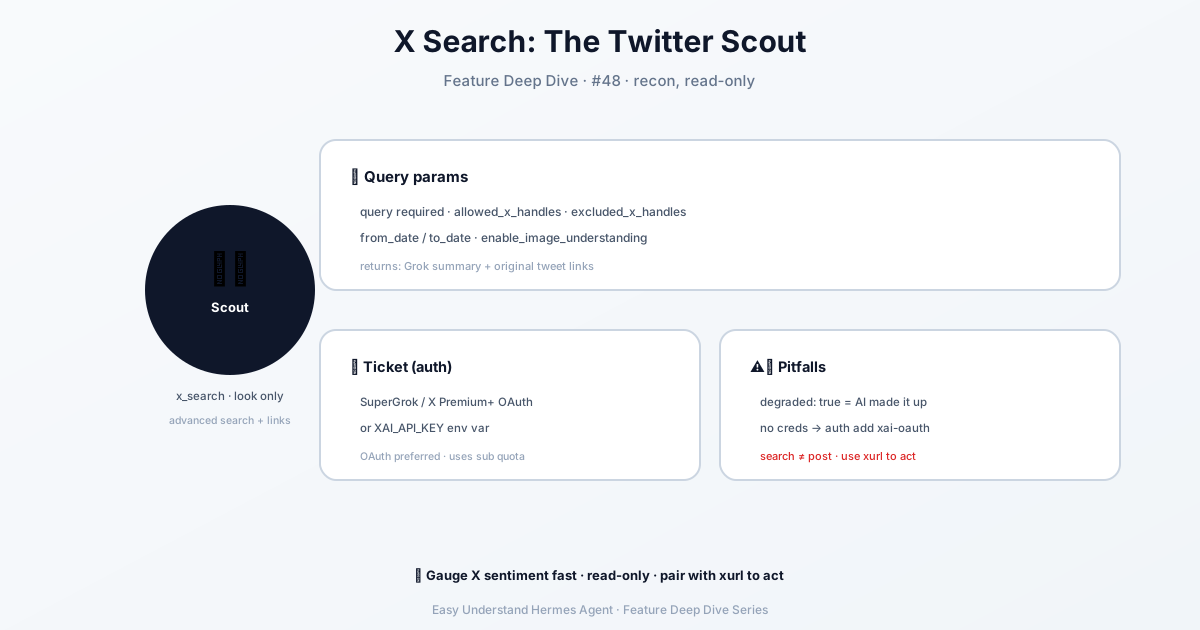
What This Feature Does
Hermes Agent gives you a simple, natural-language way to search tweets on X (formerly Twitter). Instead of remembering complex search operators or memorizing hashtags, you just type what you want in plain English, and the AI handles the rest.
For example, you could say:
"Find tweets from Elon Musk about Mars missions from last month"And Hermes will go find them for you — no need to know the exact date range, handle from: filters, or worry about pagination.
How to Use It
The magic is in the command. Here’s the basic shape:
/search_tweets "your search query here"You can make it smarter with extra details:
/search_tweets "AI regulation news" --limit 20That tells Hermes to grab 20 recent tweets about AI regulation. You can also ask for specific users, dates, or even sentiment:
/search_tweets "positive mentions of our product" --from @ourcompany --since 2024-01-01Why It’s Different From Just Opening X
| Regular X Search | Hermes Agent Search |
|---|---|
| You type keywords | You type full questions |
| You filter manually | AI auto-filters |
| You scroll through results | You get a clean summary |
| One-off search | Can feed results into other tasks |
The real power? You can chain it with other Hermes tools. For example, you could search for tweets, then ask Hermes to summarize the sentiment, or draft replies — all in one session.
A Real-World Example
Let’s say you’re researching competitor announcements. Instead of manually searching, you could:
/search_tweets "competitor product launch" --limit 50Then follow up with:
"Summarize the main themes in those tweets"Hermes will pull the tweets, analyze them, and give you a tidy summary — saving you from reading 50 tweets yourself.
Quick Tips for Better Results
- Be specific: “tweets about iPhone battery issues” works better than “iPhone”
- Use quotes for exact phrases:
"Tesla recall"finds exact matches - Combine with other tools: Search → summarize → draft a response — all in one flow
- Check the count: Start with
--limit 10to test your query before scaling up
Wrapping Up
X Search with Hermes Agent turns a tedious, manual process into a quick conversation. You ask, it finds, and you move on — no more tab-hopping or filter-fiddling.
Practical tip: Before you start a search session, write down what you really want to know. A clear question gets you a better result than a vague keyword. And remember — you can always ask Hermes to refine the search if the first pass isn’t quite right. Happy searching!
📖 Official Docs
This article is based on the official Hermes Agent documentation:Official docs › user-guide/features/x-search