Context Files — Your Project's Instruction Manual
Context Files — Project Manuals — easy-to-understand guide based on official docs
Context Files — Your Project’s Instruction Manual
Last time we went over the common CLI operations. Today we’re getting into something a bit more “hardcore” — context files.
Think of it as an instruction manual for your project, written for the AI. Every time you start a Hermes session, it automatically reads this file to quickly get up to speed on your project background, tech stack, coding conventions, common commands… and then answers your questions with all that “memory” in hand.
Why do you need a context file?
Imagine this: you just joined a team and inherited an old project. Nobody tells you what the project does, where the code lives, or how to run the tests. You’re stuck digging through docs, asking coworkers, guessing… AI is in the same boat.
Without a context file, Hermes starts every session with amnesia and relies on you to explain everything over and over. With one, the AI is up to speed from the very first message, and the quality of its answers jumps up a level.
Where do context files go?
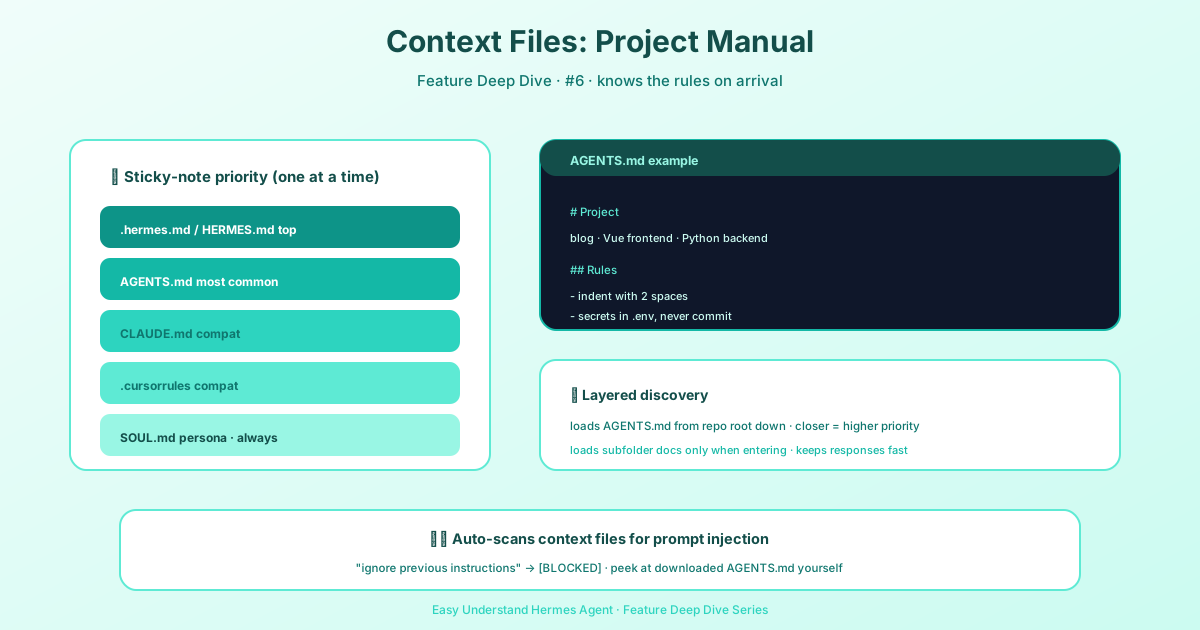
Hermes supports several kinds of context files. From highest priority to lowest:
.hermes.md/HERMES.md— project description, highest priorityAGENTS.override.md— your own local override (usually added to.gitignore)AGENTS.md— the most commonly used project manualCLAUDE.md— Claude Code’s context file, which Hermes also recognizes.cursorrules/.cursor/rules/*.mdc— Cursor’s rules files
Only one project context file is loaded per session (whichever matches first wins). There’s also SOUL.md, which governs the AI’s personality and speaking style. It’s only read from the HERMES_HOME directory, has nothing to do with the project, and is always loaded separately.
Quick tip: if there’s an AGENTS.override.md sitting next to AGENTS.md, Hermes loads the override and ignores the AGENTS.md in the repo. If you want your own set of instructions without touching the file your team shares, this is how you do it.
What goes in it?
There’s no fixed template, but here’s what we recommend including:
# Project Name

## Overview
One sentence explaining what this project does.

## Tech Stack
- Backend: Python 3.12 + FastAPI
- Frontend: React 18 + Vite
- Database: PostgreSQL 15

## Common Commands
- Start dev server: `make dev`
- Run tests: `make test`
- Format code: `make format`

## Coding Conventions
- Use type annotations
- Follow Conventional Commits for commit messages
- Never push directly to the main branch
How do you use context files?
Once you start Hermes, it loads the context file automatically. You can also use the /context command to view or switch manually:
/context         # View the currently loaded context file
/context path    # Switch to a specific file
Pro tip: multi-level context
You can place multiple context files at different levels. For example:
- Project root: overall description, tech stack
src/api/directory: API module-specific notes
Hermes merges all the context files it finds, giving the AI both a big-picture view and the local details.
If your project is in a git repo, Hermes walks down from the git root and chains together every AGENTS.md along the way — the closer to the current directory, the later it’s loaded and the higher its priority. Files in subdirectories are only “discovered” and injected when the AI actually reads that directory, so your system prompt doesn’t get stuffed full right from the start.
Things to watch out for
- Don’t make it too long — a context file isn’t a documentation library. Keep it short enough for the AI to read in one pass (a few hundred lines max)
- Don’t put sensitive info in it — context files get sent to the AI provider along with your session
- Keep it up to date — when the project changes, the manual needs to change too
- Security scanning — all context files go through a prompt-injection check first, and anything suspicious gets blocked. Your own
SOUL.mdis the exception: if it trips a scan rule, it won’t be blocked outright — you’ll just see a ⚠ in/contextreminding you to review it. But if thatSOUL.mdwas installed from someone else viahermes profile installor similar, it gets blocked like anything else
In one sentence: a context file is the “onboarding session” between you and the AI. Spend ten minutes writing one, and you’ll save a ton of explanation time in every future session — with better answers to boot. Seriously, give every project one!
📖 Official Docs
This article is based on the official Hermes Agent documentation:Official docs › user-guide/features/context-files