Talk to AI with Voice Mode
Talk to AI with Voice Mode — easy-to-understand guide based on official docs
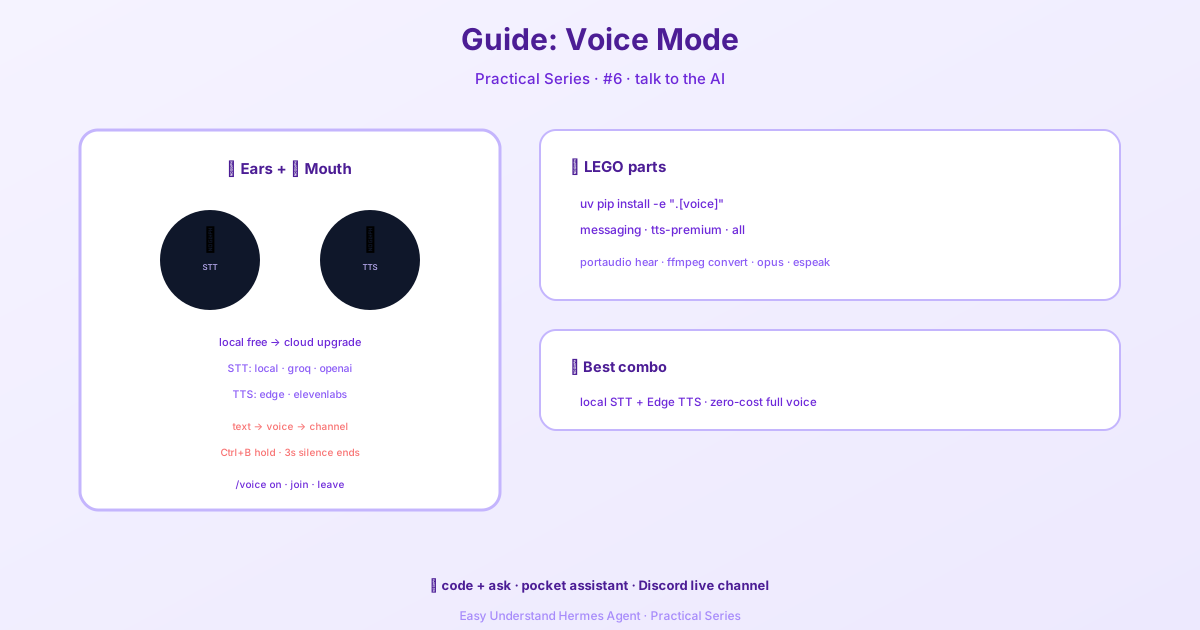
Talk to AI with Voice Mode
Voice mode is one of those features that feels like magic the first time you try it. Instead of typing every command and reading every response, you can just… talk. Hermes listens, thinks, and speaks back. This guide walks you through everything you need to get voice mode running, from a simple microphone setup to a full Discord voice channel bot.
What voice mode is good for
Voice mode shines when your hands are busy or you just want a more natural way to interact with AI. Here are the most common use cases:
- Hands-free CLI workflow — keep coding or researching while you talk to Hermes
- Spoken responses in Telegram or Discord — get voice replies alongside normal text messages
- Live Discord voice channel — have Hermes join a voice channel for real-time conversation
- Quick idea capture — dictate thoughts while walking around instead of typing
Three ways to use voice mode
Hermes offers three distinct voice experiences. Pick the one that fits your needs:
| Mode | Best for | Platform |
|---|---|---|
| Interactive microphone loop | Personal hands-free use while coding | CLI |
| Voice replies in chat | Spoken responses with normal messaging | Telegram, Discord |
| Live voice channel bot | Group or personal live conversation | Discord voice channels |
A good path is to start simple: get text working first, then enable voice replies, and finally move to Discord voice channels if you want the full experience.
Step 1: Make sure text mode works first
Before touching voice mode, verify that Hermes starts and your provider is configured. Run hermes and ask something simple like:
What tools do you have available?If that’s not solid yet, fix text mode first. Voice mode builds on top of it.
Step 2: Install the right extras
Depending on which voice experience you want, install the corresponding extras:
CLI microphone + playback:
cd ~/.hermes/hermes-agent && uv pip install -e ".[voice]"Messaging platforms (Telegram/Discord):
cd ~/.hermes/hermes-agent && uv pip install -e ".[messaging]"Premium ElevenLabs TTS (optional):
cd ~/.hermes/hermes-agent && uv pip install -e ".[tts-premium]"Local NeuTTS (optional):
python -m pip install -U neutts[all]Everything:
cd ~/.hermes/hermes-agent && uv pip install -e ".[all]"Step 3: Install system dependencies
Voice mode needs a few system packages to handle audio input, conversion, and playback.
macOS:
brew install portaudio ffmpeg opus
brew install espeak-ng
Ubuntu / Debian:
sudo apt install portaudio19-dev ffmpeg libopus0
sudo apt install espeak-ng
Here’s why each one matters:
portaudio→ microphone input and playback for CLI voice modeffmpeg→ audio conversion for TTS and messaging deliveryopus→ Discord voice codec supportespeak-ng→ phonemizer backend for NeuTTS
Step 4: Choose your speech providers
Hermes supports both local and cloud speech stacks. The easiest and cheapest setup uses local STT and free Edge TTS:
- STT provider:
local - TTS provider:
edge
Add any cloud keys to ~/.hermes/.env:
# Cloud STT options (local needs no key)
GROQ_API_KEY=***
VOICE_TOOLS_OPENAI_KEY=***

# Premium TTS (optional)
ELEVENLABS_API_KEY=***
Speech-to-text recommendations:
local→ best default for privacy and zero costgroq→ very fast cloud transcriptionopenai→ good paid fallback
Text-to-speech recommendations:
edge→ free and good enough for most usersneutts→ free local/on-device TTSelevenlabs→ best qualityopenai→ good middle groundmistral→ multilingual, native Opus
Step 5: Recommended configuration
Here’s a solid conservative default for most people:
voice:
  record_key: "ctrl+b"
  submit_mode: "direct"  # TUI: direct | draft
  max_recording_seconds: 120
  auto_tts: false
  beep_enabled: true
  silence_threshold: 200
  silence_duration: 3.0

stt:
  provider: "local"
  local:
    model: "base"

tts:
  provider: "edge"
  edge:
    voice: "en-US-AriaNeural"
The submit_mode setting controls what happens after transcription:
direct(default) submits the transcript immediatelydraftputs the transcript in the composer so you can edit before sending
For editable voice drafts, set submit_mode: "draft".
Using voice mode in the CLI
Start Hermes and turn on voice mode:
hermesThen inside the CLI:
/voice onRecording flow:
- Press
Ctrl+B - Speak
- Wait for silence detection to stop recording automatically
- Hermes transcribes and responds
- If TTS is on, it speaks the answer
- The loop can automatically restart for continuous use
Useful commands:
/voice
/voice on
/voice off
/voice tts
/voice status
Great CLI workflows
Walk-up debugging: Say “I keep getting a docker permission error. Help me debug it.” Then continue hands-free with follow-ups like “Read the last error again” or “Now give me the exact fix.”
Research and brainstorming: Perfect for walking around while thinking, dictating half-formed ideas, and asking Hermes to structure your thoughts in real time.
Accessibility: If typing is inconvenient, voice mode is one of the fastest ways to stay in the full Hermes loop.
Tuning CLI behavior
If Hermes starts or stops recording too aggressively, adjust the silence settings in your config:
voice:
  silence_threshold: 200
  silence_duration: 3.0
Lower the threshold if it stops too early, or raise it if background noise keeps it recording. The duration controls how long of a pause triggers the stop.
Voice mode is a game-changer once you get it set up. Start with the basic CLI loop, then expand to messaging platforms and Discord voice channels as you get comfortable. Happy talking!
📖 Official Docs
This article is based on the official Hermes Agent documentation:Official docs › guides/use-voice-mode-with-hermes