Memory Providers — Where Memory Lives
Memory Providers — Where Memory Lives — easy-to-understand guide based on official docs
Memory Providers — Where Memory Lives
Ever feel like your AI assistant forgets everything between conversations? You tell it your coffee order, your project deadlines, your dog’s name — and next session, it’s like you’re strangers again.
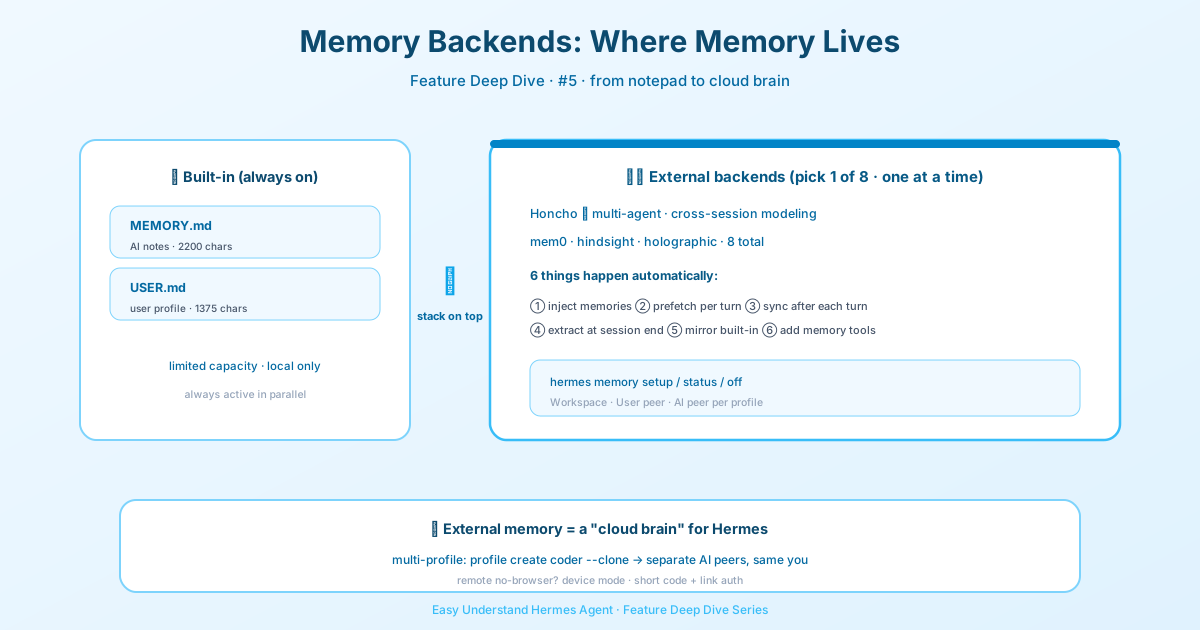
That’s where memory providers come in. Think of them as the long-term brain for your Hermes Agent. While the built-in MEMORY.md and USER.md files are like sticky notes on your desk, memory providers are like a full filing cabinet — searchable, organized, and persistent across every session.
The Big Picture
Hermes Agent now ships with 8 external memory provider plugins. Here’s the key rule: only one external provider can be active at a time, but the built-in memory always stays on alongside it. So you’re never losing your basic setup — you’re just adding superpowers.
Each provider’s data is isolated per profile, so different profiles don’t step on each other’s memories.
Getting Started in 3 Commands
hermes memory setup      # interactive picker + configuration
hermes memory status     # check what's active
hermes memory off        # disable external provider
That’s it. Run hermes memory setup, pick your provider, and you’re rolling. You can also switch providers through hermes plugins → Provider Plugins → Memory Provider, or manually edit ~/.hermes/config.yaml:
memory:
  provider: honcho   # or mem0, hindsight, holographic, retaindb, byterover, supermemory, openviking
What Happens When a Provider Is Active?
Once you’ve got a provider running, Hermes automatically does six things behind the scenes:
- Injects provider context into the system prompt — so the agent knows what it knows
- Prefetches relevant memories before each turn (in the background, so no lag)
- Syncs conversation turns to the provider after each response
- Extracts memories on session end (for providers that support it)
- Mirrors built-in memory writes to the external provider
- Adds provider-specific tools so the agent can search, store, and manage memories
The best part? Your built-in memory keeps working exactly as before. The external provider is purely additive — no breaking changes.
Spotlight: Honcho
Let’s zoom in on one provider to show you what’s possible. Honcho is an AI-native system for cross-session user modeling. It uses “dialectic reasoning” — basically, it has internal conversations about you to build a richer picture over time.
What Makes Honcho Special?
- Two-layer context injection: a base layer (session summary + user representation + peer card) plus a dialectic supplement (LLM reasoning). The dialectic automatically picks cold-start prompts (general facts) vs. warm prompts (session-specific) based on what it already knows.
- 5 built-in tools:
honcho_profile(read/update peer card),honcho_search(semantic search),honcho_context(session context),honcho_reasoning(LLM-synthesized), andhoncho_conclude(create/delete conclusions).
Three Knobs to Control Cost and Depth
You get independent control over how much you spend and how deep the reasoning goes:
contextCadence— how often the base layer refreshes (API call frequency)dialecticCadence— how often the dialectic LLM fires (LLM call frequency)dialecticDepth— how many reasoning passes per invocation (1–3)
There’s also a query-adaptive reasoning level: longer queries automatically trigger deeper reasoning, capped at a configurable reasoningLevelCap.
Setup Wizard Got a Makeover
The old hermes honcho setup command still works (it redirects to hermes memory setup), but the new wizard is smarter. For headless machines (SSH, remote VMs), just pick device at the auth-method prompt — the CLI prints a short code and verification link, you approve from any browser, done. No API key copy-paste needed. It even auto-detects when there’s no usable local browser and defaults to this option.
Config File Locations
Honcho looks for config in this order:
$HERMES_HOME/honcho.json(profile-local)~/.hermes/honcho.json~/.honcho/config.json(global)
The Takeaway
Memory providers turn Hermes from a chatty assistant into a continuously learning partner. Whether you’re building multi-agent systems, need cross-session context, or just want your agent to remember your preferences without re-explaining them every time — there’s a provider for you.
Start with hermes memory setup, explore the options, and give your agent a memory worth having.
📖 Official Docs
This article is based on the official Hermes Agent documentation:Official docs › user-guide/features/memory-providers