Why Hermes Remembers (and You Don't Have To)
Persistent Memory — AI's Long-Term Memory — easy-to-understand guide based on official docs
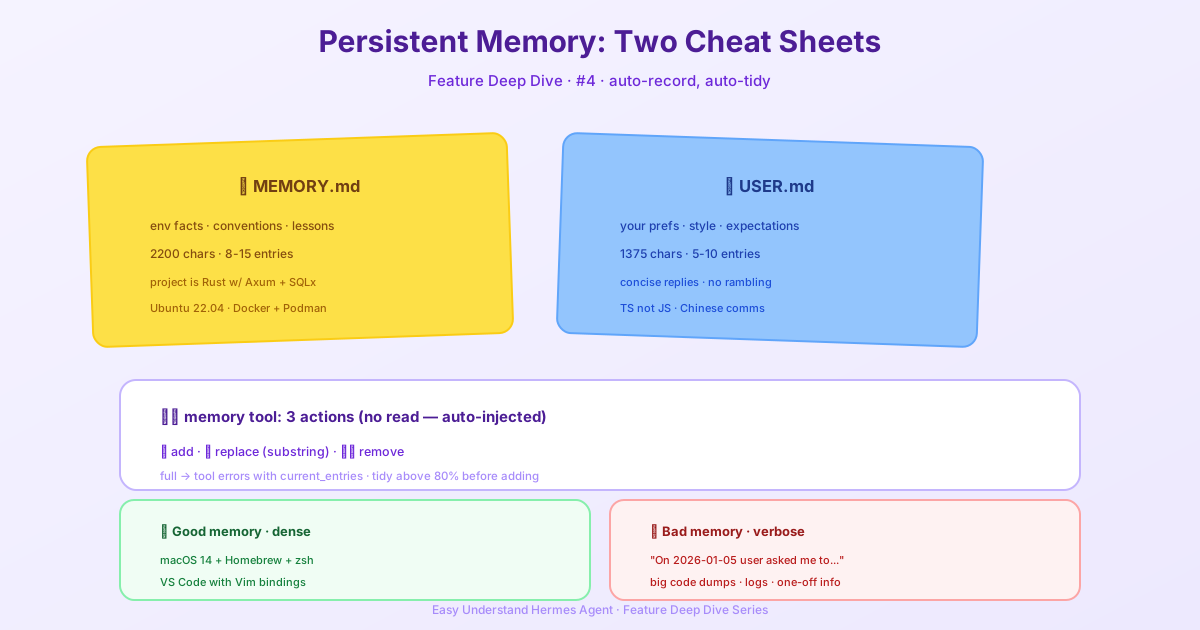
Why Hermes Remembers (and You Don’t Have To)
Ever told an assistant something once, then had to repeat it every single time? Frustrating, right? Hermes Agent fixes that with persistent memory. It’s like giving your agent a tiny notebook it actually reads before every conversation.
Here’s the kicker: Hermes doesn’t try to remember everything. It keeps a bounded, curated set of notes. Think of it as a sticky note, not a filing cabinet. This keeps things fast, focused, and—most importantly—accurate.
The Two Files Behind the Magic
Hermes uses two simple text files to store what it knows. They live in ~/.hermes/memories/:
| File | What It Holds | Size Limit |
|---|---|---|
| MEMORY.md | Agent’s personal notes: environment facts, project conventions, lessons learned | 2,200 characters (~800 tokens) |
| USER.md | Your profile: preferences, communication style, expectations | 1,375 characters (~500 tokens) |
At the start of every session, Hermes reads these files and injects them into its system prompt as a frozen snapshot. It’s like reading its notebook before starting work. The snapshot doesn’t change mid-session—that’s intentional, because it keeps things fast and predictable.
Memory Needs Session Boundaries
The whole memory system is built around the moment a session ends: MEMORY.md and USER.md carry the essentials into the next session, and session_search fills the gaps once the old context is gone. Inside a single session none of that machinery has a reason to run—everything important is still in the live context, so the agent rarely consults session_search and mostly compacts memory entries instead of curating them.
This matters on messaging platforms (Telegram, Discord, etc.), where a chat is deliberately one continuous session that survives restarts, gateway crashes, and machine reboots. Shutting the machine down overnight does not end the session—the next message picks it up exactly where it left off. If you never reset, a chat can run for weeks as a single session: convenient, but it grows expensive (compaction runs repeatedly over an ever-longer history) and the learning loop of forget → recall from memory → search past sessions almost never gets to fire. Fresh memory entries also stay invisible to the running session because of the frozen snapshot above.
Practice: run /new at natural boundaries—a finished task, a change of topic, the start of a day. Each boundary is when memory pays off: the agent re-reads the updated MEMORY.md/USER.md snapshot, starts from a cheap short context, and reaches for session_search when it actually needs history. On the CLI this mostly takes care of itself (every invocation is a new session); on gateways the boundary is yours to create.
How the Agent Manages Its Memory
Hermes doesn’t just store notes; it actively curates them using the memory tool. There are three actions:
add— Write a new memory entryreplace— Update an existing entry (uses substring matching)remove— Delete an entry that’s no longer relevant
There’s no read action—memory is injected into the system prompt automatically at session start, so the agent already sees it as part of the conversation.
Here’s the clever part: replace and remove use short, unique substrings. You don’t need to quote the whole entry. Just give a snippet that uniquely identifies it.
# If memory contains "User prefers dark mode in all editors"
memory(action="replace", target="memory",
       old_text="dark mode",
       content="User prefers light mode in VS Code, dark mode in terminal")
If your substring matches multiple entries, Hermes will ask you to be more specific. No accidental deletions.
What Goes in Each Notebook
memory — The Agent’s Personal Notes
This is for facts about the environment and workflows:
- OS, tools, and project structure
- Project conventions and config details
- Tool quirks and workarounds discovered
- Completed task diary entries
- Skills and techniques that worked
user — Your Profile
This is all about you:
- Name, role, timezone
- Communication preferences (concise vs. detailed)
- Pet peeves and things to avoid
- Workflow habits
- Technical skill level
What Hermes Saves (and What It Skips)
Hermes saves proactively—you don’t have to ask. It remembers:
- Your preferences: “I prefer TypeScript over JavaScript” → saved to
user - Environment facts: “This server runs Debian 12 with PostgreSQL 16” → saved to
memory - Corrections: “Don’t use
sudofor Docker commands” → saved tomemory - Conventions: “Project uses tabs, 120-char line width” → saved to
memory - Completed work: “Migrated database from MySQL to PostgreSQL on 2026-01-15” → saved to
memory - Explicit requests: “Remember that my API key rotation happens monthly” → saved to
memory
But it’s smart about what not to save:
- Trivial or vague info (“User asked about Python”)
- Facts it can easily look up (like Python version docs)
- Huge data dumps (code blocks, log files)
- Session-specific ephemera (temporary file paths)
- Anything already in context files like
SOUL.mdorAGENTS.md
When Memory Gets Full
Memory limits are strict, and there’s no silent auto-compaction. If a write would exceed the limit, the memory tool returns an error. Hermes then makes room itself—consolidating or removing entries in the same turn before retrying.
One important note: replace is also bound by the limit. Swapping an entry for a longer one can still overflow, so the new content might need to be shortened (or another entry removed) to fit.
A good habit: once memory passes about 80% full (the system prompt header shows the percentage), consolidate before adding. Merging a few small “project uses X” entries into one richer entry usually frees plenty of room.
A Word of Caution
Don’t point two agent processes at the same Hermes home directory. Memory writes are automatic and load back at session start. Two writers sharing one home will compound each other’s entries into a mess neither of you authored. Memory is scoped per profile by design—give a second agent its own profile. If they need shared memory, use an external memory provider instead.
The Takeaway
Hermes’s memory system is designed to be focused, curated, and reliable. It remembers what matters, forgets what doesn’t, and keeps you in control. No more repeating yourself—just tell Hermes once, and it’ll remember.
📖 Official Docs
This article is based on the official Hermes Agent documentation:Official docs › user-guide/features/memory