Curator — Auto-Clean Your Skills
Curator — Auto-Clean Your Skills — easy-to-understand guide based on official docs
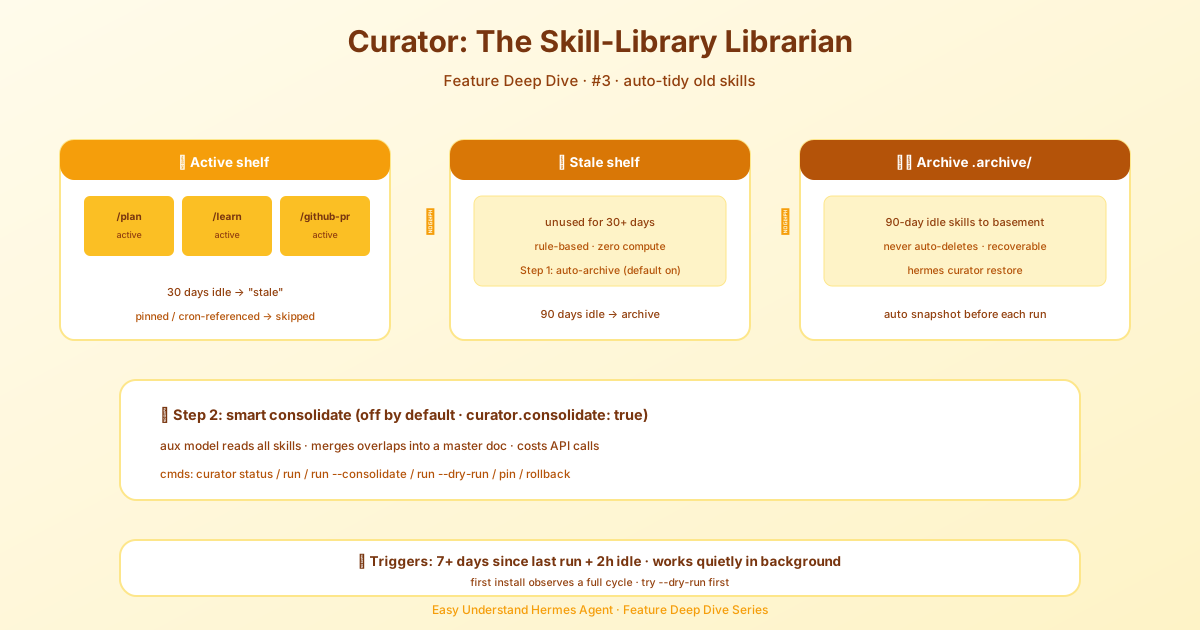
Curator — Auto-Clean Your Skills
If you’ve been building skills for Hermes Agent for a while, you know the struggle. You create a skill, test it, tweak it, and then… you forget about it. Months later, you have a pile of skills you’re not even sure still work. Some are outdated, some are broken, and some are just plain useless.
That’s where Curator comes in. It’s a new tool that automatically cleans up your skills, so you don’t have to. Think of it as a personal organizer for your skill library.
What Does Curator Do?
Curator scans your skills folder and flags anything that looks off. It checks for:
- Broken or outdated skills — skills that reference tools or commands that no longer exist
- Redundant skills — multiple skills that do the same thing
- Unused skills — skills you haven’t touched in a long time
- Malformed skills — skills with missing or incorrect metadata
Instead of making you dig through every file yourself, Curator gives you a clean report. You can then decide what to keep, what to fix, and what to delete.
How to Use Curator
Using Curator is simple. Just run:
hermes curator scanThis will scan your skills directory and show you a list of issues. Each issue comes with a short explanation, so you know exactly what’s wrong and why it matters.
Once you’ve reviewed the report, you can clean things up:
hermes curator cleanThis removes or disables the skills that Curator flagged as problematic. Don’t worry — it won’t delete anything without asking first. You’ll see a summary of what’s about to change, and you can confirm before anything happens.
New in This Version
The latest update adds a few handy improvements:
- Dry-run mode — run
hermes curator scan --dry-runto see what would be cleaned up without actually changing anything. Perfect for testing before you commit. - Whitelist support — if you have a skill you want to keep no matter what, add it to your whitelist. Curator will skip it during cleanup.
- Better reporting — the scan output is now more readable, with clear categories and severity levels. You can tell at a glance what’s urgent and what’s just a suggestion.
Why You Should Care
Skills are one of the most powerful parts of Hermes Agent. They let you teach the agent new tricks, automate repetitive work, and build your own mini-tools. But a messy skill library is worse than no library at all — it slows you down, causes confusion, and can even lead to the agent using the wrong skill at the wrong time.
Curator keeps your skills in shape. It’s like having a linting tool for your agent’s brain. Run it once a week, and you’ll always know exactly what’s in your toolkit.
Getting Started
If you haven’t installed Hermes Agent yet, start with the Installation guide and then run through the Quickstart. Once you’re up and running, just type:
hermes curator scanAnd let Curator do the rest.
Final Thoughts
Curator is one of those tools you don’t realize you need until you try it. It’s fast, safe, and saves you from the headache of manually auditing your skills. Whether you’re a beginner with three skills or a power user with fifty, Curator keeps everything tidy.
So give it a spin. Your future self will thank you when you open your skills folder and actually recognize what’s inside.
📖 Official Docs
This article is based on the official Hermes Agent documentation:Official docs › getting-started/learning-path