Hermes Roadmap: Cron Will Evolve into Agentic Scheduled Jobs
Hermes official roadmap part 3: how cron upgrades from a simple timer into a thinking task system.
Imagine your alarm clock didn’t just beep at 7 AM, but also checked the weather, laid out your umbrella by the door, and printed today’s meeting schedule on the fridge. That’s the upgrade Hermes is planning for scheduled tasks — turning a dumb timer into a thoughtful, self-correcting digital butler.
What This Direction Is: From Alarm Clock to All-Round Manager
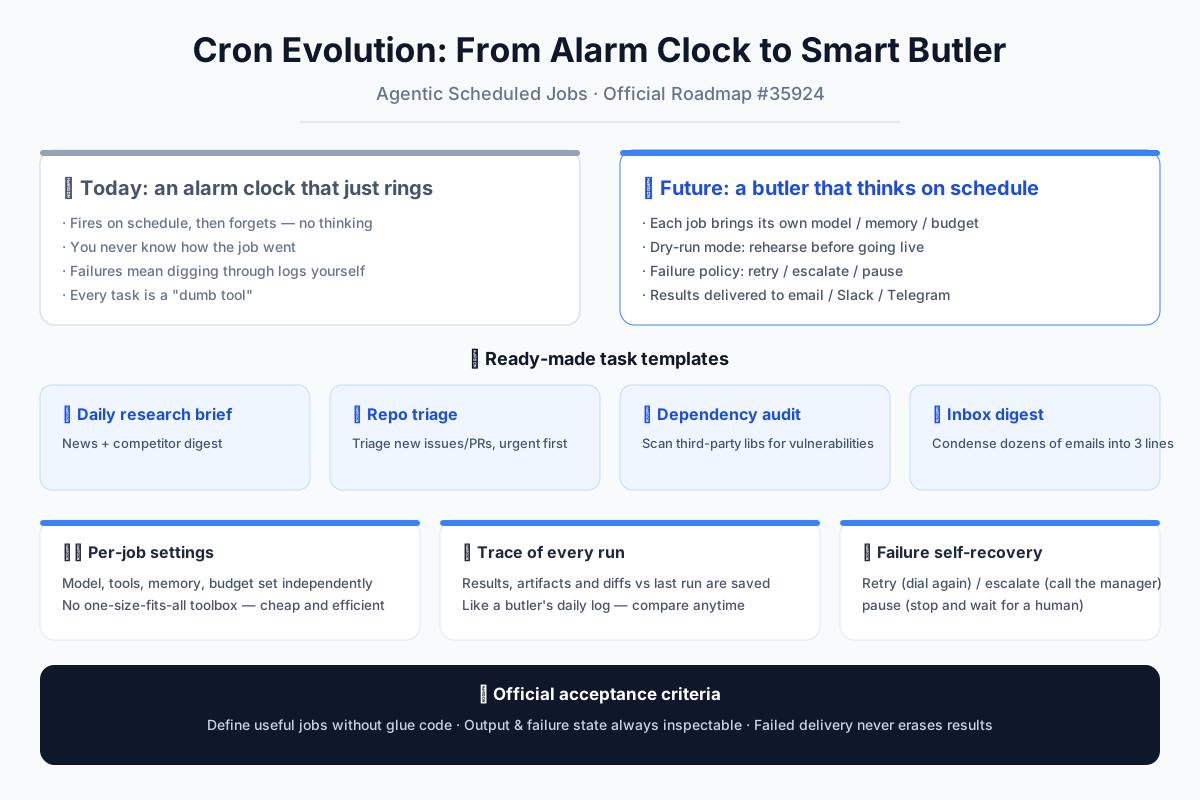
Right now, a traditional cron job is like an old alarm clock: it goes off at the exact right time, but it can’t tell you whether it actually did anything useful. Did it fetch the right data? Did it fail silently? You have no idea until you manually check the logs. The proposed roadmap item, “agentic scheduled jobs,” wants to replace that alarm clock with a full-time house manager. This manager doesn’t just wake you up — it remembers your preferences, uses its own judgment, and if something goes wrong, it knows how to fix it or who to call for help.
The core difference is simple: old cron only “triggers.” The new system gives each scheduled task its own little toolbox — its own model, memory, and budget — so it can think, act, and even recover from mistakes on its own. You don’t write custom code for every situation; you just describe what you want, and the agent handles the rest.
What the Official Plan Includes
The roadmap breaks down into six practical pieces, each designed to make scheduled tasks genuinely useful without requiring you to be a developer.
1. Job Templates: Ready-Made “Life Scenario Packs”
Think of these like the recipe cards that come free with a new oven. You don’t need to invent anything from scratch. The first four templates cover the most common needs:
- Daily Research Brief: Every morning, it scans industry news and competitor updates, then compiles a neat summary — like a personalized newspaper delivered with your coffee.
- Repo Triage: If you’re a developer, this acts like a hospital nurse for your GitHub issues and pull requests. It sorts them by urgency — critical bugs go to the top, minor suggestions go to the bottom — so you don’t have to wade through everything yourself.
- Dependency Audit: This is the home inspector for your code. It regularly checks the third-party libraries you use for security holes, just like checking your house’s wiring and plumbing on a schedule.
- Inbox Summary: Every evening, it condenses dozens of emails into three sentences: “Two need your reply, one is a newsletter, the rest can wait.” You stop drowning in noise.
2. Per-Job Settings: Each Assistant Has Its Own Personality
Not every task needs the same brain. You can assign a cheaper, faster model to simple jobs and a more powerful one to complex analysis. You can also set separate tool access, memory capacity, and spending budgets. It’s like giving your gardener a good pair of shears and your accountant a calculator — no need to hand everyone the same giant toolbox. This keeps costs down and efficiency up.
3. Dry-Run Mode: Rehearse Before the Real Show
This is a lifesaver. Before a scheduled job runs for real, you can put it in “dry-run” mode — like a dress rehearsal for a play. The agent pretends to execute, shows you exactly what it would do and what output it would produce, and then you decide whether to let it loose. No more waking up at 3 AM to a mistakenly sent email because the logic had a flaw. You catch problems before they happen.
4. Persistent Artifacts and Diffs: Every Run Leaves a Paper Trail
After each execution, the system saves not just the final output, but also the intermediate files and a “diff” — a comparison showing what changed since the last run. Imagine your manager keeping a daily work journal. You can ask, “What was different in last Wednesday’s brief compared to today’s?” and get a clear answer, rather than just a green checkmark saying “success.” This makes debugging and tracking over time genuinely possible.
5. Delivery Targets: Results Come to You, Not the Other Way Around
The output doesn’t have to sit in a hidden folder. You can choose where it goes: email, Slack, Telegram, a dashboard, or plain files. It’s like subscribing to a newspaper — it arrives at your door automatically. You don’t write code to fetch results; you just tell the agent “send it to my Slack,” and it does.
6. Failure Policies: When Things Go Wrong, It Knows What to Do
This is where it becomes truly human-like. If a job fails, the system doesn’t just shrug. It follows a three-step playbook:
- Retry: Like redialing a busy phone number — sometimes it just needs another attempt.
- Escalate: If retrying doesn’t work, it bumps the issue up to a human or a more powerful agent, like an employee going to their manager.
- Pause: If something looks seriously wrong, it stops the job entirely and waits for human intervention — better safe than sorry.
Acceptance Criteria: The Promises That Must Be Kept
The official plan includes three clear checks to know if this is done right:
- No glue code needed: A non-developer can define a useful scheduled job by filling in a form, not writing scripts.
- Inspectable after execution: You can always see the output and the failure state — like a package with a tracking number, every step is visible.
- Delivery failures don’t erase results: Even if the email server goes down, your data stays safe in the system. You don’t lose the work just because the delivery failed.
What This Means for Users
In the past, a scheduled task was a “dumb tool.” It ran, but you couldn’t tell if it ran well. If something broke, you had to dig through raw logs yourself. Now, it becomes a “digital employee” that talks, takes notes, and calls for help when needed.
You no longer need to write a bunch of scripts just to “summarize data every morning.” You pick a template, fill in the parameters, and say, “Send the result to my email.” The agent does the rest. And if the email service is down one day, your results are still safe — when the service comes back, it can resend.
This isn’t just an upgrade to cron. It’s a shift from “automation” to “autonomy” — from “execute on time” to “think, execute, report, and self-repair on time.” For regular users, it means you can finally trust those repetitive, tedious, and judgment-heavy tasks to a digital steward that actually earns your confidence. You set it once, and it handles the rest — quietly, reliably, and with a paper trail you can check anytime.
📖 Official Docs
This article is based on the official Hermes Agent documentation:GitHub ›/issues/35924