Hermes Roadmap Overview: The 12 Directions Announced by the Official Team
Hermes official roadmap part 2: all 12 roadmap directions announced on 2026-05-31, explained in plain language.
Imagine trying to pilot a spaceship while only being able to look at a single blinking light on the dashboard.
That’s the current experience of steering Hermes through its text-based control panel, the TUI. The good news? The official roadmap’s very first item, Issue #35915, is all about turning that lonely light into a full mission control center.
What This Direction Is: From a Blind Box to a Glass Cockpit
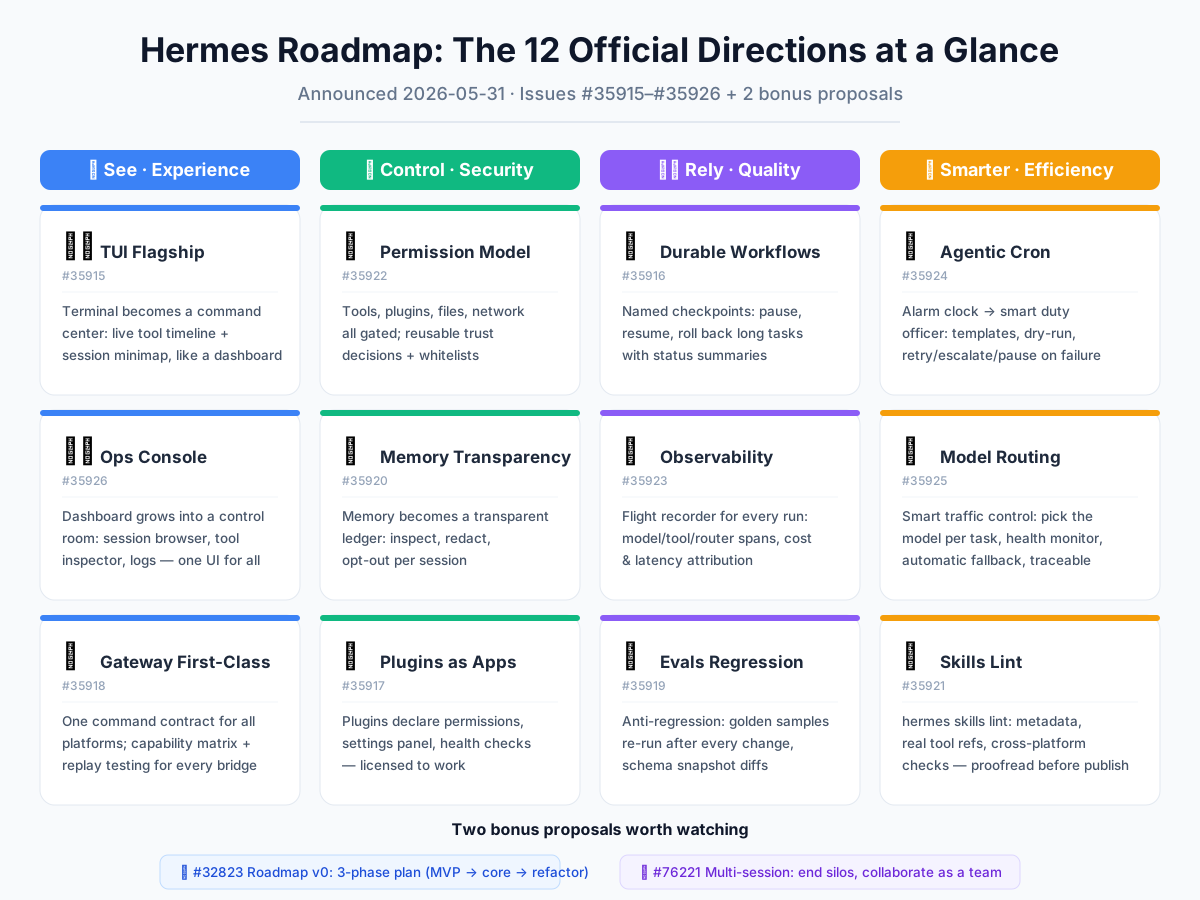
Think of the TUI as the cockpit of a highly capable, but currently opaque, aircraft. You give it a destination (a task), and it flies. But right now, you can’t see the instruments. You don’t know if the engine is sputtering, if you’ve burned too much fuel, or if you’ve already passed the checkpoint you wanted to visit. You just wait for the landing announcement.
This roadmap item is about replacing that blind box with a glass cockpit. It’s about giving you, the pilot, a transparent, live dashboard that shows every lever, gauge, and map. The goal is to make the TUI not just a place where you type commands, but the flagship experience—the primary, most insightful way to watch Hermes work, understand its decisions, and jump in when needed.
What the Official Plan Includes: The New Instrument Panel
The proposal is a detailed shopping list for this new cockpit. Here’s what they plan to build, piece by piece:
A Live Tool Timeline (The Engine Monitor) You’ll see a scrolling, real-time feed of every “tool” Hermes uses—whether it’s editing a file, searching the web, or running a script. Each entry will be a card you can expand or collapse. You’ll see the raw output (the stdout preview), spot any errors instantly, and even see when Hermes retries a failed action. It’s like watching a mechanic’s diagnostic readout for every single move the agent makes.
A Session Minimap (The Navigation Chart) For long, complex missions, you’ll get a miniature overview of the entire session. This isn’t just a list of messages. It’s a visual map showing the flow: where messages were sent, where tools were called, where “checkpoints” (save points) were created, which files were touched, how much money the session has spent so far, and how much time has elapsed. You can glance at this map and instantly know “we are here, we did this, and it cost this much.”
Keyboard-Native Approval Prompts (The Quick-Action Buttons) When Hermes needs your permission to do something, it shouldn’t break your flow. The plan is to make these approval prompts lightning-fast and entirely keyboard-driven. Instead of navigating menus, you’ll hit a single key to approve a common action. It’s the difference between fumbling for a key in the dark and having a well-labeled, tactile button right under your thumb.
First-Class Views for Key Actions (The Specialized Sub-Displays)
The roadmap calls for dedicated, built-in screens for commands that are currently clunky. This includes a proper view for /diff (seeing file changes), /tests (running and viewing test results), /plan (viewing the current plan), /handoff (preparing a summary for another agent or human), and /checkpoint (managing save points). Instead of these being text-in, text-out afterthoughts, they become polished, interactive panels.
A “Flight Recorder” for Debugging (The Black Box) Finally, they want to explore a “run replay” mode. This would let you record an entire agent session and then replay it later, step-by-step, to see exactly what happened and why. This is invaluable for debugging a task that went sideways—you can rewind the tape, watch the decisions, and find the exact moment of failure.
The acceptance criteria for this whole project is simple: you must be able to inspect recent tool calls without ever leaving the terminal, and long-running sessions must show meaningful progress at a glance. Crucially, they’re building this within the existing TUI architecture—not creating a separate, parallel React-based chat app. It’s an upgrade to the current cockpit, not a rebuild of the plane.
What This Means for You: Trust Through Visibility
For a non-developer, this is the single most important feature for building trust in an AI agent. Right now, you have to take a leap of faith that Hermes is doing the right thing. With this update, you won’t have to.
You’ll become the supervisor, not just the passenger. You’ll see the agent’s “thought process” as a tangible series of actions. When something looks wrong, you can catch it early. When a task is taking a while, you can see progress and cost, instead of staring at a blank screen wondering if it’s stuck. When you need to pause and check a diff, or save a checkpoint before making a risky change, you’ll have a dedicated, one-keypress button for it.
Ultimately, this roadmap item transforms Hermes from a mysterious “auto-pilot” into a transparent, collaborative co-pilot. It’s the difference between trusting a process blindly and understanding it. And understanding is the first step to truly powerful collaboration. This is the foundation upon which every other roadmap item—from better memory to smarter routing—will become visible and manageable. It’s not just a new interface; it’s the new way you’ll see and steer your AI.
📖 Official Docs
This article is based on the official Hermes Agent documentation:GitHub ›/issues/32823