Tutorial 26: Batch Processing
Tutorial 26: Batch Processing — easy-to-understand guide based on official docs
This is part of the Hermes Agent official tutorial series. View all tutorials
Think of this like a morning checklist you run before starting work — you don’t want to remember every task yourself, so you write them down once, and your assistant checks them off automatically every day. That’s exactly what Hermes lets you do with gateway hooks and a simple file called BOOT.md.
In this tutorial, you’ll learn how to make Hermes run a custom “batch” of tasks every time your gateway starts — like checking logs, posting reminders, or even running a mini-agent that thinks and reports back.
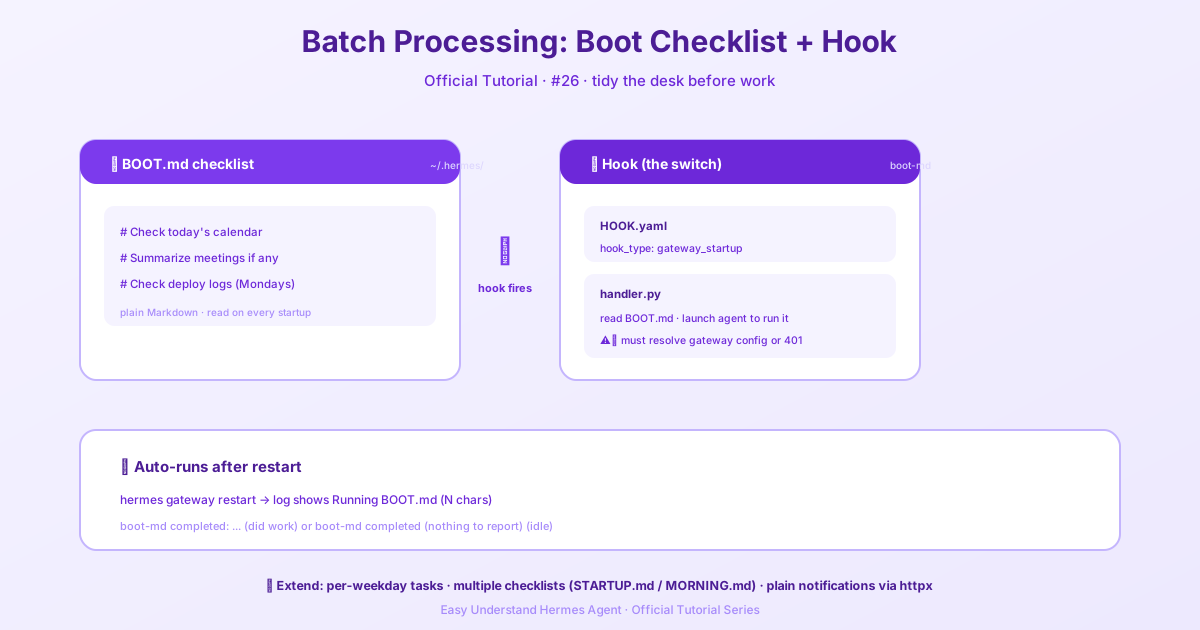
Step 1: Create your hook directory
First, create a folder inside your hooks directory. Each hook lives in its own subfolder with two files: HOOK.yaml (the config) and handler.py (the logic).
mkdir -p ~/.hermes/hooks/boot-md
cd ~/.hermes/hooks/boot-md
Now create HOOK.yaml:
name: "boot-md"
event: "gateway_startup"
That’s it — the event tells Hermes to fire this hook when the gateway boots.
Step 2: Write the handler
Now create handler.py. This is where the magic happens. The handler reads a file called BOOT.md from your home directory, then starts a background thread that runs an agent with those instructions.
Here’s the core idea (simplified):
import os, threading
from pathlib import Path
from hermes.agent import AIAgent

def run_boot_md():
    content = Path.home().joinpath(".hermes", "BOOT.md").read_text()
    print(f"Running BOOT.md ({len(content)} chars)")

    agent = AIAgent(
        instructions=content,
        model=_resolve_gateway_model(),          # uses your gateway’s model
        **_resolve_runtime_agent_kwargs()       # uses your provider credentials
    )
    result = agent.run()
    print(f"boot-md completed: {result.summary()}")

def handler(event):
    thread = threading.Thread(target=run_boot_md, daemon=True)
    thread.start()
The two key lines:
_resolve_gateway_model()reads the gateway’s currently-configured model._resolve_runtime_agent_kwargs()resolves provider credentials the same way a normal gateway turn does — including API keys, base URLs, OAuth tokens, and credential pools.
Without these, a bare AIAgent() falls back to built-in defaults and will 401 against any non-default endpoint.
Step 3: Test it
Restart the gateway:
hermes gateway restartWatch the logs:
hermes logs --follow --level INFO | grep boot-mdYou should see Running BOOT.md (N chars) followed by either boot-md completed: ... (summary of what the agent did) or boot-md completed (nothing to report) when the agent replied with an exact silence token such as [SILENT].
Delete ~/.hermes/BOOT.md to disable the checklist — the hook stays loaded but silently skips when the file isn’t there.
Extending the pattern
- Schedule-aware checklists: key off
datetime.now().weekday()inside BOOT.md’s instructions (“if it’s Monday, also check the weekly deploy log”). The instructions are free-form text, so anything the agent can reason about is fair game. - Multiple checklists: point the hook at a different file (
STARTUP.md,MORNING.md, etc.) and register separate hook directories for each. - Non-agent variant: if you don’t need a full agent loop, skip
AIAgententirely and have the handler post a fixed notification directly viahttpx. Cheaper, faster, and has no provider dependency.
Why this isn’t a built-in
An earlier version of Hermes shipped this as a built-in hook and silently spawned an agent with bare defaults on every gateway boot. That surprised users with custom endpoints and made the feature invisible to users who didn’t know it was running. Keeping it as a documented pattern — built by you, in your hooks directory — means you see exactly what it does and opt in by writing the files.
How It Works
- On gateway startup,
HookRegistry.discover_and_load()scans~/.hermes/hooks/ - Each subdirectory with
HOOK.yaml+handler.pyis loaded dynamically - Handlers are registered for their declared events
- At each lifecycle point,
hooks.emit()fires all matching handlers - Errors in any handler are caught and logged — a broken hook never crashes the agent
:::info Gateway hooks only fire in the gateway (Telegram, Discord, Slack, WhatsApp, Teams). The CLI does not load gateway hooks. For hooks that work everywhere, use plugin hooks. :::
Summary
You now know how to turn a simple text file into a powerful startup checklist that runs automatically. Whether it’s a full agent loop or a quick HTTP call, the pattern is the same: write a hook, point it at a file, and let Hermes handle the rest.
Next up: Tutorial 27 — Voice Mode: talking to Hermes hands-free.
📖 Official Docs
This article is based on the official Hermes Agent documentation:Official docs › user-guide/features/batch-processing