Tutorial 25: Code Execution
Tutorial 25: Code Execution — easy-to-understand guide based on official docs
This is part of the Hermes Agent official tutorial series. View all tutorials
Imagine you’re baking a cake and instead of fetching ingredients one at a time, you write down the entire recipe, hand it to a helper, and they bring back only the finished cake. That’s exactly what Code Execution does for Hermes Agent — it lets the agent run a full Python script that calls multiple tools inside, then returns only the final result to the conversation.
What Is Code Execution?
Normally, when Hermes needs to search the web, read a file, or run a command, it does each step one at a time — and every intermediate result gets loaded into its “memory” (the context window). That’s slow and wastes tokens.
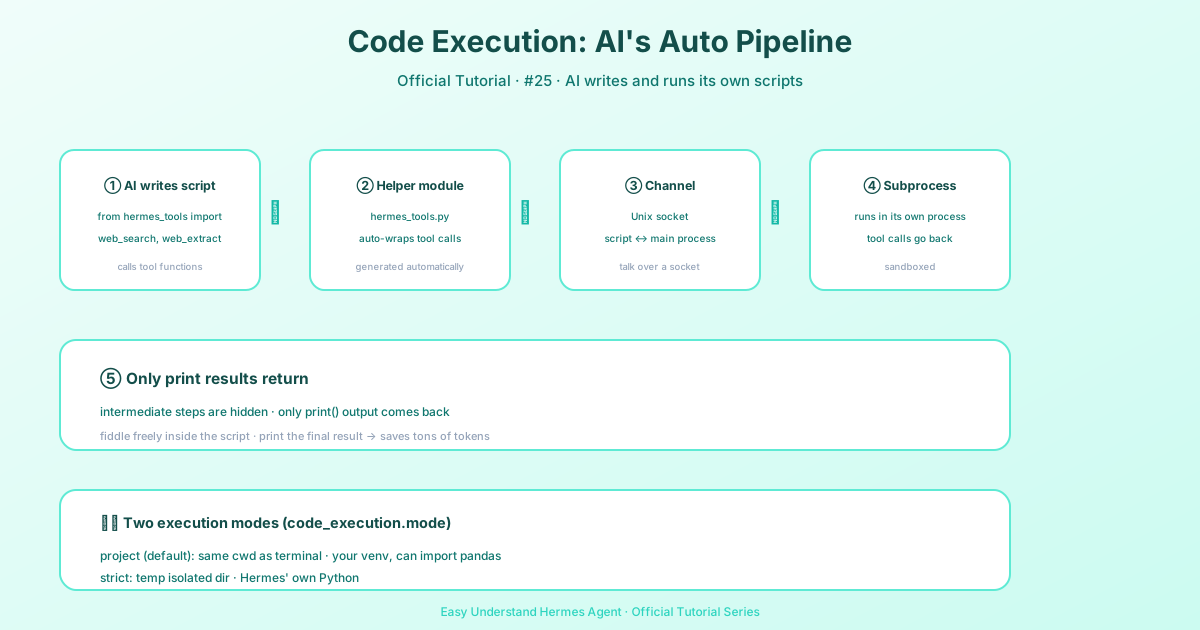
With the execute_code tool, Hermes writes a Python script that can call tools programmatically — like web_search, read_file, or patch — all in one go. The script runs in a separate child process, and only the print() output comes back to the agent. All the messy intermediate data stays hidden.
How It Works: Step by Step
Step 1: The agent writes a Python script
It starts by importing tools from a special module:
from hermes_tools import web_search, web_extractStep 2: Hermes creates a helper module
It automatically generates a hermes_tools.py stub that connects your script to the main agent.
Step 3: A communication channel opens
Hermes opens a Unix domain socket (a fast, local “phone line” between processes) and starts a listener thread.
Step 4: The script runs in a child process
Every tool call inside your script travels over that socket back to Hermes, which executes it and sends the result back.
Step 5: Only the print output returns
The script’s print() statements are the only thing the LLM sees. All the intermediate tool results never enter the context window — saving massive amounts of tokens.
When Does Hermes Use This?
The agent automatically chooses execute_code when it spots:
- 3 or more tool calls with logic in between (like filtering or comparing)
- Bulk data processing — e.g., searching many files and extracting snippets
- Loops — repeating an action on many items
The big win? Token efficiency. Instead of feeding every search result back into the conversation, only the final summary comes through.
Practical Examples You Can Try
1. Data Processing Pipeline
from hermes_tools import search_files, read_file
import json

# Find all config files and extract database settings
matches = search_files("database", path=".", file_glob="*.yaml", limit=20)
configs = []
for match in matches.get("matches", []):
    content = read_file(match["path"])
    configs.append({"file": match["path"], "preview": content["content"][:200]})

print(json.dumps(configs, indent=2))
2. Multi-Step Web Research
from hermes_tools import web_search, web_extract
import json

results = web_search("Rust async runtime comparison 2025", limit=5)
summaries = []
for r in results["data"]["web"]:
    page = web_extract([r["url"]])
    for p in page.get("results", []):
        if p.get("content"):
            summaries.append({
                "title": r["title"],
                "url": r["url"],
                "excerpt": p["content"][:500]
            })

print(json.dumps(summaries, indent=2))
3. Bulk File Refactoring
from hermes_tools import search_files, read_file, patch

matches = search_files("old_api_call", path="src/", file_glob="*.py")
fixed = 0
for match in matches.get("matches", []):
    result = patch(
        path=match["path"],
        old_string="old_api_call(",
        new_string="new_api_call(",
        replace_all=True
    )
    if "error" not in str(result):
        fixed += 1

print(f"Fixed {fixed} files out of {len(matches.get('matches', []))} matches")
4. Build and Test Pipeline
from hermes_tools import terminal
import json

result = terminal("cd /project && python -m pytest --tb=short -q 2>&1", timeout=120)
output = result.get("output", "")

passed = output.count(" passed")
failed = output.count(" failed")

print(json.dumps({"passed": passed, "failed": failed}, indent=2))
Execution Mode
execute_code has two execution modes controlled by code_execution.mode in ~/.hermes/config.yaml:
| Mode | Working directory | Python interpreter |
|---|---|---|
project (default) |
The session’s working directory (same as terminal()) |
Active VIRTUAL_ENV / CONDA_PREFIX python, falling back to Hermes’s own python |
strict |
A temp staging directory isolated from the user’s project | sys.executable (Hermes’s own python) |
When to leave it on project: you want import pandas, from my_project import foo, or relative paths like open(".env") to work the same way they do in terminal(). This is almost always what you want.
When to flip to strict: you need maximum reproducibility — you want the same interpreter every session regardless of which venv the user activated, and you want scripts quarantined from the project tree (no risk of accidentally reading project files through a relative path).
# ~/.hermes/config.yaml
code_execution:
  mode: project   # or "strict"
Fallback behavior in project mode: if VIRTUAL_ENV / CONDA_PREFIX is unset, broken, or points at a Python older than 3.8, the resolver falls back cleanly to sys.executable — it never leaves the agent without a working interpreter.
Security-critical invariants are identical across both modes:
- environment scrubbing (API keys, tokens, credentials stripped)
- tool whitelist (scripts cannot call
execute_coderecursively,delegate_task, or MCP tools) - resource limits (timeout, stdout cap, tool-call cap)
Switching mode changes where scripts run and which interpreter runs them, not what credentials they can see or which tools they can call.
Resource Limits
| Resource | Limit | Notes |
|---|---|---|
| Timeout | 5 minutes (300s) | Script is killed with SIGTERM, then SIGKILL after 5s grace |
| Stdout | 50 KB | Shown head-and-tail inline; the full output is saved to ~/.hermes/cache/exec/ and the path is included in the result |
| Stderr | 10 KB | Included in output on non-zero exit for debugging |
| Tool calls | 50 per execution | Error returned when limit reached |
All limits are configurable via config.yaml:
# In ~/.hermes/config.yaml
code_execution:
  mode: project      # project (default) | strict
  timeout: 300       # Max seconds per script (default: 300)
  max_tool_calls: 50 # Max tool calls per execution (default: 50)
State Between Calls (the session kernel)
On the local terminal backend, execute_code does not start a fresh interpreter for every call. Each session owns a persistent Python kernel, so variables, imports, and loaded data from one call are available in the next. The agent can load a dataset once and query it across several turns instead of re-reading it every time. Subagents get their own kernel; kernels are never shared across sessions. A subagent’s kernel lives exactly as long as the subagent: it is exempt from the live-kernel cap while the subagent runs (a wide fan-out no longer evicts a sibling’s kernel mid-task) and is disposed when the subagent finishes.
What ends a kernel:
- Timeout or interrupt. A cell that hits the timeout (or is interrupted) kills the kernel process and its state is lost on purpose; the result says so and the next call starts a fresh kernel.
reset=true. The agent can passreset: trueto discard the kernel’s state and start clean. This is also the way to pick up environment changes: a kernel’s environment is frozen when it spawns, so a newly allowlisted passthrough variable is invisible until the kernel is reset.- Idle timeout and eviction. Kernels die with the session, after
code_execution.kernel_idle_timeoutidle seconds (default 1800), or when more thancode_execution.max_session_kernels(default 4) top-level sessions’ kernels are alive and the oldest is evicted (running subagents’ kernels do not count against the cap).
The security envelope is the same as a one-shot script: environment scrubbing, the tool whitelist, and the per-call tool budget all apply to every cell, and tool-call authority (approvals, session, allow-list) is rebound on each cell.
# ~/.hermes/config.yaml
code_execution:
  kernel_idle_timeout: 1800   # seconds a kernel may sit idle before it is reaped
  max_session_kernels: 4      # kernels kept alive at once; oldest is evicted past this
Remote backends (Docker, SSH, Modal) run a remote session kernel with the same contract. If the kernel cannot be spawned on the backend, Hermes falls back to running each call as a standalone script and says so in the result.
Large output. Stdout over 50 KB is shown head-and-tail inline, and the full text is saved under ~/.hermes/cache/exec/ with the path included in the result, so the agent can page through it with read_file instead of re-running the script.
Key Points to Remember
- Available tools inside scripts:
web_search,web_extract,read_file,write_file,search_files,patch, andterminal(foreground only). - Only
print()output returns — everything else stays hidden. - Great for loops, filtering, and multi-step workflows — it’s like giving Hermes a mini-programming environment.
Summary
Code Execution turns Hermes from a step-by-step assistant into a batch processor. It writes a script, runs it, and gives you only the final answer — saving time, tokens, and mental overhead. If you ever see Hermes doing a lot of repetitive tool calls, it’s probably using this feature under the hood.
Next up: Tutorial 26 — Batch Processing: running hundreds of prompts in parallel.
📖 Official Docs
This article is based on the official Hermes Agent documentation:Official docs › user-guide/features/code-execution