Tutorial 24: Persistent Goals
Tutorial 24: Persistent Goals — easy-to-understand guide based on official docs
This is part of the Hermes Agent official tutorial series. View all tutorials
Imagine you’re cooking a complex meal and you tell your sous-chef, “Keep chopping vegetables until the prep station is fully stocked.” You don’t stand there repeating yourself after every single carrot — you trust them to keep going until the job is done. Persistent Goals gives Hermes that same “keep going until finished” superpower for your coding tasks.
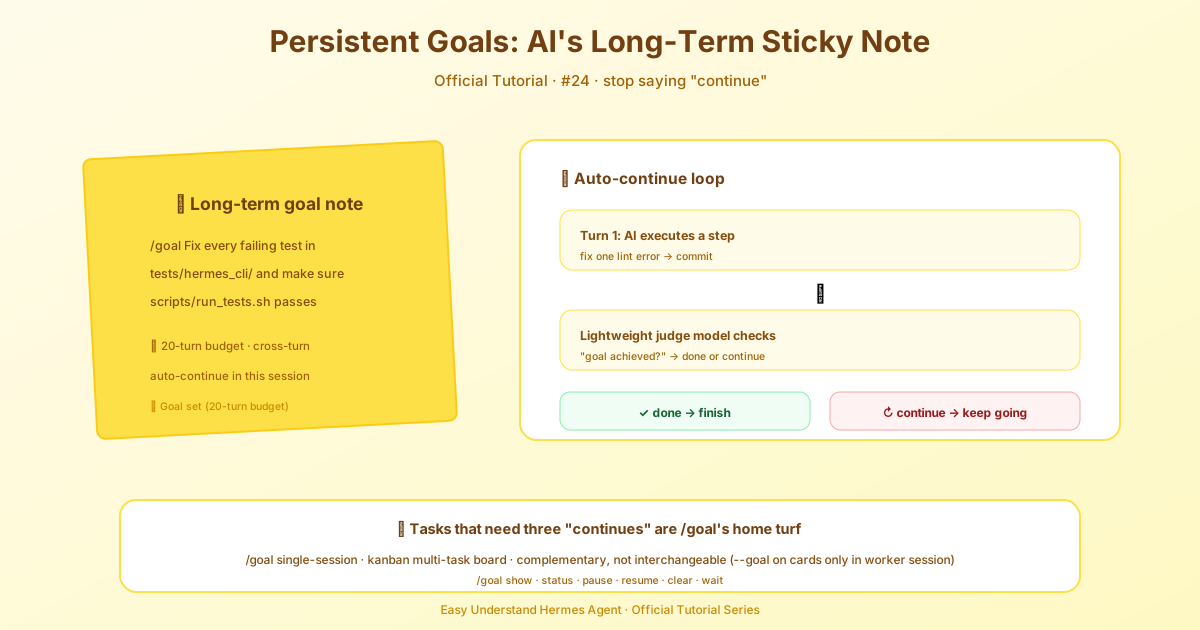
What Does /goal Do?
Normally, you give Hermes a task, it responds, and then it stops — waiting for your next instruction. With /goal, you give Hermes a standing objective that survives across turns. After each response, a lightweight “judge” model checks: “Is the goal done yet?” If not, Hermes automatically feeds itself a continuation prompt and keeps working — no nagging from you required. It loops until the goal is achieved, you pause or clear it, or the turn budget runs out.
This is inspired by a similar feature in Codex CLI, and it’s perfect for tasks where you’d otherwise have to say “keep going” three times.
Step 1: Know When to Use It
Use /goal when you want Hermes to iterate on its own without re-prompting. Great examples:
/goal Fix every lint error in src/ and verify ruff check passes/goal Port feature X from repo Y, including tests, and get CI green/goal Investigate why session IDs sometimes drift on mid-run compression and write up a report/goal Build a small CLI to rename files by their EXIF dates, then test it against the photos/ folder
If your task only needs one turn, skip /goal. It shines when you’d otherwise be stuck babysitting.
Step 2: Understand the Difference Between /goal and Kanban
This is a common point of confusion, so let’s keep it simple:
/goalis single-session. It keeps working inside this one conversation until done. It never creates a board card, never assigns work to another profile, never fans out.- Kanban is a board of many tasks. Each card gets its own worker process with its own session. Cards, dependencies, assignees, and handoffs live on the board.
The overlap is small but deliberate: a kanban card created with --goal uses the same continuation engine, but inside that one card’s session — it borrows the engine, not the board.
| You want | Reach for |
|---|---|
| Keep iterating on one task in this chat until done | /goal <text> |
| Many independent tasks with dependencies | hermes kanban create … |
| One board card that keeps iterating until acceptance criteria met | Kanban card with --goal |
Remember: /goal never touches the board, and pausing/clearing a goal never moves a card. If you want work on the board, put it there yourself.
Step 3: Run Your First Goal
Here’s the quick start:
/goal Fix every failing test in tests/hermes_cli/ and make sure scripts/run_tests.sh passes for that directoryHere’s what you’ll see happen:
- Goal accepted — You’ll see a confirmation like:
⊙ Goal set (20-turn budget): <your goal> - Turn 1 runs — Hermes starts working as if you’d sent the goal as a normal message.
- Judge runs — After that turn, the judge model decides
done,continue, orblocked. - Loop fires if needed — If
continue, you’ll see:↻ Continuing toward goal (1/20): <judge's reason>— and Hermes automatically takes the next step. - Terminates — Eventually, the goal is achieved, you pause or clear it, or the turn budget runs out.
Step 4: Manage the Loop
You’re always in control. You can pause a goal to stop the loop temporarily, clear it to cancel entirely, or just let it run to completion. The 20-turn budget prevents infinite loops, so you don’t need to worry about Hermes running away forever.
A few handy extras: /goal show prints the active goal’s completion contract, /goal resume restarts the loop and resets the turn counter, and /goal wait <pid> parks the loop on a background process until it exits (the PID must be a live process on the Hermes host). You can also add a quality gate — a shell command that must exit 0 before the goal counts as done — with /goal gate add <command>. Gates run before the judge each turn, re-run against current inputs every boundary, and default to 3 retries with a 5-minute timeout; if a gate exhausts its retries the goal auto-pauses so you can fix it, remove the gate, or /goal resume.
Summary
/goal is your “keep going until it’s done” feature. It’s perfect for single-session tasks that need multiple iterations — lint fixes, porting features, investigations, or building small tools. It’s not for managing many tasks at once (that’s Kanban’s job). Just set your goal, let the judge watch over the loop, and step in only when you want to pause, clear, or adjust.
Next up: Tutorial 25 — Code Execution: batch-processing tasks with Python scripts.
📖 Official Docs
This article is based on the official Hermes Agent documentation:Official docs › user-guide/features/goals