Hermes A2A Protocol — AI Agents Talking to AI
Hermes A2A (agent-to-agent) protocol: how Hermes agents call other A2A agents over HTTP, the setup you need, and the safety defaults.
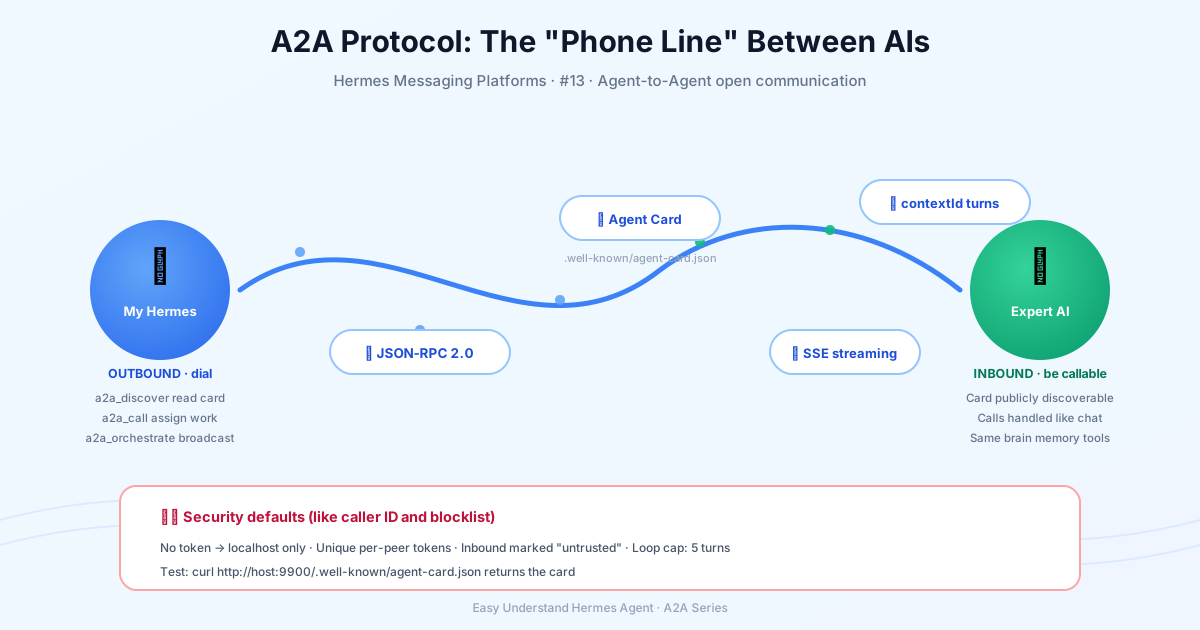
A2A Protocol — AI Talking to AI
Remember when the only way two AI agents could talk was if they were built by the same company, running on the same machine, speaking the same private language? That era is over. The A2A (Agent-to-Agent) protocol is the open standard that lets independent AI agents from different frameworks actually talk to each other — think of it as the “email protocol” for AI agents.
The Hermes A2A plugin works in both directions. Your agent can call other A2A agents as tools, and other agents can send tasks to your Hermes over HTTP. It plays nicely with any A2A-compliant peer — another Hermes, LangChain, CrewAI, Google ADK agents, or anything built on the official a2a-sdk.
When should you use A2A?
A2A shines in three scenarios:
- Hermes ↔ Hermes across machines — your desktop agent hands tasks to a Hermes on a server (or vice versa), each with its own memory, tools, and credentials.
- Delegating to specialist agents — a peer advertising
web_searchorresearchskills on its Agent Card can be discovered and called mid-conversation. - Being a callable service — expose your Hermes so agents from other frameworks can send it tasks.
Need multiple agents on the same machine? Prefer delegation (in-process subagents) or the kanban board (durable multi-profile work queue). A2A is for crossing process, machine, or framework boundaries.
Getting started
Enable the A2A gateway platform:
hermes gateway setup # pick A2AOr in ~/.hermes/config.yaml:
gateway:
  platforms:
    a2a:
      enabled: true
      extra:
        port: 9900
The outbound client tools ship as the a2a toolset, off by default. Enable it per platform:
hermes tools enable a2a --platform cli        # CLI/TUI sessions
hermes tools enable a2a --platform telegram   # or any messaging platform
hermes tools enable a2a --platform a2a        # let inbound A2A tasks call peers (agent chaining)
The tools work in every process type — CLI, TUI, gateway, and cron — even without the inbound platform enabled.
Outbound: calling other agents
With the a2a toolset enabled, your agent gains five powerful tools:
| Tool | What it does |
|---|---|
a2a_discover(url) |
Fetch and summarize a peer’s Agent Card |
a2a_call(agent, message, context_id?) |
Send a task, get the reply; multi-turn via context_id |
a2a_list() |
Configured peers, saved conversations, metrics |
a2a_history(context_id) |
Recall a persisted A2A conversation |
a2a_orchestrate(capability, message, mode?) |
Fan a task out to every peer advertising a capability (all / first / best) |
Configure known peers in config.yaml:
a2a_agents:
  researcher:
    url: "http://research-box.local:9900"
    auth: { type: bearer, token: "..." }
    timeout: 120
    capabilities: [web_search, research]
Then just ask: “Ask the researcher agent to summarize today’s arXiv postings.” Direct URLs work too — a2a_call accepts any A2A endpoint.
Inbound: being callable
With the platform enabled, Hermes serves:
- Agent Card at
GET /.well-known/agent-card.json— advertises your agent’s name, skills (derived from enabled toolsets), and auth requirements. The legacyagent.jsonpath still answers too. - JSON-RPC 2.0 at
POST /— canonical v1.0 methods (SendMessage,SendStreamingMessage,GetTask,ListTasks,CancelTask,SubscribeToTask, push-notification config CRUD), plus the older path-style aliases likemessage/send. - SSE streaming for
SendStreamingMessage, with spec-correct JSON-RPC-enveloped frames. - Push notifications (webhooks) for long-running tasks, HMAC-SHA256 signed.
Inbound tasks are injected into a live gateway session — the same agent, memory, and tools that serve your other channels — and the final reply is returned to the caller as the task result. Conversations are keyed by the A2A contextId, so a peer can hold a multi-turn exchange.
Interoperability is verified against the official Python a2a-sdk (card resolution, SendMessage, streaming).
Security: safe by default
Every widening step is explicit:
- No token ⇒ localhost only. The server binds
127.0.0.1. Remote exposure requires a bearer token and an explicitA2A_HOST. - Per-peer tokens —
A2A_PEER_TOKENS="alice:tok1,bob:tok2"gives each peer its own credential; the authenticated name drives rate limiting, trust, and audit. - Prompt-injection filtering — inbound text is filtered and framed as untrusted peer input. Remote peers cannot invoke operator slash commands.
- Outbound redaction — credential-shaped strings (API keys, JWTs, tokens) are scrubbed from replies.
- Audit log — every exchange appends to
~/.hermes/a2a_audit.jsonl. - Anti-loop — per-context turn caps stop two agents ping-ponging forever.
Quick test
# From another machine / agent:
curl http://your-host:9900/.well-known/agent-card.json

curl -X POST http://your-host:9900/ \
  -H 'Content-Type: application/json' \
  -H 'Authorization: Bearer <token>' \
  -d '{"jsonrpc":"2.0","id":1,"method":"SendMessage",
       "params":{"message":{"messageId":"m1","role":"ROLE_USER",
                 "parts":[{"text":"What tools do you have?"}]}}}'
That’s it. Your Hermes is now part of the A2A ecosystem — ready to talk to any agent, anywhere, in the open protocol that’s quickly becoming the standard for AI-to-AI communication.
One last tip: if long tasks time out, raise A2A_REPLY_TIMEOUT. The orphan-task sweep follows that window, so a late reply is stored rather than discarded — or have the caller register a push-notification config and poll GetTask.
📖 Official Docs
This article is based on the official Hermes Agent documentation:Official docs › user-guide/messaging/a2a