毎朝のブリーフィングボットを作ろう
Build a Daily Briefing Bot — easy-to-understand guide based on official docs
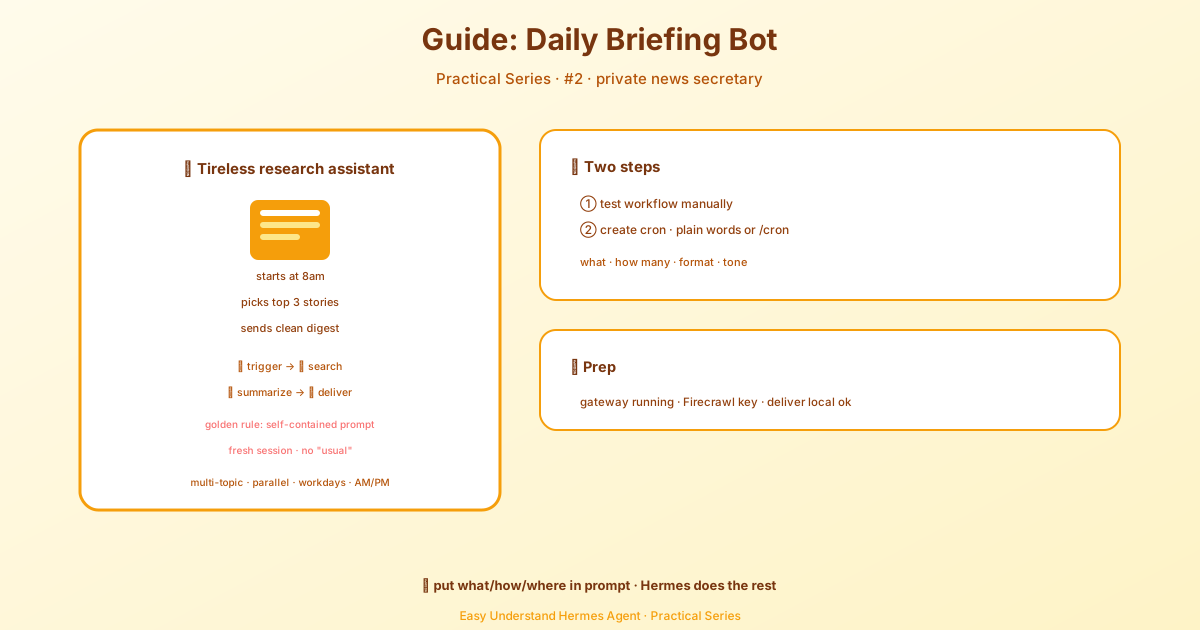
毎朝のブリーフィングボットを作ろう
毎朝、目が覚めると、自分が本当に気になるニュースだけが厳選されて届いている——そんな世界を想像してみてください。フィードを延々とスクロールする必要も、ノイズもなし。ただ、あなたに関係のあるストーリーだけが、コーヒーとともに準備されています。
今日作るのは、まさにそれ。完全自動で動くパーソナルブリーフィングボットです。ウェブを検索し、トップニュースを要約し、結果をTelegramやDiscordに送信します。そして何より嬉しいのは——コードは一切不要だということ。
作るもの
流れはこんな感じです:
- 午前8:00 — cronスケジューラーがジョブを起動
- Hermesが起動 — あなたのプロンプトで新しいエージェントセッションを開始
- ウェブ検索 — 指定トピックの最新ニュースを取得
- 要約 — クリーンなブリーフィング形式に整理
- 配信 — TelegramまたはDiscordにブリーフィングを送信
全体が完全自動で動きます。あなたは朝のコーヒーを飲みながら、ブリーフィングを読むだけです。
前提条件
始める前に、以下を確認してください:
- Hermes Agentがインストール済み — インストールガイドを参照
- Gatewayが実行中 — gatewayデーモンがcron実行を処理します:
hermes gateway install   # ユーザーサービスとしてインストール
sudo hermes gateway install --system   # Linuxサーバー: 起動時に自動起動するシステムサービス
# または
hermes gateway # フォアグラウンドで実行- Firecrawl APIキー — ウェブ検索用に環境変数
FIRECRAWL_API_KEYを設定 - メッセージング設定済み(推奨だが必須ではない) — TelegramまたはDiscordをホームチャンネルと連携
メッセージングがない?問題ありません。
deliver: "local"を使えば、このチュートリアルをそのまま進められます。ブリーフィングは~/.hermes/cron/output/に保存され、いつでも読めます。
ステップ1: ワークフローを手動でテスト
自動化する前に、ブリーフィングが機能することを確認しましょう。チャットセッションを開始します:
hermes次に、このプロンプトを入力します:
Search for the latest news about AI agents and open source LLMs.
Summarize the top 3 stories in a concise briefing format with links.
Hermesがウェブを検索し、結果を読み取り、次のような出力を生成します:
☀️ Your AI Briefing — March 8, 2026

1. Qwen 3 Released with 235B Parameters
   Alibaba's latest open-weight model matches GPT-4.5 on several
   benchmarks while remaining fully open source.
   → https://qwenlm.github.io/blog/qwen3/

2. LangChain Launches Agent Protocol Standard
   A new open standard for agent-to-agent communication gains
   adoption from 15 major frameworks in its first week.
   → https://blog.langchain.dev/agent-protocol/

3. EU AI Act Enforcement Begins for General-Purpose Models
   The first compliance deadlines hit, with open source models
   receiving exemptions under the 10M parameter threshold.
   → https://artificialintelligenceact.eu/updates/

---
3 stories • Sources searched: 8 • Generated by Hermes Agent
これが機能すれば、自動化の準備は完了です。
ヒント: フォーマットを試行錯誤してみましょう。気に入る出力が得られるまで、さまざまなプロンプトを試してください。「絵文字の見出しを使って」とか「各要約は2文以内に」といった指示を追加してみましょう。最終的に決めた内容をcronジョブに設定します。
ステップ2: Cronジョブを作成
次に、これを毎朝自動で実行されるようにスケジュールしましょう。2つのオプションがあります。
cronジョブを作成する前に、Hermesにデフォルトのモデルとプロバイダーがグローバルに設定されていることを確認してください。特定のジョブに異なる値を使いたい場合は、作成時にジョブごとに明示的なモデル/プロバイダーのオーバーライドを設定します。
オプションA: 自然言語(チャット内)
Hermesにやりたいことを伝えるだけ:
Every morning at 8am, search the web for the latest news about AI agents
and open source LLMs. Summarize the top 3 stories in a concise briefing
with links. Use a friendly, professional tone. Deliver to telegram.Hermesが統一されたcronjobツールを使って、cronジョブを作成してくれます。
オプションB: CLIスラッシュコマンド
より細かく制御したい場合は/cronコマンドを使います:
/cron add "0 8 * * *" "Search the web for the latest news about AI agents and open source LLMs. Find at least 5 recent articles from the past 24 hours. Summarize the top 3 most important stories in a concise daily briefing format. For each story include: a clear headline, a 2-sentence summary, and the source URL. Use a friendly, professional tone. Format with emoji bullet points and end with a total story count."黄金のルール: 自己完結型プロンプト
重要なコンセプト: cronジョブは完全に新しいセッションで実行されます——過去の会話の記憶も、「以前に設定した」というコンテキストもありません。プロンプトには、エージェントがジョブを実行するために必要なすべてを含める必要があります。
悪いプロンプト:
Do my usual morning briefing.良いプロンプト:
Search the web for the latest news about AI agents and open source LLMs.
Find at least 5 recent articles from the past 24 hours. Summarize the
top 3 most important stories in a concise daily briefing format. For each
story include: a clear headline, a 2-sentence summary, and the source URL.
Use a friendly, professional tone. Format with emoji bullet points.良いプロンプトは、何を検索するか、記事を何件にするか、どんなフォーマットか、どんなトーンかを具体的に指定しています。エージェントが必要とするすべてが、一度に含まれているのです。
ステップ3: ブリーフィングをカスタマイズ
基本的なブリーフィングが動くようになったら、創造性を発揮してみましょう。
マルチトピック・ブリーフィング
1つのブリーフィングで複数の分野をカバー:
/cron add "0 8 * * *" "Create a morning briefing covering three topics. For each topic, search the web for recent news from the past 24 hours and summarize the top 2 stories with links.

Topics:
1. AI and machine learning — focus on open source models and agent frameworks
2. Cryptocurrency — focus on Bitcoin, Ethereum, and regulatory news
3. Space exploration — focus on SpaceX, NASA, and commercial space

Format as a clean briefing with clear section headers for each topic. Use emoji bullet points and end with a total story count."
時間や頻度を変更
代わりに週次ダイジェストが欲しい?cron式を変更するだけです:
/cron add "0 9 * * 1" "Search for the latest AI research papers from the past week. Summarize the 5 most significant findings in a technical briefing format..."これは毎週月曜日の午前9時——週次のディープダイブに最適です。
まとめ
これで、以下のことができる完全自動のブリーフィングボットが完成しました:
- ウェブを検索して最新ニュースを取得
- クリーンなフォーマットに要約
- メッセージングアプリに配信
- スケジュールで自動実行——手作業は一切不要
同じパターンは、あらゆる定期的なリサーチタスクに使えます:マーケットレポート、競合トラッキング、スポーツスコア、あるいは毎日のジョークまで。黄金のルールを忘れないでください:プロンプトを自己完結型にすること。あとはHermesがすべて処理してくれます。
さあ、ブリーフィングボットをセットアップして、自分に関係のあるニュースとともに朝のコーヒーを楽しみましょう。
📖 公式ドキュメント
この記事は Hermes Agent の公式ドキュメントに基づいています:公式ドキュメント › guides/daily-briefing-bot