데일리 브리핑 봇 만들기
Build a Daily Briefing Bot — easy-to-understand guide based on official docs
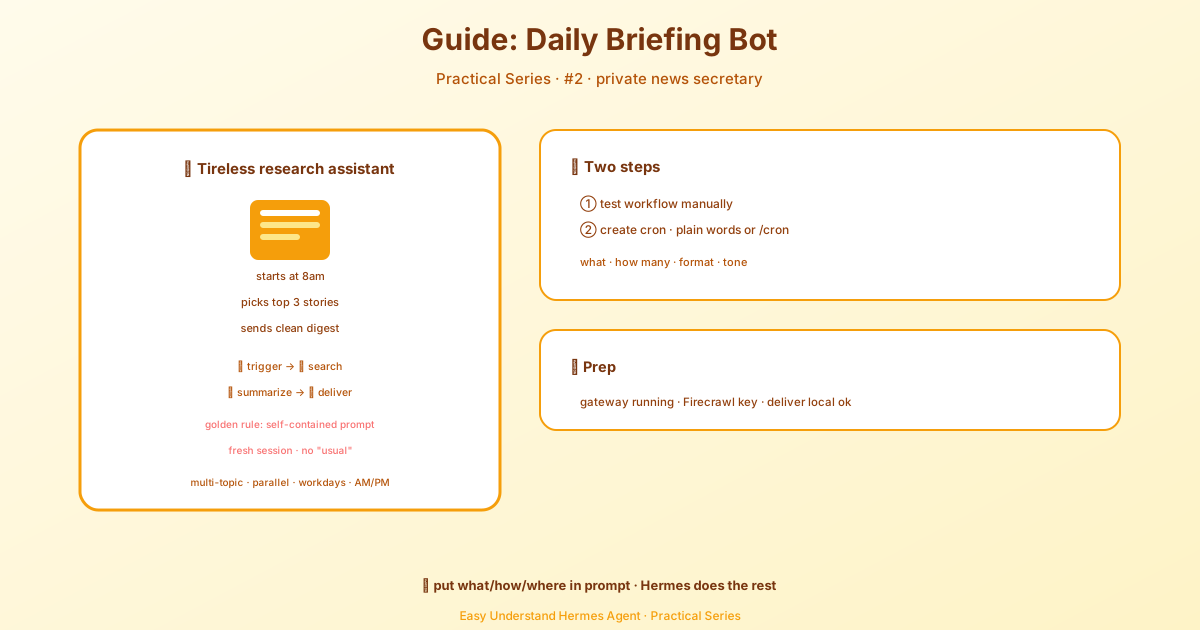
데일리 브리핑 봇 만들기
매일 아침, 당신이 실제로 관심 있는 뉴스만 골라 정리한 요약본이 휴대폰으로 도착하는 상상을 해보세요. 피드를 끝없이 스크롤할 필요도 없고, 노이즈도 없이 오직 중요한 이야기만 커피와 함께 준비되어 있습니다.
오늘 바로 그걸 만들 겁니다: 스스로 작동하는 개인 브리핑 봇. 웹을 검색하고, 주요 기사를 요약하고, 결과를 Telegram이나 Discord로 보내줍니다. 그리고 가장 좋은 점? 코드가 전혀 필요 없다는 것.
무엇을 만드나
흐름은 이렇습니다:
- 오전 8:00 — cron 스케줄러가 작업을 트리거합니다
- Hermes가 시작되어 당신의 프롬프트로 새 에이전트 세션을 만듭니다
- 웹 검색이 주제에 대한 최신 뉴스를 가져옵니다
- 요약이 깔끔한 브리핑 형식으로 정리합니다
- 전송이 브리핑을 Telegram이나 Discord로 보냅니다
전체 과정이 손을 대지 않아도 작동합니다. 당신은 그저 아침 커피와 함께 브리핑을 읽기만 하면 됩니다.
사전 준비사항
시작하기 전에 다음이 준비되어 있는지 확인하세요:
- Hermes Agent 설치 — 설치 가이드를 참조하세요
- Gateway 실행 중 — gateway 데몬이 cron 실행을 처리합니다:
hermes gateway install   # 사용자 서비스로 설치
sudo hermes gateway install --system   # Linux 서버: 부팅 시 시스템 서비스로 실행
# 또는
hermes gateway # 포그라운드로 실행- Firecrawl API 키 — 웹 검색을 위해 환경 변수에
FIRECRAWL_API_KEY를 설정하세요 - 메시징 설정 (선택 사항이지만 권장) — 홈 채널과 연결된 Telegram 또는 Discord
메시징이 없어도 괜찮습니다.
deliver: "local"을 사용해도 이 튜토리얼을 그대로 따라갈 수 있습니다. 브리핑은~/.hermes/cron/output/에 저장되며 언제든지 읽을 수 있습니다.
1단계: 워크플로우를 수동으로 테스트하기
자동화하기 전에 브리핑이 제대로 작동하는지 확인해 봅시다. 채팅 세션을 시작하세요:
hermes그런 다음 이 프롬프트를 입력하세요:
Search for the latest news about AI agents and open source LLMs.
Summarize the top 3 stories in a concise briefing format with links.
Hermes가 웹을 검색하고, 결과를 읽고, 다음과 같은 결과물을 만들어냅니다:
☀️ Your AI Briefing — March 8, 2026

1. Qwen 3 Released with 235B Parameters
   Alibaba's latest open-weight model matches GPT-4.5 on several
   benchmarks while remaining fully open source.
   → https://qwenlm.github.io/blog/qwen3/

2. LangChain Launches Agent Protocol Standard
   A new open standard for agent-to-agent communication gains
   adoption from 15 major frameworks in its first week.
   → https://blog.langchain.dev/agent-protocol/

3. EU AI Act Enforcement Begins for General-Purpose Models
   The first compliance deadlines hit, with open source models
   receiving exemptions under the 10M parameter threshold.
   → https://artificialintelligenceact.eu/updates/

---
3 stories • Sources searched: 8 • Generated by Hermes Agent
이것이 작동한다면 자동화할 준비가 된 것입니다.
팁: 형식을 반복해서 개선해 보세요. 마음에 드는 결과가 나올 때까지 다양한 프롬프트를 시도해 보세요. “이모지 헤더를 사용해” 또는 “각 요약을 2문장 이하로 유지해” 같은 지침을 추가해 보세요. 최종적으로 정한 내용을 cron 작업에 넣으면 됩니다.
2단계: Cron 작업 만들기
이제 매일 아침 자동으로 실행되도록 예약해 봅시다. 두 가지 옵션이 있습니다.
cron 작업을 만들기 전에 Hermes에 기본 모델과 공급자가 전역적으로 설정되어 있는지 확인하세요. 특정 작업에 다른 값을 사용하려면 작업을 만들 때 명시적으로 작업별 모델/공급자 오버라이드를 설정하세요.
옵션 A: 자연어 (채팅에서)
Hermes에게 원하는 것을 말하기만 하면 됩니다:
Every morning at 8am, search the web for the latest news about AI agents
and open source LLMs. Summarize the top 3 stories in a concise briefing
with links. Use a friendly, professional tone. Deliver to telegram.
Hermes가 통합 cronjob 도구를 사용해 cron 작업을 만들어 줍니다.
옵션 B: CLI 슬래시 명령어
더 세밀한 제어를 위해 /cron 명령어를 사용하세요:
/cron add "0 8 * * *" "Search the web for the latest news about AI agents and open source LLMs. Find at least 5 recent articles from the past 24 hours. Summarize the top 3 most important stories in a concise daily briefing format. For each story include: a clear headline, a 2-sentence summary, and the source URL. Use a friendly, professional tone. Format with emoji bullet points and end with a total story count."핵심 원칙: 자족적(Self-Contained) 프롬프트
중요한 개념: cron 작업은 완전히 새로운 세션에서 실행됩니다 — 이전 대화의 기억도 없고, “아까 설정해 둔 것”에 대한 맥락도 없습니다. 프롬프트에는 에이전트가 작업을 수행하는 데 필요한 모든 것이 포함되어야 합니다.
나쁜 프롬프트:
Do my usual morning briefing.좋은 프롬프트:
Search the web for the latest news about AI agents and open source LLMs.
Find at least 5 recent articles from the past 24 hours. Summarize the
top 3 most important stories in a concise daily briefing format. For each
story include: a clear headline, a 2-sentence summary, and the source URL.
Use a friendly, professional tone. Format with emoji bullet points.
좋은 프롬프트는 무엇을 검색할지, 기사 몇 개를, 어떤 형식으로, 어떤 톤으로 구체적으로 명시합니다. 에이전트가 한 번에 필요한 모든 것이 담겨 있습니다.
3단계: 브리핑 커스터마이징
기본 브리핑이 작동하면 창의력을 발휘할 수 있습니다.
다중 주제 브리핑
하나의 브리핑에서 여러 영역을 다루세요:
/cron add "0 8 * * *" "Create a morning briefing covering three topics. For each topic, search the web for recent news from the past 24 hours and summarize the top 2 stories with links.

Topics:
1. AI and machine learning — focus on open source models and agent frameworks
2. Cryptocurrency — focus on Bitcoin, Ethereum, and regulatory news
3. Space exploration — focus on SpaceX, NASA, and commercial space

Format as a clean briefing with clear section headers for each topic. Use emoji bullet points and end with a total story count."
시간 또는 빈도 변경
주간 다이제스트를 원하시나요? cron 표현식만 바꾸면 됩니다:
/cron add "0 9 * * 1" "Search for the latest AI research papers from the past week. Summarize the 5 most significant findings in a technical briefing format..."이것은 매주 월요일 오전 9시입니다 — 주간 딥다이브에 완벽합니다.
마무리
이제 완전히 자동화된 브리핑 봇을 갖게 되었습니다:
- 웹에서 최신 뉴스를 검색하고
- 깔끔한 형식으로 요약하고
- 메시징 앱으로 전달하고
- 일정에 따라 실행됩니다 — 수동 작업 없이
같은 패턴은 반복적인 리서치 작업에도 모두 적용됩니다: 시장 보고서, 경쟁사 추적, 스포츠 점수, 심지어 매일 한 줄 농담까지도요. 핵심 원칙만 기억하세요: 프롬프트를 자족적으로 만들면, Hermes가 나머지를 처리합니다.
지금 바로 브리핑 봇을 설정하고, 당신에게 중요한 뉴스와 함께 아침 커피를 즐겨보세요.
📖 공식 문서
この記事は Hermes Agent の공식 문서に基づいています:공식 문서 › guides/daily-briefing-bot