Plugins — Give Hermes New Superpowers Without Touching Core Code
Built-in Plugins — Ready-to-Use Enhancements — easy-to-understand guide based on official docs (updated 2026-08-09)
Plugins — Give Hermes New Superpowers Without Touching Core Code
So you’ve been playing with Hermes for a while. You’ve got your checkpoints, you’ve rolled back a few mistakes, and now you’re thinking: “I wish Hermes could do this one specific thing that’s unique to my workflow.”
Good news: you don’t need to modify Hermes core code. You don’t need to fork the repo. You just need to drop a folder into the right place.
Welcome to the Hermes plugin system.
What Exactly Is a Plugin?
Think of a plugin as a small, self-contained add-on that lives in its own directory. It can add new tools, hooks, slash commands, and even entire platform integrations — all without touching the core Hermes codebase.
The basic structure looks like this:
~/.hermes/plugins/my-plugin/
├── plugin.yaml      # manifest
├── __init__.py      # register() — wires schemas to handlers
├── schemas.py       # tool schemas (what the LLM sees)
└── tools.py         # tool handlers (what runs when called)
Drop that folder in, restart Hermes, and your tools appear right alongside the built-in ones. The model can call them immediately.
Your First Plugin in 2 Minutes
Let’s build a complete working example. We’ll create a hello_world tool and log every tool call via a hook.
Step 1: Create ~/.hermes/plugins/hello-world/plugin.yaml:
name: hello-world
version: "1.0"
description: A minimal example plugin
Step 2: Create ~/.hermes/plugins/hello-world/__init__.py:
"""Minimal Hermes plugin — registers a tool and a hook."""

import json


def register(ctx):
    # --- Tool: hello_world ---
    schema = {
        "name": "hello_world",
        "description": "Returns a friendly greeting for the given name.",
        "parameters": {
            "type": "object",
            "properties": {
                "name": {
                    "type": "string",
                    "description": "Name to greet",
                }
            },
            "required": ["name"],
        },
    }

    def handle_hello(params, **kwargs):
        del kwargs
        name = params.get("name", "World")
        return json.dumps({"success": True, "greeting": f"Hello, {name}!"})

    ctx.register_tool(
        name="hello_world",
        toolset="hello_world",
        schema=schema,
        handler=handle_hello,
    )

    # --- Hook: log every tool call ---
    def on_tool_call(tool_name, params, result):
        print(f"[hello-world] tool called: {tool_name}")

    ctx.register_hook("post_tool_call", on_tool_call)
Step 3: Restart Hermes. That’s it. The model can now call hello_world, and every tool invocation gets logged.
One important note: the model-facing tool description lives in schema["description"]. The optional ctx.register_tool(description=...) is separate registry metadata. If you provide both, keep them in sync — the model sees the schema value.
What Else Can Plugins Do?
The ctx.* API is your toolbox. Here’s what you can do inside register(ctx):
| Capability | How |
|---|---|
| Add tools | ctx.register_tool(name=..., toolset=..., schema=..., handler=...) |
| Add hooks | ctx.register_hook("post_tool_call", callback) |
| Add slash commands | ctx.register_command(name, handler, description) — adds /name in CLI and gateway sessions |
| Dispatch tools from commands | ctx.dispatch_tool(name, args) — invokes a registered tool with parent-agent context auto-wired |
| Add CLI commands | ctx.register_cli_command(name, help, setup_fn, handler_fn) — adds hermes <plugin> <subcommand> |
| Inject messages | ctx.inject_message(content, role="user", session_key=...) |
| Ship data files | Path(__file__).parent / "data" / "file.yaml" |
| Bundle skills | ctx.register_skill(name, path) — namespaced as plugin:skill |
| Gate on env vars | requires_env: [API_KEY] in plugin.yaml |
| Distribute via pip | [project.entry-points."hermes_agent.plugins"] |
| Register a gateway platform | ctx.register_platform(name, label, adapter_factory, check_fn, ...) |
| Register an image-generation backend | ctx.register_image_gen_provider(provider) |
| Register a video-generation backend | ctx.register_video_gen_provider(provider) |
| Register a context-compression engine | ctx.register_context_engine(engine) |
| Register a terminal execution backend | ctx.register_terminal_environment_provider(provider) |
| Route human approval prompts | ctx.register_approval_transport(name, present_fn) |
| Register a memory backend | Subclass MemoryProvider in plugins/memory/<name>/__init__.py |
| Run a host-owned LLM call | ctx.llm.complete(...) / ctx.llm.complete_structured(...) |
| Call an MCP tool | ctx.call_mcp(server, tool, arguments, timeout=30) |
| Register an inference backend | LLM provider registration |
Installing Plugins Safely
General plugins and user-installed backends are disabled by default — discovery finds them, but nothing with hooks or tools loads until you add the plugin’s name to plugins.enabled in ~/.hermes/config.yaml. You can flip state with hermes plugins (interactive toggle), hermes plugins enable <name>, or hermes plugins disable <name>.
For a reproducible install, pin a full immutable commit (tags, branches, and abbreviated SHAs are not accepted):
hermes plugins install owner/repo --ref 0123456789abcdef0123456789abcdef01234567Hermes checks out the commit detached, verifies that HEAD exactly matches the requested SHA, and records the canonical source, installed revision, and pin status in the current profile. hermes plugins update refuses to move a pinned plugin; choose a new exact commit explicitly with hermes plugins install <source> --force --ref <new-commit>. The same pin is available in Hermes Desktop under Skills → Plugins → Install from Git, and hermes plugins list prints the pin in its Source column (git pinned@<sha8>).
Installing from a private repository
hermes plugins install clones non-interactively (it never prompts for a username or password), so a private repo needs a credential Hermes can find on its own. For an https:// source it tries, in order:
GITHUB_TOKENorGH_TOKENfrom your.env(GitHub hosts only).- The
ghCLI’s login (gh auth login), GitHub hosts only. - Your git credential helper (
git credential fill) for that host — works for GitLab, Bitbucket and self-hosted servers if a credential is already stored.
The credential is sent as a one-shot HTTP header for that install or update; it is never written into the plugin’s .git/config or the install metadata. SSH sources (git@host:owner/repo.git) authenticate through your ssh-agent as before.
A Word of Caution
Project-local plugins under ./.hermes/plugins/ are disabled by default. This is a safety feature. Only enable them for trusted repositories by setting HERMES_ENABLE_PROJECT_PLUGINS=true before starting Hermes.
Bundled Plugins You Can Turn On
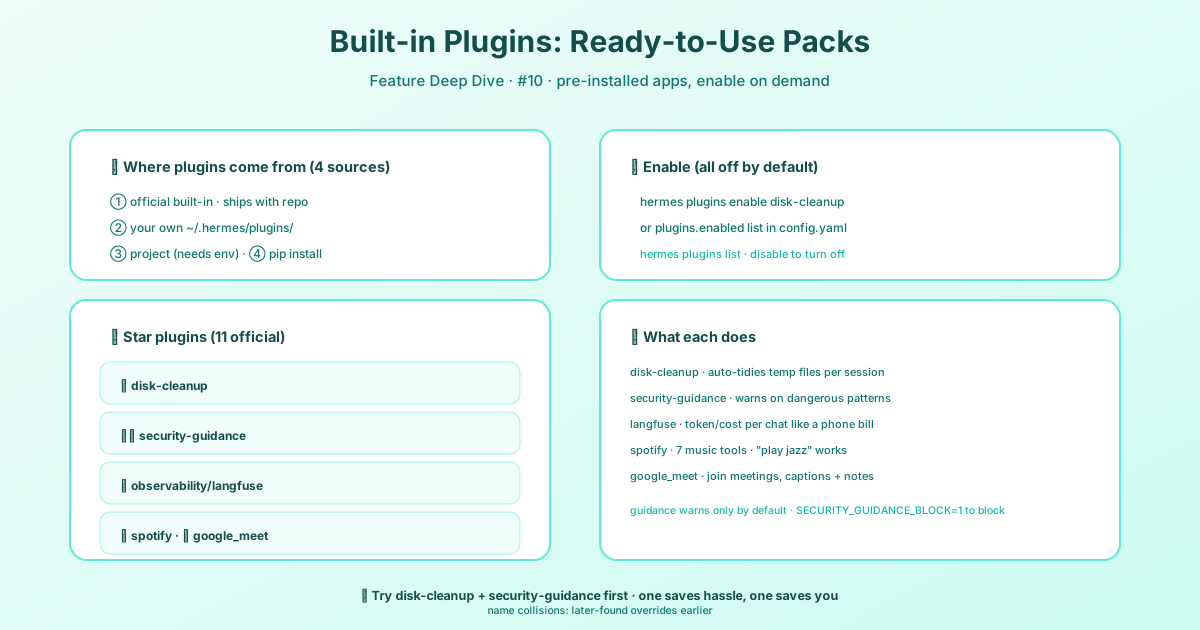
Hermes also ships a handful of plugins in-tree under <repo>/plugins/<name>/. They use the exact same plugin surface as anything you write yourself — hooks, tools, slash commands — just maintained by the Hermes team. See the Plugins page for the general plugin system, and Build a Hermes Plugin to write your own.
Like user plugins, bundled ones are opt-in: discovery finds them, but nothing loads until you run hermes plugins enable <name> (or add the name to plugins.enabled). They are never auto-enabled, not even on a fresh install.
A few worth knowing:
disk-cleanup— tracks ephemeral files (test_*,tmp_*,*.test.*) created insideHERMES_HOMEor/tmp/hermes-*and sweeps them on session end. It adds a/disk-cleanupslash command withstatus,dry-run,quick,deep,track, andforgetsubcommands. Safety is strict: it only ever touches paths underHERMES_HOMEor/tmp/hermes-*, rejects Windows mounts like/mnt/c/..., and never removes well-known state dirs (logs/,memories/,sessions/,cron/,cache/,skills/,plugins/,disk-cleanup/itself) even when empty. Your project trees (workspace/,projects/,plans/,home/) andkanban/are never tracked at all — atest_*.pyinside your project is source code, not scratch.security-guidance— pattern-matches dangerous code onwrite_file/patch/skill_manageand appends a warning (or blocks, withSECURITY_GUIDANCE_BLOCK=1). 25 rules, warn-by-default.observability/langfuse— traces turns, LLM calls, and tool calls to Langfuse. Set it up interactively withhermes tools→ Langfuse Observability, or manually withpip install langfuseplushermes plugins enable observability/langfuse.google_meet— joins Meet calls and transcribes them from Meet’s own live captions (the bot never decodes the meeting audio, so no STT billing — and captions are lossy and English-biased). Realtime mode (mode='realtime') is speak-only on the audio side: replies are synthesized by OpenAI Realtime and played into the call through a virtual microphone, while what the bot hears is still the caption stream.meet_statusreportsmicStateso a silent bot can be diagnosed.spotify,teams_pipeline,image_gen/*,hermes-achievements, andkanban/dashboardround out the set.
NeMo Relay is no longer a bundled plugin
NeMo Relay moved into Hermes core, so don’t run hermes plugins enable observability/nemo_relay. To opt into Relay middleware or exporters, create a standard Relay plugins.toml and point HERMES_NEMO_RELAY_PLUGINS_TOML at it before starting Hermes.
The old HERMES_NEMO_RELAY_ATOF_* and HERMES_NEMO_RELAY_ATIF_* settings no longer activate exporters — a .env that still carries them (and no HERMES_NEMO_RELAY_PLUGINS_TOML) exports nothing, and the gateway logs one warning saying so. hermes doctor reports these stale settings when no replacement plugins.toml is selected.
Automatic migration. hermes update (and hermes migrate relay, or hermes migrate relay --all-profiles for every profile home) converts the legacy variables into <hermes home>/relay-plugins.toml, sets HERMES_NEMO_RELAY_PLUGINS_TOML in that profile’s .env, and comments the legacy lines out (nothing is deleted). Under a multiplexed gateway every profile home gets its own file. The generated file is validated through Relay before it is written; this is the shape it produces (note the type = "file" sink discriminator — a sink without it is rejected):
version = 1

[[components]]
kind = "observability"
enabled = true

[components.config]
version = 4
enable_full_payloads = false

[components.config.atof]
enabled = true

[[components.config.atof.sinks]]
type = "file"
output_directory = "/home/you/.hermes/telemetry/nemo-relay/atof"
filename = "hermes-atof.jsonl"
mode = "append"

[components.config.atif]
enabled = true
agent_name = "Hermes Agent"
model_name = "unknown"
output_directory = "/home/you/.hermes/telemetry/nemo-relay/atif"
filename_template = "trajectory-{session_id}.json"

[components.config.policy]
unknown_component = "warn"
unknown_field = "warn"
unsupported_value = "error"
Then add HERMES_NEMO_RELAY_PLUGINS_TOML=/home/you/.hermes/relay-plugins.toml to .env and restart the gateway.
Where to Go Next
The plugin system is your gateway to making Hermes truly yours. Whether you’re building a custom tool for yourself, your team, or a specific project, this is the right path.
For a complete step-by-step guide with a full working example, check out the Build a Hermes Plugin developer guide. It walks you through everything from project structure to distribution.
Your checkpoints keep you safe. Your plugins make you powerful. Combine them, and there’s not much you can’t do.
📖 Official Docs
This article is based on the official Hermes Agent documentation:Official docs › user-guide/features/built-in-plugins