Plugins: Make Hermes Truly Yours
Plugin System — Endless Extensions — easy-to-understand guide based on official docs (updated 2026-08-09)
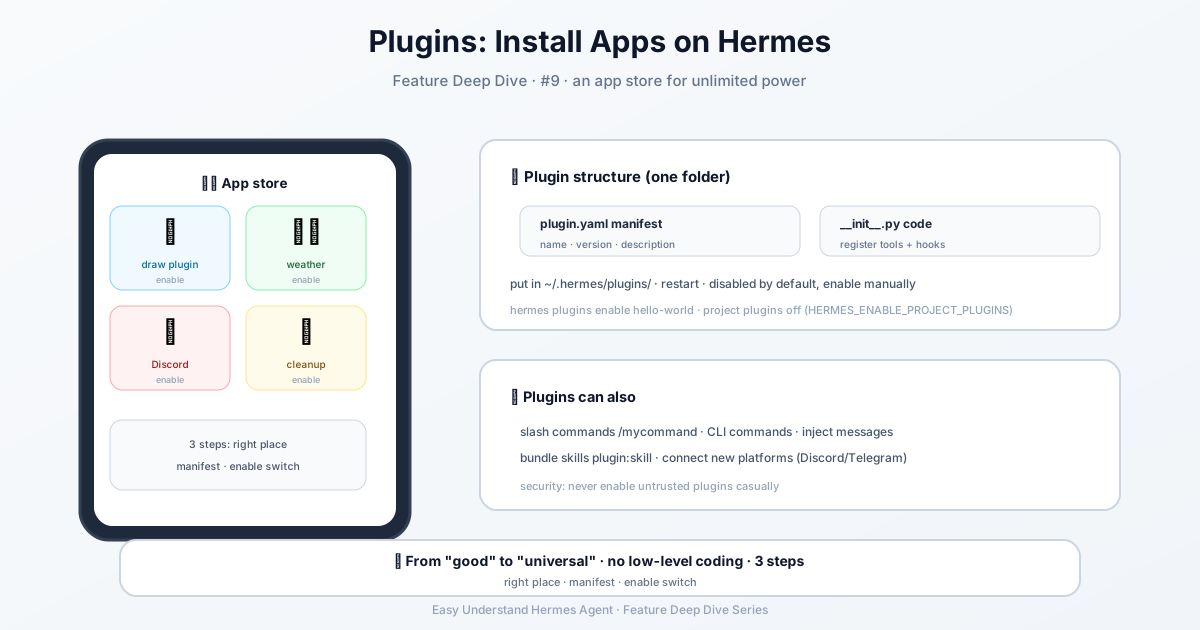
Plugins: Make Hermes Truly Yours
If you’ve ever thought, “I wish Hermes could do this,” — plugins are your answer. They let you add custom tools, hooks, and integrations without touching Hermes’ core code. Think of them as LEGO bricks for your AI assistant: snap in a new capability, and the model can use it right away.
The Big Idea
Instead of modifying Hermes’ internals (which can break things and make upgrades painful), you drop a small folder into the right place. Hermes picks it up automatically, and your new tools appear alongside the built-in ones. The model can call them immediately — no restart required (well, one restart, but that’s it).
How It Works: A 30-Second Tour
Create a directory in ~/.hermes/plugins/ with a manifest file and some Python code:
~/.hermes/plugins/my-plugin/
├── plugin.yaml      # manifest — name, version, description
├── __init__.py      # register() — wires schemas to handlers
├── schemas.py       # tool schemas (what the LLM sees)
└── tools.py         # tool handlers (what runs when called)
That’s it. Start Hermes, and your tools are live.
Your First Plugin: Hello World
Let’s build something real. Here’s a complete plugin that adds a hello_world tool and logs every tool call:
~/.hermes/plugins/hello-world/plugin.yaml
name: hello-world
version: "1.0"
description: A minimal example plugin
~/.hermes/plugins/hello-world/__init__.py
"""Minimal Hermes plugin — registers a tool and a hook."""

import json


def register(ctx):
    # --- Tool: hello_world ---
    schema = {
        "name": "hello_world",
        "description": "Returns a friendly greeting for the given name.",
        "parameters": {
            "type": "object",
            "properties": {
                "name": {
                    "type": "string",
                    "description": "Name to greet",
                }
            },
            "required": ["name"],
        },
    }

    def handle_hello(params, **kwargs):
        del kwargs
        name = params.get("name", "World")
        return json.dumps({"success": True, "greeting": f"Hello, {name}!"})

    ctx.register_tool(
        name="hello_world",
        toolset="hello_world",
        schema=schema,
        handler=handle_hello,
    )

    # --- Hook: log every tool call ---
    def on_tool_call(tool_name, params, result):
        print(f"[hello-world] tool called: {tool_name}")

    ctx.register_hook("post_tool_call", on_tool_call)
Drop both files into ~/.hermes/plugins/hello-world/, restart Hermes, and ask the model to say hello. It works. The hook prints a log line after every tool invocation.
One tip: Put the tool’s description in schema["description"] — that’s what the model sees. The optional ctx.register_tool(description=...) is just internal registry metadata; if you omit it, it defaults to the schema description, but Hermes won’t copy it back into a schema that has none. Define the text once in the schema, and keep both in sync if you use both.
What Plugins Can Do
The ctx.* API is your toolbox. Here’s what you can build:
| Capability | How |
|---|---|
| Add tools | ctx.register_tool(name=..., toolset=..., schema=..., handler=...) |
| Add hooks | ctx.register_hook("post_tool_call", callback) |
| Add slash commands | ctx.register_command(name, handler, description) — adds /name in CLI and gateway sessions |
| Dispatch tools from commands | ctx.dispatch_tool(name, args) — invokes a registered tool with parent-agent context auto-wired |
| Add CLI commands | ctx.register_cli_command(name, help, setup_fn, handler_fn) — adds hermes <plugin> <subcommand> |
| Inject messages | ctx.inject_message(content, role="user", session_key=...) |
| Ship data files | Path(__file__).parent / "data" / "file.yaml" |
| Bundle skills | ctx.register_skill(name, path) — namespaced as plugin:skill, loaded via skill_view("plugin:skill") |
| Gate on env vars | requires_env: [API_KEY] in plugin.yaml — prompted during hermes plugins install |
| Distribute via pip | [project.entry-points."hermes_agent.plugins"] |
| Register a gateway platform | ctx.register_platform(name, label, adapter_factory, check_fn, ...) — Discord, Telegram, IRC, and more |
| Register image/video generation | ctx.register_image_gen_provider(provider) and ctx.register_video_gen_provider(provider) |
| Register a context engine | ctx.register_context_engine(engine) — custom context-compression engines |
| Register a terminal backend | ctx.register_terminal_environment_provider(provider) — cloud sandbox execution |
| Route approval prompts | ctx.register_approval_transport(name, present_fn) — custom human-approval flows |
| Register a memory backend | Subclass MemoryProvider in plugins/memory/<name>/__init__.py (separate discovery system) |
| Run host-owned LLM calls | ctx.llm.complete(...) / ctx.llm.complete_structured(...) — borrow the user’s active model + auth |
| Call MCP tools | ctx.call_mcp(server, tool, arguments, timeout=30) |
| Register an inference backend | register_provider(ProviderProfile(...)) in plugins/model-providers/<name>/__init__.py |
Plugins can also ship from several sources: bundled (<repo>/plugins/), user (~/.hermes/plugins/), project, pip entry points, and NixOS declarative installs via services.hermes-agent.extraPlugins / extraPythonPackages.
Plugins Are Opt-In
General plugins and user-installed backends are disabled by default. Discovery still finds them (so they show up in hermes plugins and /plugins), but nothing with hooks or tools loads until you add the plugin’s name to plugins.enabled in ~/.hermes/config.yaml. That keeps third-party code from running without your explicit consent.
hermes plugins                    # interactive toggle (space to check/uncheck)
hermes plugins enable <name>      # add to allow-list
hermes plugins disable <name>     # remove from allow-list + add to disabled
After hermes plugins install owner/repo, you’re asked Enable 'name' now? [y/N] — it defaults to no. For scripted installs, skip the prompt with --enable or --no-enable. Bundled “always-works” infrastructure (bundled platform plugins, bundled backends, memory providers, context engines, model providers) bypasses the allow-list and is activated through config.yaml instead.
Safety First
Project-local plugins under ./.hermes/plugins/ are disabled by default. That’s intentional — you don’t want random repos running arbitrary code on your machine. Enable them only for trusted repositories:
export HERMES_ENABLE_PROJECT_PLUGINS=truePinning and Private Repositories
For a reproducible install, pin a full immutable commit (tags, branches, and abbreviated SHAs are not accepted):
hermes plugins install owner/repo --ref 0123456789abcdef0123456789abcdef01234567Hermes checks out the commit detached, verifies that HEAD exactly matches the requested SHA, and records the canonical source, installed revision, and pin status in the current profile. hermes plugins update refuses to move a pinned plugin; choose a new exact commit explicitly with hermes plugins install <source> --force --ref <new-commit>. The same pin is available in Hermes Desktop under Skills → Plugins → Install from Git (a Pin to commit field that takes the full 40-character SHA), and the plugins list shows a pinned @ <sha8> badge on every pinned install. hermes plugins list prints the pin in its Source column (git pinned@<sha8>).
hermes plugins install clones non-interactively (it never prompts for a username or password), so a private repo needs a credential Hermes can find on its own. Every clone, pinned --ref fetch, and hermes plugins update pull is attempted anonymously first — public repos never see your credential, so a stale or revoked token can’t break a public install. Only when the remote refuses anonymous access does Hermes look for a credential. For an https:// source it tries, in order: GITHUB_TOKEN or GH_TOKEN from your .env (GitHub hosts only); the gh CLI’s login (gh auth login), GitHub hosts only; then your git credential helper (git credential fill) for that host — which works for GitLab, Bitbucket and self-hosted servers if a credential is already stored. The credential is sent as a one-shot HTTP header for that install or update and is never written into the plugin’s .git/config or the install metadata. SSH sources (git@host:owner/repo.git) authenticate through your ssh-agent as before. The same resolution applies to hermes plugins update, catalog MCP installs from git, and profile distributions fetched from a git URL.
The Bottom Line
Plugins are the cleanest way to extend Hermes. No core modifications, no merge conflicts, no “it worked on my machine” drama. Just drop a folder, restart, and go.
Want the full walkthrough? Check out the Build a Hermes Plugin guide — it has a complete working example you can copy and adapt.
Your Hermes, your rules. Happy building!
📖 Official Docs
This article is based on the official Hermes Agent documentation:Official docs › user-guide/features/plugins