Personality & SOUL.md: Give Your AI a Real Identity
Personality & SOUL.md — Give AI a Character — easy-to-understand guide based on official docs
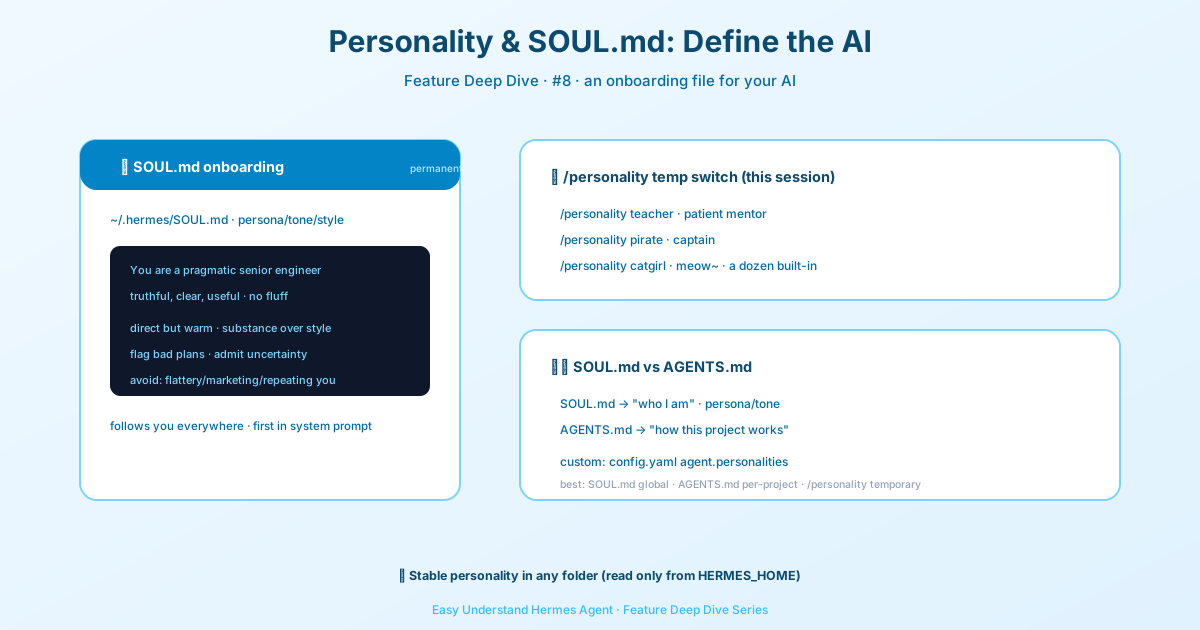
Personality & SOUL.md: Give Your AI a Real Identity
In our last post, we talked about how Hermes Agent never forgets a conversation. But here’s a question: who exactly is Hermes when you talk to it? A generic assistant? A robot with no personality?
The answer is: that’s entirely up to you now.
Hermes Agent’s personality is fully customizable, and it all starts with a single file called SOUL.md. Think of it as your AI’s DNA — the core identity that shapes everything it says and does.
What Is SOUL.md?
SOUL.md is the primary identity of your Hermes Agent. It’s the very first thing loaded into the system prompt, sitting in slot #1 — the most important position. This file defines who the agent is before anything else happens.
By default, Hermes creates a starter SOUL.md for you automatically at:
~/.hermes/SOUL.mdIf you run Hermes with a custom home directory, it uses that instead:
$HERMES_HOME/SOUL.mdWhy This Design Matters
Here’s the clever part: Hermes only loads SOUL.md from your HERMES_HOME directory — never from your current working folder. Why does that matter?
Imagine you’re working on three different projects. If Hermes loaded personality from whatever folder you happened to be in, your AI’s personality could shift wildly between projects. One minute it’s a serious engineer, the next it’s a pirate captain — just because you changed directories.
By loading only from HERMES_HOME, your personality stays consistent. It belongs to the Hermes instance itself, not to any particular project.
What Should Go in SOUL.md?
Use SOUL.md for durable voice and personality guidance:
- Tone and communication style
- Level of directness
- Default interaction style
- What to avoid stylistically
- How to handle uncertainty or disagreement
Don’t put project-specific stuff in there — no file paths, repo conventions, or temporary workflow details. Those belong in AGENTS.md (more on that in a moment).
Here’s a simple example of what a good SOUL.md looks like:
# Personality

You are a pragmatic senior engineer with strong taste.
You optimize for truth, clarity, and usefulness over politeness theater.

## Style
- Be direct without being cold
- Prefer substance over filler
- Push back when something is a bad idea
- Admit uncertainty plainly
- Keep explanations compact unless depth is useful

## What to avoid
- Sycophancy
- Hype language
- Repeating the user's framing if it's wrong
- Overexplaining obvious things
SOUL.md vs. AGENTS.md — The Golden Rule
This is the most important distinction to remember:
- SOUL.md = identity, tone, style, communication defaults (follows you everywhere)
- AGENTS.md = project architecture, coding conventions, repo workflows (belongs to a specific project)
A useful rule of thumb: if it should follow you everywhere, it belongs in SOUL.md. If it belongs to a project, it belongs in AGENTS.md.
SOUL.md vs. /personality
SOUL.md is your durable default personality. The /personality command is a session-level overlay — a temporary mode switch.
Think of it this way:
SOUL.md= your baseline voice/personality= a temporary costume change
For example, you might keep a pragmatic default SOUL, then use /personality teacher when tutoring someone, or /personality creative for a brainstorming session.
Built-in Personalities
Hermes ships with several fun built-in personalities you can switch to anytime:
| Name | Description |
|---|---|
| helpful | Friendly, general-purpose assistant |
| concise | Brief, to-the-point responses |
| technical | Detailed, accurate technical expert |
| creative | Innovative, outside-the-box thinking |
| teacher | Patient educator with clear examples |
| kawaii | Cute expressions, sparkles, and enthusiasm ★ |
| pirate | Captain Hermes, tech-savvy buccaneer |
| noir | Hard-boiled detective narration |
| surfer | Totally chill bro vibes |
Security First
One important note: SOUL.md goes through prompt-injection scanning before it’s used, just like other context files. So keep it focused on persona and voice — don’t try to sneak in strange meta-instructions. If the file is empty or can’t be loaded, Hermes gracefully falls back to its built-in default identity.
Ready to Give Your AI a Soul?
Editing SOUL.md is the simplest way to make Hermes truly yours. Open the file, write a personality you’d enjoy talking to, and save it. Your AI will remember who it is — every single conversation.
Next up: We’ll dive into how AGENTS.md helps your AI understand your projects. Stay tuned!
📖 Official Docs
This article is based on the official Hermes Agent documentation:Official docs › user-guide/features/personality