Hermes Credential Pools — Rotate API Keys
Hermes Agent credential pools: add a second key, pick a rotation strategy, and see how errors are handled so long runs do not stop mid-task.
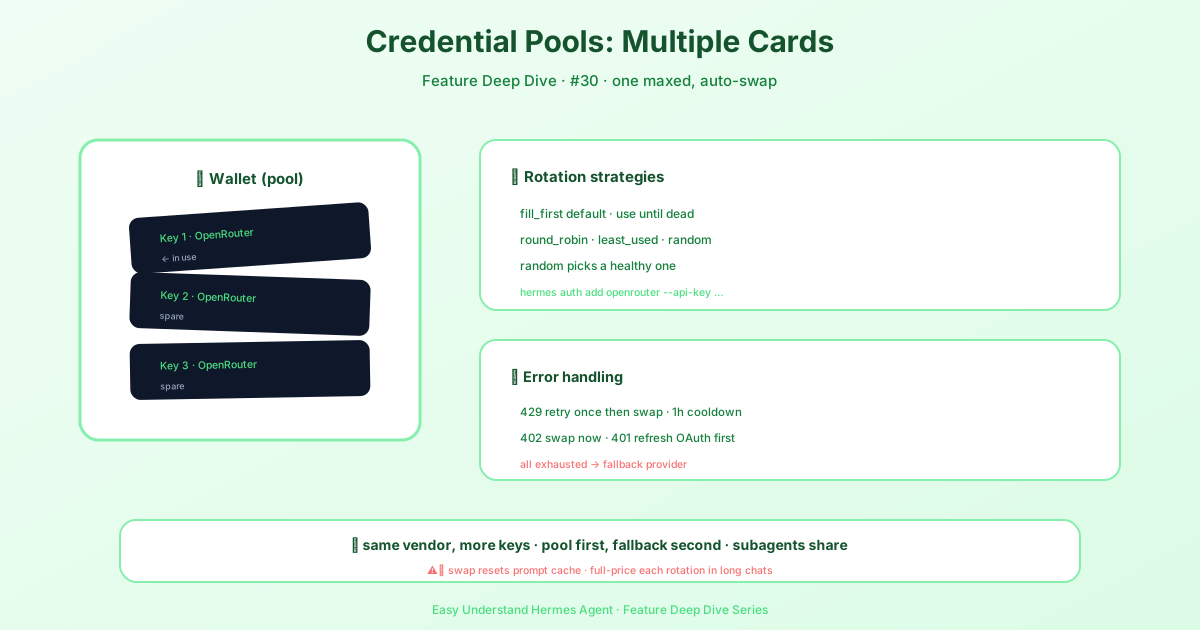
Credential Pools — Never Get Cut Off Mid-Conversation Again
Picture this: you’re deep in a long, productive chat with your AI assistant. Suddenly, you hit a rate limit or your billing quota runs dry. The session dies. All that context, gone.
That’s exactly the problem credential pools solve. Instead of relying on a single API key, Hermes lets you register multiple keys for the same provider. When one key gets throttled, Hermes automatically rotates to the next healthy one — keeping your conversation alive without you lifting a finger.
One note before you start: pools are mainly for API-key providers like OpenRouter and Anthropic. A single Nous Portal OAuth already covers 300+ models, so most Portal users don’t need a pool at all.
Pools vs. Fallback Providers — What’s the Difference?
It’s easy to confuse these two features, but they solve different problems:
- Credential pools rotate between keys from the same provider (e.g., two OpenRouter keys)
- Fallback providers switch to a different provider entirely (e.g., OpenRouter → Anthropic)
Here’s the order of operations: Hermes tries your pool first. If all pool keys are exhausted, then the fallback provider kicks in. Pools are your first line of defense; fallbacks are your last resort.
A Quick Heads-Up About Prompt Caches
One thing to know: rotating keys resets the provider-side prompt cache. Why? Because caches are tied to the specific account/API key that made the request. When Hermes switches to a new key mid-session, that key has no cached history — so the next request re-reads your full conversation at full price.
This is a trade-off. Rotation keeps your session alive (which is the whole point), but on very long conversations, each rotation costs one full-price pass over your context. Worth it? Usually, yes — losing the session entirely is worse.
Getting Started — It’s Ridiculously Easy
If you already have an API key in your .env file, Hermes auto-discovers it as a one-key pool. To actually benefit from pooling, just add more keys:
# Add a second OpenRouter key
hermes auth add openrouter --api-key sk-or-v1-your-second-key

# ...or let a browser login mint one (OpenRouter OAuth PKCE; stored as a plain API key)
hermes auth add openrouter --type oauth

# Add a second Anthropic key
hermes auth add anthropic --type api-key --api-key sk-ant-api03-your-second-key

# Add an Anthropic OAuth credential (requires Claude Max plan)
hermes auth add anthropic --type oauth
Check your pools anytime:
hermes auth listYou’ll see something like:
openrouter (2 credentials):
  #1  OPENROUTER_API_KEY   api_key id=ab12cd34 priority=0 env:OPENROUTER_API_KEY ←
  #2  backup-key           api_key id=ef56gh78 priority=1 manual
The ← marks your currently selected credential. id= is the entry id accepted by hermes auth remove <provider> <target> when a label is ambiguous, and priority= is the order the pool tries credentials in under the fill_first strategy.
Managing Everything Interactively
Run hermes auth with no subcommand, and you get a friendly wizard:
What would you like to do?
  1. Add a credential
  2. Remove a credential
  3. Reset cooldowns for a provider
  4. Set rotation strategy for a provider
  5. Exit
For providers that support both API keys and OAuth (like Anthropic), the wizard asks which type you want to add — just pick and follow the prompts.
One Codex-specific gotcha: each hermes auth add openai-codex login becomes its own pool entry, but only different OpenAI accounts rotate independently. Two logins of the same account share one token family upstream, so OpenAI revokes the older one and the second entry adds no quota. Hermes warns you at add time — log into a different account, or keep just one.
Rotation Strategies — Pick Your Flavor
Priority positions are zero-based and clamp to the pool’s ends; displayed targets are one-based indices, entry IDs, or unambiguous exact labels. auth add --priority also places an existing entry updated by reauthentication. Anthropic keeps manual credentials ahead of seeded credentials, so the command reports the effective position when that rule changes it. Other strategies may override priority, and reordering does not rebind credentials already held by a running session.
Every successful pool selection increments request_count, regardless of strategy. Refresh-only lookups and peeks do not count — status reads like hermes doctor, the /model picker’s provider rows, and dashboard auth cards are peeks, so they never refresh, rotate, or bench a credential. These are selection counters, not billing totals or a count of every inference request: a cached credential can serve multiple requests. Counts remain in memory until the next existing pool write (for example rotation, exhaustion, refresh, or an administrative change); this does not add a disk write per selection.
You can control how Hermes picks the next key. Configure via the wizard or in config.yaml:
credential_pool_strategies:
  openrouter: round_robin
anthropic: least_used| Strategy | Behavior |
|---|---|
fill_first (default) |
Use the first healthy key until exhausted, then move on; order is each credential’s priority (hermes auth priority changes it) |
round_robin |
Cycle through keys evenly |
least_used |
Always pick the key with the lowest request count |
random |
Random selection among healthy keys |
Demoting a Healthy Credential
The pool only benches a credential after the provider rejects it. If you’re actively using a credential elsewhere — say a Codex login whose weekly window you want to save for interactive work — you can move it to the back of the fill_first order before it runs dry:
hermes auth list openai-codex                 # find the index, id or label
hermes auth priority openai-codex 1 99        # 1-based index, entry id, or exact label; large n = last
hermes auth priority openai-codex work-seat 0 # ...and back to the front later
The demoted entry stays healthy: it isn’t exhausted, so hermes auth reset has nothing to clear, and it’s still used once every credential ahead of it is benched. Sessions already holding a credential keep it until they rotate; new sessions follow the new order.
How Errors Are Handled
Different errors trigger different responses:
| Error | Behavior | Cooldown |
|---|---|---|
| 429 Rate Limit | Retry same key once, then rotate on second 429 | 1 hour |
| 402 Billing/Quota | Immediately rotate to next key | 1 hour |
| 401 Auth Expired | Try refreshing OAuth token first | 5 minutes |
| 400 Codex model entitlement | Bench this key for that model only and rotate; other models keep using the key | Until hermes auth reset (per model) |
| All keys exhausted | Fall through to fallback_model |
— |
The has_retried_429 flag resets on every successful call, so a single transient blip won’t trigger rotation.
A couple of behaviours worth knowing:
- Quota benches are temporary for live sessions too. When a 429/402 rotates a session off a credential, that session checks at the start of each turn whether the benched credential is back and moves back as soon as its cooldown lifts. A long-running chat returns to a subscription seat once its window reopens instead of billing the metered fallback forever. A
401bench doesn’t trigger this, and an explicit/modelswitch cancels a pending switch-back. - Anthropic 429s are per model. A generic 429 for one Claude model cools that credential down for that model only — the same key keeps serving every other Claude model. Billing and auth failures still bench the whole credential.
- A dead OAuth login is reported, not benched. If a refresh token is rejected for good, the pool logs one warning naming the entry and the repair command, and the credential leaves rotation until you sign in again — no quiet hourly failures.
Custom Endpoint Pools
Got a custom OpenAI-compatible endpoint (Together.ai, RunPod, a local server)? Those get their own pools too, keyed by the endpoint name from your config. When you set one up via hermes model, it auto-generates a name like “Together.ai” or “Local (localhost:8080)” — and that name becomes your pool identifier.
The Bottom Line
Credential pools are your safety net for staying online. No more mid-conversation crashes, no more frantic dashboard visits to check your quota. Just smooth, uninterrupted sessions — even when one key runs dry.
📖 Official Docs
This article is based on the official Hermes Agent documentation:Official docs › user-guide/features/credential-pools