Fallback Providers — AI Never Down
Fallback Providers — AI Never Down — easy-to-understand guide based on official docs
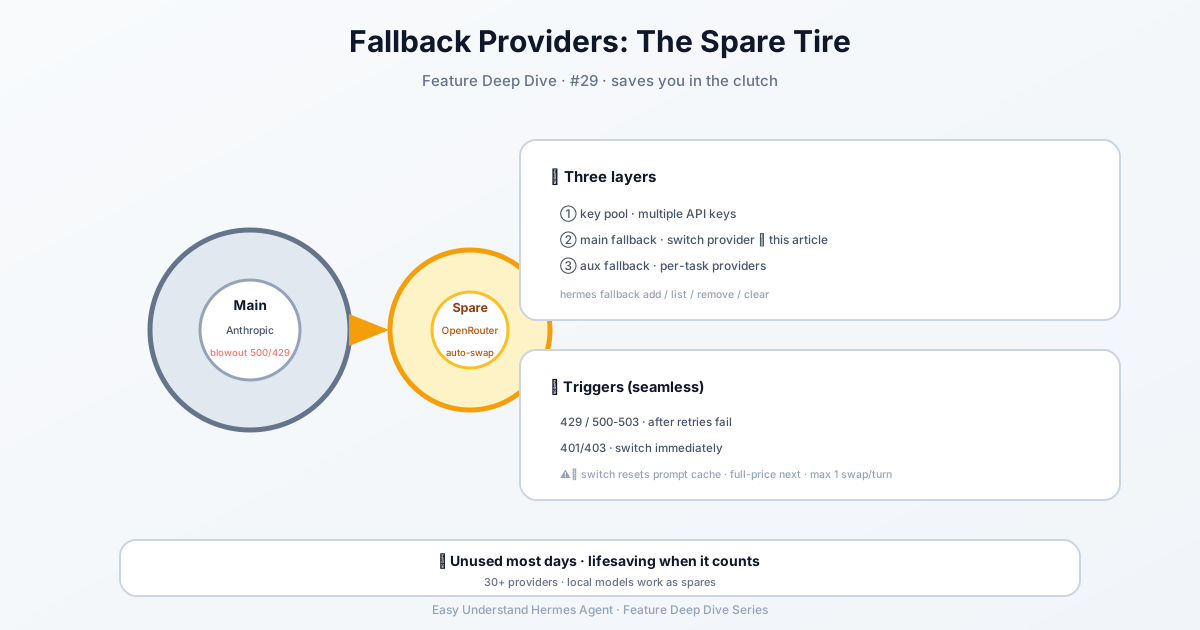
Fallback Providers — AI Never Down
Ever been in the middle of a big task when your AI provider suddenly goes down? It’s like your favorite coffee shop closing right when you need that caffeine fix. With Hermes Agent, that’s no longer a problem. Let’s look at how fallback providers keep your agent running, no matter what.
Two Kinds of Models, One Goal
Hermes uses two types of model slots:
- Main model — this is the brain. Every user message, every tool call, every streamed response goes through it.
- Auxiliary models — these are the helpers. They handle side-jobs like context compression, image analysis, web-page summarization, approval scoring, MCP tool routing, session-title generation, and skill search.
Each auxiliary task has its own slot and can be overridden independently. That means you can use a cheap, fast model for summarizing web pages while keeping your main model for complex reasoning.
Setting Up Your Main Model
Open the dashboard and click Models in the sidebar. You’ll see two sections:
- Model Settings — where you assign models to slots
- Usage analytics — ranked cards showing token counts, costs, and capability badges for every model that ran a session
To set your main model, click Change on the Main model row. A picker dialog opens with two columns:
- Left — authenticated providers (only ones you’ve set up with API keys or OAuth)
- Right — the curated model list for the selected provider
Type in the filter box to narrow by provider name, slug, or model ID. Pick a model, hit Switch, and Hermes writes it to ~/.hermes/config.yaml.
What Happens When You Switch Mid-Session?
Here’s a crucial detail: when you switch models inside an active session, Hermes checks whether your next message will need context compression against the new model’s window. If the session is already near that threshold, you’ll get a warning. The switch still applies immediately, but compression runs on your first message after the switch.
Important warning: Mid-session switches reset the prompt cache. Prompt caches are keyed to the model serving the request, so any model change means the next message re-reads the entire conversation at full input-token price instead of the cached (~75–90% discounted) rate. On a long session, this one-time re-read can cost more than the per-token difference between models. Switch when you need to, but prefer doing it early in a conversation.
The Magic of Fallback Providers
Now, the star of the show: fallback providers. When your main model fails or hits capacity, Hermes automatically tries the next provider in your fallback chain. This happens seamlessly — you don’t even notice.
The fallback chain works like this:
- Try the main model
- If unavailable, try any task-specific
auxiliary.<task>.fallback_chain - Then try the main
fallback_providers/fallback_modelchain - Finally, use Hermes’ built-in auxiliary discovery chain
Configure the chain with the interactive hermes fallback manager (subcommands add, list/ls, remove/rm, and clear), or edit the top-level fallback_providers list in ~/.hermes/config.yaml directly — each entry needs both provider and model, and entries missing either field are ignored. There are no environment variables for the primary fallback chain; this is intentional, so a stale shell export can’t override a deliberate choice.
Fallback is turn-scoped: each new user message starts with the primary model restored, and within a single turn fallback activates at most once — if the fallback also fails, normal error handling takes over. The per-turn retry is reset-aware: when the primary’s credentials report a rate-limit reset time that hasn’t elapsed yet (subscription windows like Claude Pro/Max’s 5-hour blocks or Codex weekly limits), Hermes skips the doomed retry and stays on the fallback until the reset passes. Expiry makes the primary eligible for a later retry; it does not schedule a retry or guarantee recovery. Transient 429s without a reset time use an exponential cooldown, and when a switch arms that cooldown the fallback notice includes its approximate remaining duration, for example: Primary retry eligible in ~60 s; recovery is not guaranteed.
Fallback also re-resolves the reasoning effort for the fallback model — its own agent.reasoning_overrides entry if set, otherwise the global agent.reasoning_effort. The same happens when the CLI falls back at startup because the primary’s auth fails before the first request, so the fallback model gets its own configured effort rather than the primary’s. An explicit hermes chat --reasoning <level> is kept across that startup switch, since it’s your intent for the run.
One more trigger worth knowing: an HTTP-200 response whose only assistant text is a router’s Connect timeout, please try again later. with zero completion tokens counts as an invalid response, so it’s retried instead of shown as the answer. A streamed refusal (the model declining with an explanation) is a terminal content_filter result, not an empty response, so it’s surfaced rather than retried.
Setting Up Auxiliary Models
Click Show auxiliary to reveal the 11 task slots. Every auxiliary task defaults to auto — meaning Hermes tries your main model for that job too. Override a specific task when you want a cheaper or faster model for a side-job.
Fastest Path: Nous Portal
If you want 300+ models under one subscription, check out Nous Portal. On a fresh install, run:
hermes setup --portalThis logs you in and sets Nous as your provider in one command. Inspect what’s wired up with:
hermes portal infoPortal subscribers also get 10% off token-billed providers.
Quick Setup Tips
On a brand-new install, your config has model: "" (an empty string meaning “not configured yet”). The first time you run hermes setup or hermes model, that key upgrades to a mapping with provider, default, base_url, and api_mode sub-keys. If you ever see an empty string in config.yaml, run hermes model (or click Change in the dashboard) and Hermes will write the dict form for you.
Data Training Tiers
Some models like muse-spark-1.2-contributor are discounted because the vendor may train on your prompts and completions. Interactive model selection always shows a confirmation prompt. Non-interactive startup paths (like Kanban workers and cron agents) fail closed because they can’t ask that question.
If training on the unattended workload’s data is acceptable, record a persistent acknowledgement:
hermes config set security.allow_data_training_tiers_noninteractive trueRevoke it with:
hermes config unset security.allow_data_training_tiers_noninteractiveNever Down, Always On
With fallback providers, your agent keeps working even when one provider has a bad day. The setup is straightforward, the switching is automatic, and you get peace of mind knowing your AI is never down.
Keep reading: Hermes credential pools — Where fallback providers swap models, Hermes credential pools rotate several keys for the same provider.
📖 Official Docs
This article is based on the official Hermes Agent documentation:Official docs › user-guide/features/fallback-providers