Hermes Roadmap: Plugins Will Become Installable Apps
Hermes official roadmap part 6: plugins with permission declarations, settings panels, and health checks.
Plugins today are a bit like buying a mystery box — you only find out what’s inside after you’ve already paid and opened it.
What this direction is
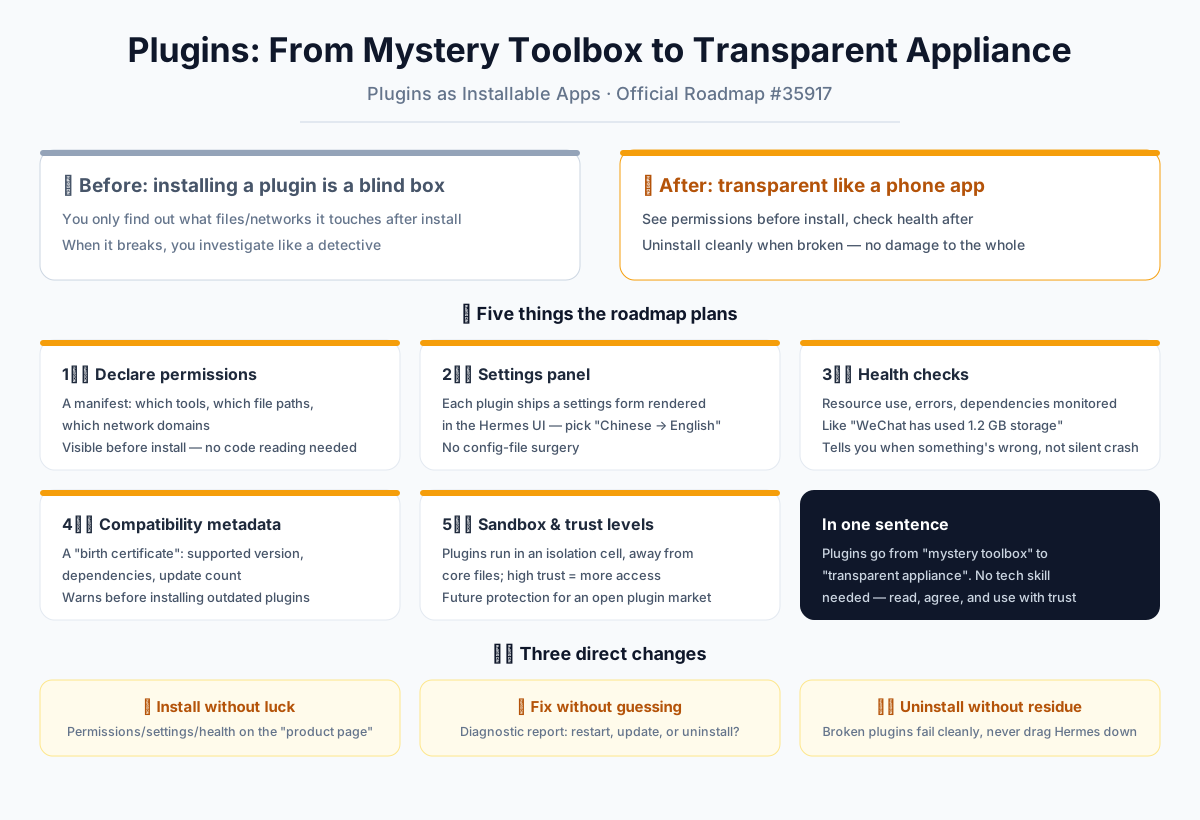
Think of Hermes plugins as appliances in your home. Right now, inviting a plugin into your setup is like calling an electrician who shows up with a duffel bag full of tools. You have no idea how many holes they’ll drill in your wall, which wires they’ll touch, or whether they’ll leave your fuse box in a worse state than they found it. You just hope for the best.
The Hermes roadmap wants to change that. Instead of a mysterious toolbox, plugins should become transparent, well-labeled smart appliances. Before you even plug one in, it hands you a manual that says: “I need this much power, I connect to this water line, and here’s exactly what I’ll do for you.” You read the manual, decide if you’re comfortable, and only then give it the green light.
In practical terms, this means a plugin will no longer be a black box. It will behave like a mobile app on your phone. Before installation, it tells you: “I need access to your calendar,” “I can read your photos,” “I will check for updates online.” You tap “Allow” or you tap “Deny.” If you don’t agree, the plugin can’t even touch the files it asked about — it simply doesn’t get the keys.
What the official plan includes
1. Plugins will “state their business” — declared permissions
Every plugin will come with a clear list of what it intends to use: which tools it needs, which file paths it wants to read, which environment variables it accesses, and which network domains it will contact. This is like a food delivery app telling you it needs location and notification permissions — nothing hidden, no fine print buried in code. You see the full list before you activate anything. No more detective work after the fact.
2. Plugins will “fill out forms” — settings interfaces
Right now, adjusting a plugin often means digging through configuration files, like opening up an old radio to fiddle with its screws. The roadmap changes this by giving every plugin a built-in settings form. Hermes will render this form directly in its dashboard, so you can make changes without ever touching a config file. For example, a translation plugin might offer a simple dropdown: “Chinese → English.” You click, you save, you’re done. The plugin developer designs this form in advance; Hermes just displays it nicely for you.
3. Plugins will “get checkups” — health checks and diagnostics
Plugins can get tired or sick over time, just like your phone’s battery degrades. The roadmap includes regular health checks for every plugin. Hermes will monitor resource usage, look for error logs, and verify that the services a plugin depends on are still alive. Think of it like your phone’s storage screen showing “WeChat uses 1.2 GB” — you’ll be able to see each plugin’s “blood pressure and heart rate.” If something is off, the plugin won’t silently crash. It will tell you, in plain language, “I’m having trouble connecting to the network service I need,” or “I’m using too much memory.” You’ll know whether to restart, update, or remove it.
4. Plugins will carry “identity papers” — compatibility metadata
Each plugin will come with a birth certificate of sorts: which Hermes version it supports, what other plugins it depends on, and how many updates it has gone through. This is like the expiration date and ingredient list on packaged food. If you try to install an older plugin, Hermes will warn you ahead of time: “This plugin was built two years ago and may not work well with your current version.” No more installing something and only discovering the mismatch after everything breaks.
5. Exploring a “containment zone” — sandboxing and trust levels
The most forward-looking idea is to run third-party plugins inside a sandbox — a sealed compartment where they can’t reach Hermes’ core files or interfere with each other. Think of how mobile apps on your phone can’t see each other’s data. A plugin with a high trust level might get more permissions, while a lower-trust plugin operates “behind glass,” doing its job without touching anything sensitive. This is designed for a future where a plugin marketplace opens up to third-party developers — a safety net against malicious or sloppy code.
What this means for you
Installing plugins stops being a gamble. Gone are the days of installing something and then playing detective to see what it changed on your system. From now on, the plugin’s “product page” will show its permissions, settings, health status, and compatibility — all visible before you commit.
Fixing plugins stops being guesswork. When something goes wrong, Hermes gives you a diagnostic report instead of a cryptic error message. You’ll see exactly what’s wrong, whether it’s a missing network connection or excessive memory usage, and you’ll know the right next step: restart, update, or uninstall.
Removing plugins leaves no mess behind. If a plugin is incompatible or damaged, it fails cleanly and safely. It says, “I’m broken,” then exits gracefully — without dragging down the whole Hermes system or leaving stray files scattered around.
In one sentence: plugins go from being a mysterious toolbox to a transparent household appliance. You don’t need to understand the technology. You just read the manual, tap “Agree,” and use it with confidence. This is a big step toward Hermes becoming mature — and the foundation that makes plugins safe and approachable for everyone, not just developers.
📖 Official Docs
This article is based on the official Hermes Agent documentation:GitHub ›/issues/35917