Hermes Roadmap: Making the Terminal the Flagship Experience
Hermes official roadmap part 7: real-time tool timelines, session maps, and a flight recorder for the TUI.
While every other AI company is busy polishing glossy interfaces, Hermes is making a bet that a humble terminal window can feel like a flagship product. The roadmap item we’re looking at today is about turning that black-and-white text box into a full cockpit of dials, gauges, and flight recorders.
From a Remote Control to a Cockpit
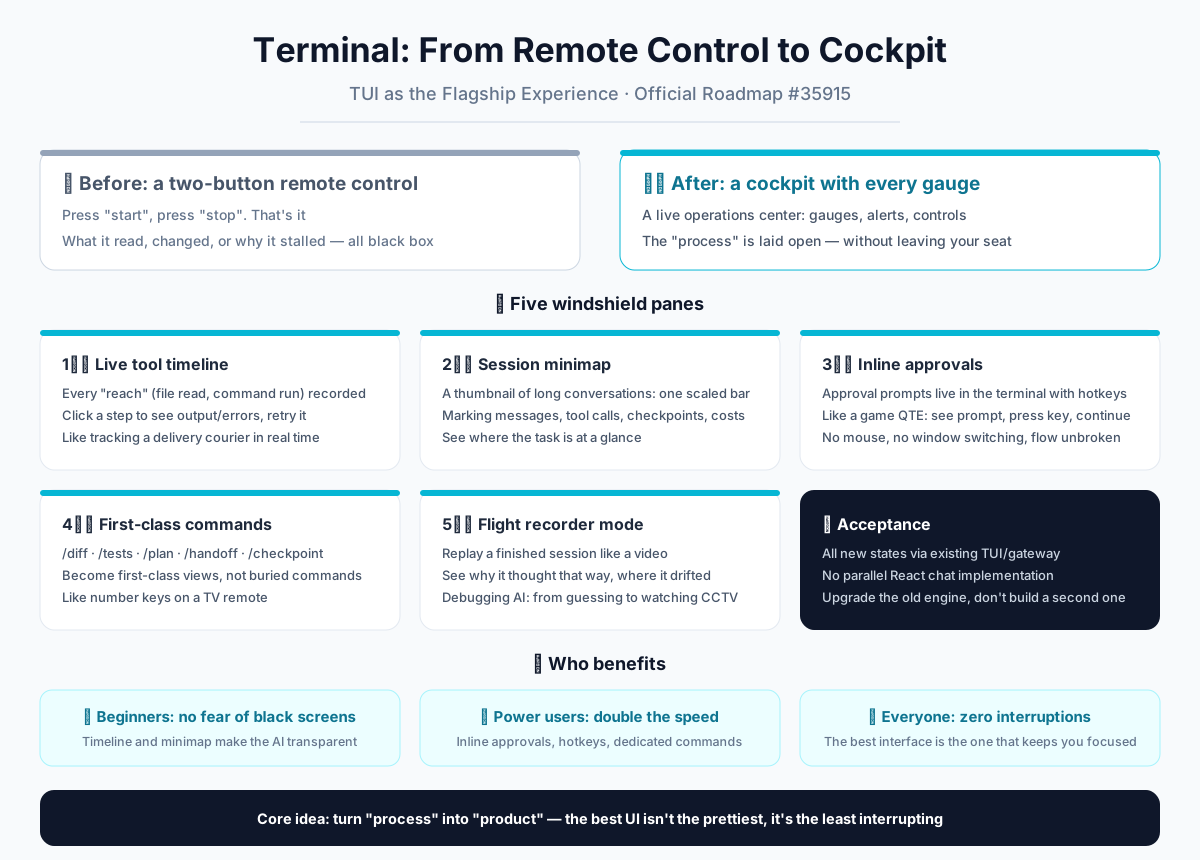
Imagine you’re using an AI to write code. Today, for most people, that experience is like holding a TV remote with only two buttons: Start and Stop. You press Start, the AI whirs away, and you have no idea what’s happening in between. Did it read your files? Did it run a command that failed? Why is it stuck? It’s a black box. You just wait for the result, or you don’t get one at all.
Hermes lives inside a Terminal User Interface (TUI) — that plain, text-based window developers love. Right now, that TUI is a lot like that two-button remote. This roadmap item is about upgrading it into an airplane cockpit. Every dial, alarm, and control stick is right in front of you — but you never have to leave your seat.
In plain words: the black-and-white window you stare at is about to become a live operations center. Instead of hiding the process, it’s going to spread it out on the table for you to see.
Five Windows in the Cockpit
The official plan breaks down into five major pieces. Think of them as five new panels on your dashboard.
1. A Live Tool Timeline: A Dashcam for Every Action
Right now, when the AI uses a tool — like searching a file or running a command — you only see the final result. This update adds a timeline of every single “reach” the AI makes. Each action becomes a clickable entry. You can expand it to see exactly what output the tool returned, what errors popped up, and even hit a retry button right there. It’s like watching a food delivery driver’s live route on a map instead of just waiting for the doorbell to ring. You see the detours, the traffic jams, and the final turn.
2. A Session Minimap: The Thumbnail of Your Long Chat
Have you ever had a 50-message conversation with an AI and completely forgotten which file you changed in message 10? This feature is a minimap — a compressed, horizontal bar that represents your entire session. It marks where messages happened, where tools were called, where checkpoints (saves) were placed, which files were touched, and even shows the running cost and elapsed time. One glance tells you exactly where you are in the mission. No more scrolling through ancient history to figure out “how did we get here?”
3. Inline Approval Prompts: The Confirm Button Lives on Your Keyboard
Sometimes the AI needs your permission to do something, like installing a package or deleting a file. Today, that might mean switching to a popup or a web page. The new design embeds these approval requests directly in the terminal, and they’re built for keyboard shortcuts. Think of it like a quick-time event in a video game: a prompt flashes, you hit one key, and the flow continues. No mouse, no window-switching, no breaking your concentration.
4. First-Class Command Views: Dedicated Channels for Common Moves
You might know some Hermes commands like /diff (see what changed), /tests (run tests), /plan (view the plan), /handoff (pass work to a colleague), and /checkpoint (save your progress). Right now, these might feel like buried menu options. This roadmap makes them first-class citizens. They get their own dedicated views and quick-access slots in the interface. It’s like having number keys on your TV remote: press 1 for news, 2 for sports. You don’t navigate menus; you just press the button.
5. Flight Recorder Mode: Replaying a Finished Mission
This is the most fascinating piece. After an AI finishes a task, you can enter a replay mode. It’s like watching a security camera recording of the entire session. You can see what the AI was thinking at each step, where it might have gone down the wrong path, and exactly what inputs and outputs led to its decisions. Debugging an AI’s behavior suddenly shifts from guessing and asking “why did it do that?” to reviewing a flight recorder and saying, “Ah, I see the exact moment it turned left when it should have turned right.”
The Acceptance Criteria: One Engine, Not Two
The official issue includes a very specific technical requirement: all these new views must work through the existing TUI architecture. They are not building a separate, parallel React-based chat app. This is crucial. It means they’re not patching an old car with a new engine — they’re upgrading the existing engine itself. You get all these new features without having to learn a new tool or switch between multiple windows. It’s the same terminal, just with a lot more horsepower.
What This Means for You
- For beginners: The black screen is no longer scary. The timeline and minimap make the “invisible” AI transparent. It’s like having a dashboard on a self-driving car — you can see why it’s turning, even if you’re not the one holding the wheel.
- For power users: This is pure efficiency. Inline approvals, keyboard shortcuts, and dedicated commands save seconds on every interaction. Those seconds add up to minutes, and those minutes add up to hours over a long project.
- For everyone: Hermes is betting on a simple truth — the best interface is not the prettiest one, but the one that interrupts your thoughts the least. The terminal is plain, but it lives where you work. No tab-switching, no load times, no flashy animations stealing your focus.
The core spirit of this roadmap is turning the process into the product. We used to only care about the result the AI gave us. Now, we get to see how it got there. When you can watch, review, and intervene in real-time, the AI stops being a magic black box and becomes a fully controllable tool at your fingertips.
This isn’t about adding more features. It’s about adding readability. Making every line of output meaningful, and every action echo back to you. The terminal will still be the terminal. But the experience will go from “usable” to “flagship.”
📖 Official Docs
This article is based on the official Hermes Agent documentation:GitHub ›/issues/35915