Tutorial 19: Skills System — Making AI Smarter
Tutorial 19: Skills System — Making AI Smarter — easy-to-understand guide based on official docs
This is part of the Hermes Agent official tutorial series. View all tutorials
Imagine your AI assistant is like a new employee. They’re smart, but they don’t know everything about your company yet. Skills are like instruction manuals you hand them only when they need to do a specific task — instead of making them memorize every manual upfront, they pull one off the shelf when the job calls for it. That’s exactly what the Skills System does for Hermes Agent.
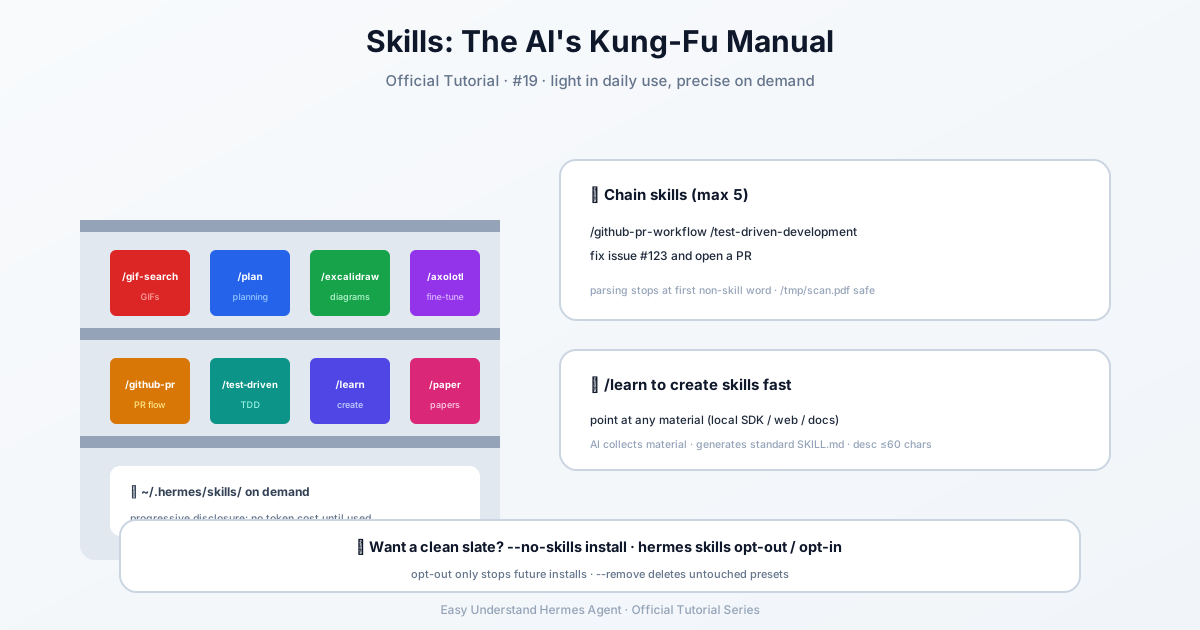
What Are Skills?
Skills are simple knowledge documents that your agent loads on demand. Think of them as cheat sheets. They follow a “progressive disclosure” pattern — the agent only reads the details when it actually needs them, which saves memory and keeps things fast. All skills live in a special folder on your computer: ~/.hermes/skills/.
Step 1: Starting Fresh (Optional)
By default, Hermes comes with a set of pre-installed skills. But maybe you want a clean slate — no bundled skills at all. Here’s how:
During installation:
curl -fsSL https://hermes-agent.nousresearch.com/install.sh | bash -s -- --no-skillsWhen creating a new profile:
hermes profile create research --no-skillsOn an already-installed profile:
hermes skills opt-out            # stop future skills from being added
hermes skills opt-out --remove   # also delete unmodified bundled skills
hermes skills opt-in --sync      # undo and re-add skills
Safe by default:
opt-outonly stops future additions — it never deletes anything. The--removeflag only deletes skills you haven’t edited. Your custom skills are always safe.
Step 2: Using Skills — Slash Commands
Here’s the magic: every installed skill automatically becomes a slash command. Just type /skill-name followed by your request:
/gif-search funny cats
/plan design a rollout for migrating our auth provider
/excalidraw
The last one loads the skill and lets the agent ask what you need. Simple as that!
Step 3: Stacking Multiple Skills
Need more than one skill at once? Chain them together at the start of your message (up to 5):
/github-pr-workflow /test-driven-development fix issue #123 and open a PRThe agent loads both skills, then uses the rest of your message as instructions. Clever, right?
A helpful tip: The parser stops at the first word that isn’t a skill. So if you have a file path like ~/.hermes/cache/scratch/scan.pdf, it won’t get confused:
/ocr-and-documents ~/.hermes/cache/scratch/scan.pdf extract the tables # loads one skill, the path is the argumentStep 4: Skill Bundles (For Repeated Combinations)
If you find yourself using the same skill combo over and over, create a skill bundle — one short command that loads multiple skills at once. It’s like making a playlist instead of picking songs one by one. The bundled plan skill is a great example of this.
Key Takeaways
- Skills = on-demand knowledge — loaded only when needed, saving tokens and time
- All skills live in
~/.hermes/skills/— easy to find, add, or remove - Slash commands make skills instant — just type
/skill-nameand go - Stack up to 5 skills in one command for complex tasks
- Opt-out for a clean profile — perfect for specialized use cases
Summary
The Skills System is like giving your AI a well-organized toolbox. Instead of carrying every tool at once, it picks exactly what it needs for the job. Whether you’re generating GIFs, planning migrations, or creating pull requests, skills make Hermes Agent smarter, faster, and more efficient — without wasting resources.
Next up: Tutorial 20 — Persistent Memory: giving Hermes a long-term memory that survives across sessions.
📖 Official Docs
This article is based on the official Hermes Agent documentation:Official docs › user-guide/features/skills