Tutorial 20: Persistent Memory — Long-Term Memory
Tutorial 20: Persistent Memory — Long-Term Memory — easy-to-understand guide based on official docs
This is part of the Hermes Agent official tutorial series. View all tutorials
Think of this feature like a sticky note on your desk: Hermes Agent writes down important things about you and your projects so it doesn’t forget them between conversations. No more repeating yourself every time you start a new chat.
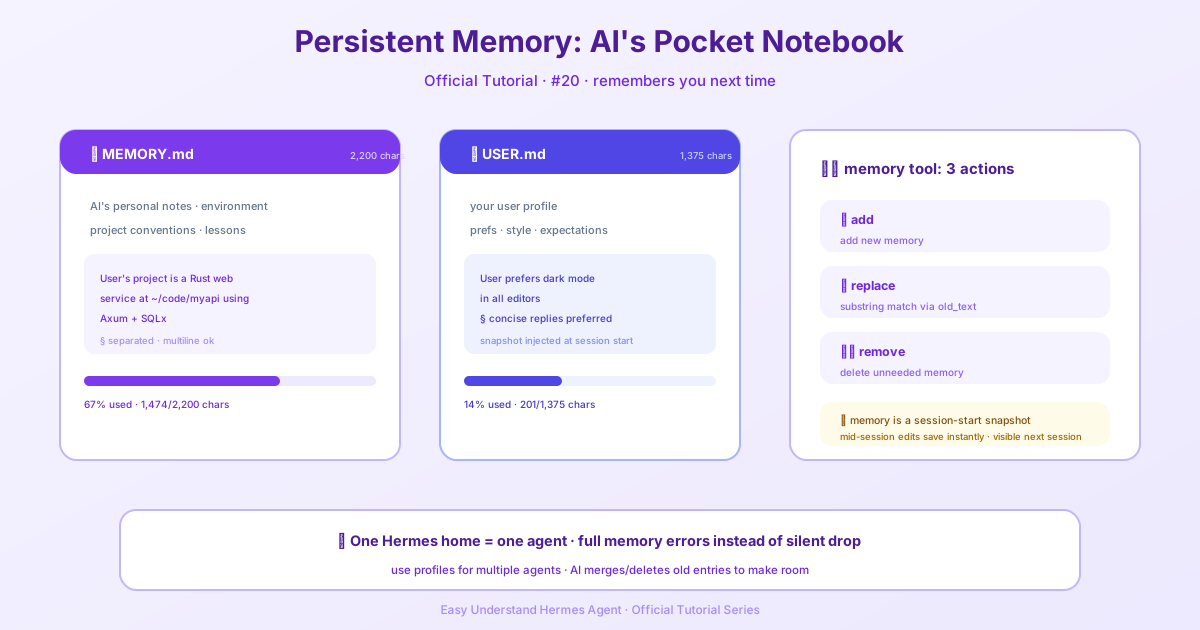
What Does Persistent Memory Do?
Normally, an AI agent starts fresh each session — it forgets everything once the conversation ends. Persistent Memory changes that. Hermes Agent keeps two small text files on your computer. It reads them at the start of every session, so it instantly remembers your preferences, your project details, and anything else you’ve taught it.
Step 1: Know the Two Memory Files
The agent’s memory lives in two files, stored in ~/.hermes/memories/:
| File | What It Stores | Size Limit |
|---|---|---|
| MEMORY.md | Agent’s personal notes — environment facts, conventions, things it learned | 2,200 characters (~800 tokens) |
| USER.md | Your profile — preferences, communication style, expectations | 1,375 characters (~500 tokens) |
The limits are intentional. They force the agent to keep only what’s important, like a well-organized notebook rather than a messy drawer.
Step 2: See How Memory Appears in the Prompt
At the start of each session, the agent loads both files and shows them as a frozen snapshot in its system prompt. Here’s an example of what the agent “sees”:
══════════════════════════════════════════════
MEMORY (your personal notes) [67% — 1,474/2,200 chars]
══════════════════════════════════════════════
User's project is a Rust web service at ~/code/myapi using Axum + SQLx
§
This machine runs Ubuntu 22.04, has Docker and Podman installed
§
User prefers concise responses, dislikes verbose explanations
Notice the details:
- A header showing which store it is (MEMORY or USER PROFILE)
- Usage percentage and character counts — so the agent knows how much room is left
- Entries separated by
§(section sign) - Entries can be multiline
Important: This snapshot is captured once at session start and never changes mid-session. If the agent updates its memory while chatting, the changes are saved to disk immediately but won’t appear in the prompt until the next session. This keeps things fast by preserving the model’s cache.
Step 3: The Agent Manages Its Own Memory
The agent uses a tool called memory with three actions:
- add — Add a new memory entry
- replace — Replace an existing entry (uses substring matching with
old_text) - remove — Delete an entry that’s no longer relevant (also uses
old_text)
There’s no read action because the memory is already injected into the prompt — the agent always sees it.
Here’s a simple example of how the agent might use the tool:
memory action=add content="User prefers bullet points over paragraphs"Or replacing an old preference:
memory action=replace old_text="User prefers concise responses" new_text="User prefers one-line answers with emojis"Step 4: What Happens When Memory Is Full?
Memory does not auto-compact. When a write would exceed the limit, the memory tool returns an error instead of silently dropping entries. The agent then makes room itself — consolidating or removing entries in the same turn before retrying.
Also note: replace is bound by the limit too. Swapping an entry for a longer one can still overflow, so the new content must be shortened (or another entry removed) to fit.
Step 5: One Agent Per Hermes Home (Important!)
Don’t point two agent processes at the same Hermes home directory. Memory writes are automatic and load back into the system prompt at session start, so two writers sharing one home will compound each other’s entries into a mess neither of them authored. Memory is scoped per profile by design — give a second agent its own profile. If they need shared memory, use an external memory provider instead.
Step 6: Give Memory a Chance to Pay Off
Memory is built around session boundaries: MEMORY.md and USER.md carry the essentials into the next session, and session_search fills the gaps once the old context is gone. Inside a single session that machinery rarely runs — everything important is still in the live context.
This matters on messaging platforms (Telegram, Discord, etc.), where a chat is deliberately one continuous session that survives restarts, gateway crashes, and machine reboots. Shutting your machine down overnight does not end the session — the next message picks it up exactly where it left off. If you never reset, a chat can run for weeks as a single session: convenient, but it grows expensive, and the forget → recall from memory → search past sessions loop almost never gets to fire. Fresh memory entries also stay invisible to the running session because of the frozen snapshot above.
Practice: run /new at natural boundaries — a finished task, a change of topic, the start of a day. Each boundary is when memory pays off: the agent re-reads the updated snapshot, starts from a cheap short context, and reaches for session_search when it actually needs history. On the CLI this mostly takes care of itself (every invocation is a new session); on gateways the boundary is yours to create.
Summary
Persistent Memory gives Hermes Agent a simple, bounded way to remember you across sessions. Two small files — MEMORY.md and USER.md — hold curated notes, injected as a frozen snapshot at session start. The agent manages these files itself using the memory tool, and character limits keep things focused. Just remember: one agent per home directory, reset sessions at natural boundaries, and the snapshot only updates at session start.
Next up: Tutorial 21 — Scheduled Tasks: setting up automations that run themselves on a timer.
📖 Official Docs
This article is based on the official Hermes Agent documentation:Official docs › user-guide/features/memory