Matrix — Decentralized Chat Network
Matrix — Decentralized Chat Network — easy-to-understand guide based on official docs
Matrix — Decentralized Chat Network
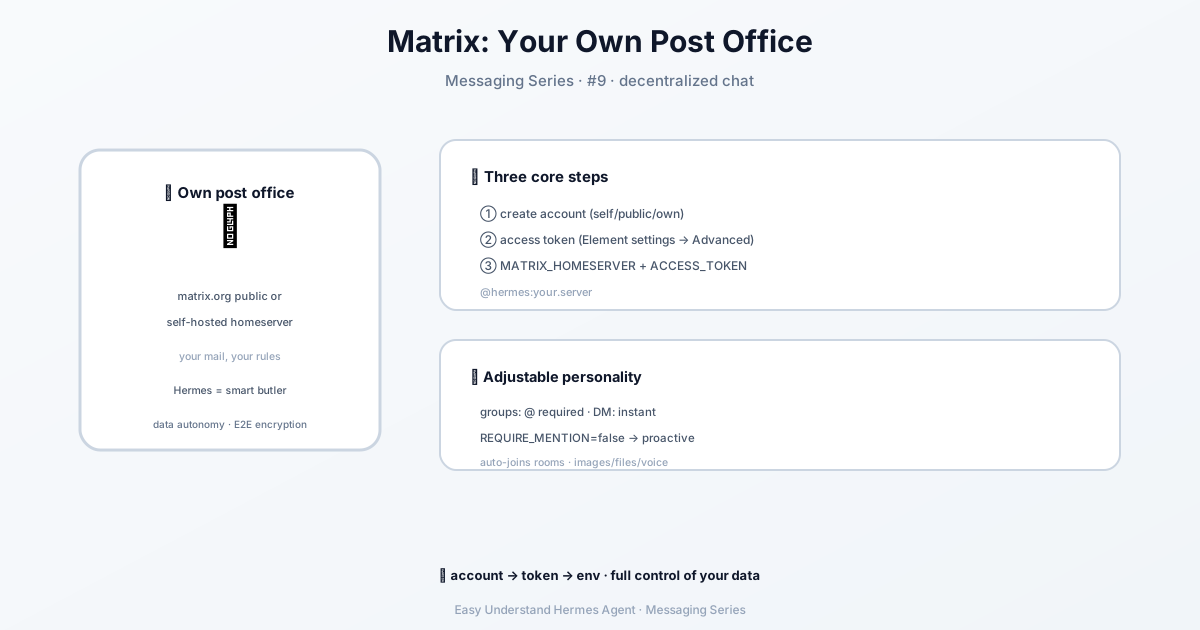
If you’ve ever wanted a chat bot that lives on your terms — not locked into a single platform — Matrix is the answer. Matrix is an open, federated messaging protocol. That means you can run your own homeserver (like Synapse, Conduit, or Dendrite) or use a public one like matrix.org. Either way, you stay in control of your communications.
Hermes Agent plugs right into this world. It connects to any Matrix homeserver using the mautrix Python SDK, processes messages through its full pipeline (tool use, memory, reasoning), and replies in real time. It handles text, files, images, audio, video, and even optional end-to-end encryption (E2EE).
How Hermes Behaves in Matrix
Here’s the part you actually care about: what happens once the bot is in your room.
- DMs — Hermes replies to every message. No
@mentionneeded. Each DM gets its own session. Want a thread when you@mentionthe bot in a DM? SetMATRIX_DM_MENTION_THREADS=true. - Rooms — By default, Hermes waits for an
@mentionbefore responding. Want it to chime in freely? SetMATRIX_REQUIRE_MENTION=falseor add room IDs toMATRIX_FREE_RESPONSE_ROOMS. Room invites are auto-accepted, so just invite the bot and it joins. - Threads — Hermes fully supports Matrix threads. Reply inside a thread and the bot keeps that context separate from the main room timeline. Threads where the bot has already participated don’t require a mention.
- Auto-threading — By default, Hermes auto-creates a thread for every message it responds to in a room. This keeps conversations tidy and isolated. Turn it off with
MATRIX_AUTO_THREAD=false. For DMs, setMATRIX_DM_AUTO_THREAD=true(default is false) to auto-thread DM messages too. - Commands — Normal
/commandswork when your client sends them. If your client reserves/for local commands, use!commandsinstead — Hermes normalizes known aliases automatically. - Interactive controls — Dangerous-command approvals and
/modelselection can use Matrix reactions. You can even limit approval reactions to the user who requested the action. - Thinking and tool activity — When gateway progress is enabled, Hermes uses threaded, editable panes for thinking and tool activity. No more flooding the main timeline with updates.
- Shared rooms — By default, Hermes isolates session history per user inside a room. Two people chatting in the same room don’t share one transcript unless you explicitly disable that.
Capability Matrix
Here’s what the Matrix adapter supports, backed by real test coverage:
| Capability | Matrix |
|---|---|
| text | yes |
| threads | yes |
| reactions | yes |
| approvals | yes |
| model picker | yes |
| thinking panes | yes |
| images | yes |
| multiple images | yes |
| files | yes |
| voice/audio | yes |
| video | yes |
| E2EE | off / optional / required |
| diagnostics | yes |
Session Model in Matrix
By default, Hermes gives each DM its own session, each thread its own session namespace, and each user in a shared room their own session. This is controlled in config.yaml:
group_sessions_per_user: trueSet it to false only if you explicitly want one shared conversation for the entire room:
group_sessions_per_user: falseShared sessions can be great for collaborative rooms, but beware: users share context growth and token costs, one person’s long tool-heavy task can bloat everyone else’s context, and one person’s in-flight run can interrupt another’s follow-up.
Mention and Threading Configuration
You can tweak everything via environment variables or config.yaml:
matrix:
  require_mention: true           # Require @mention in rooms (default: true)
  allowed_users:                  # Matrix users allowed to trigger agent turns
    - "@alice:matrix.org"
  allowed_rooms:                  # Matrix rooms allowed to trigger agent turns
    - "!abc123:matrix.org"
  free_response_rooms:            # Rooms exempt from mention requirement
    - "!abc123:matrix.org"
  ignore_user_patterns:           # Bridge/appservice ghost users to ignore
    - "^@telegram_"
    - "^@whatsapp_"
  process_notices: false          # Ignore m.notice by default
  session_scope: room             # auto|room|thread; room is recommended for project rooms
  auto_thread: true               # Auto-create threads for responses (default: true)
  dm_mention_threads: false       # Create thread when @mentioned in DM (default: false)
  max_message_length: 16000       # Outbound chunk size in chars (default: 16000, max: 65535)
Or via environment variables:
MATRIX_REQUIRE_MENTION=true
MATRIX_ALLOWED_USERS=@alice:matrix.org
MATRIX_ALLOWED_ROOMS=!abc123:matrix.org
MATRIX_FREE_RESPONSE_ROOMS=!abc123:matrix.org,!def456:matrix.org
MATRIX_IGNORE_USER_PATTERNS='^@telegram_,^@whatsapp_'
MATRIX_PROCESS_NOTICES=false
MATRIX_SESSION_SCOPE=room       # recommended for stable project-room context
MATRIX_AUTO_THREAD=true
MATRIX_DM_MENTION_THREADS=false
MATRIX_REACTIONS=true          # default: true — emoji reactions during processing
MATRIX_ALLOW_ROOM_MENTIONS=false
Tip: MATRIX_REACTIONS=false turns off the processing-lifecycle emoji reactions (👀/✅/❌) the bot posts on inbound messages. Useful for rooms where reaction events are noisy or unsupported.
Tip: Hermes sends structured Matrix user mentions for explicit IDs like @alice:example.org. Room-wide @room mentions are controlled separately.
Get Started
Just invite the bot’s Matrix user to any room — it joins automatically and starts responding. Whether you’re running your own homeserver or using matrix.org, Hermes gives you a decentralized, self-sovereign chat assistant that fits right into your existing Matrix world.
Keep reading: Hermes Agent IRC — If your community still lives on IRC, the Hermes Agent IRC guide covers channels, DMs, and access control.
📖 Official Docs
This article is based on the official Hermes Agent documentation:Official docs › user-guide/messaging/matrix