SMS — Command AI by Text
SMS — Command AI by Text — easy-to-understand guide based on official docs
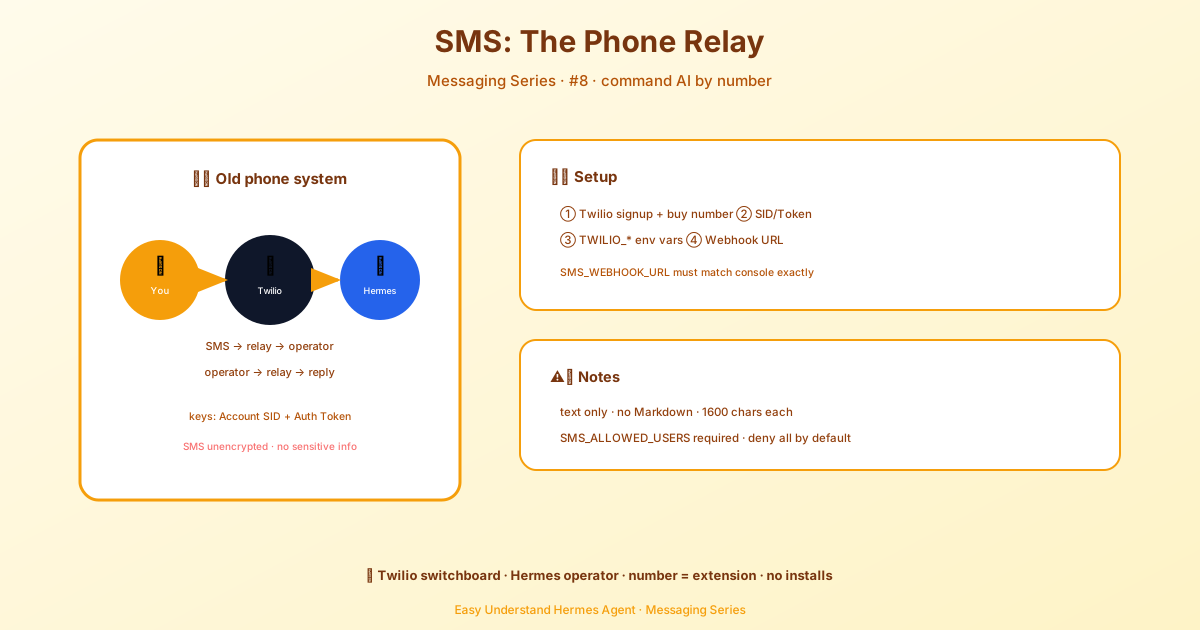
SMS — Command AI by Text
Remember the days before smartphones, when texting was the fastest way to reach someone? Well, that classic channel is still alive and kicking — and now it’s a full-fledged way to talk to your AI assistant.
Hermes now connects to SMS through Twilio, so anyone with a phone number can text your bot and get AI-powered responses back. No app installs, no QR codes, no learning curve. Just plain old text messages.
What’s New in This Update
The SMS gateway got a serious upgrade. Here’s what changed:
SMS_WEBHOOK_URLis now required — Hermes validates Twilio’s webhook signatures to keep imposters out. The gateway will refuse to start without it.- New environment variables —
SMS_WEBHOOK_HOST,SMS_WEBHOOK_PORT,SMS_INSECURE_NO_SIGNATURE, andSMS_ALLOW_ALL_USERSgive you more control. - Better security defaults — The gateway denies all users by default. You must explicitly allowlist phone numbers.
- Smarter message splitting — Long responses are now split at natural boundaries (newlines, then spaces) instead of being chopped mid-word.
Getting Started
First, you’ll need a Twilio account and a phone number with SMS capability. Twilio offers a free trial, so you can test everything without spending a dime.
You’ll also need a publicly accessible server. Twilio sends webhooks to your server when someone texts your number. If you’re running Hermes locally, tools like cloudflared or ngrok can expose your localhost to the internet.
Install the SMS extra with:
cd ~/.hermes/hermes-agent && uv pip install -e ".[sms]"Step 1: Grab Your Twilio Credentials
Head to the Twilio Console, copy your Account SID and Auth Token from the dashboard, and note your phone number in E.164 format (like +15551234567).
Step 2: Configure Hermes
The easiest way is the interactive wizard:
hermes gateway setupSelect SMS (Twilio) and follow the prompts.
Prefer manual setup? Add these to ~/.hermes/.env:
TWILIO_ACCOUNT_SID=ACxxxxxxxxxxxxxxxxxxxxxxxxxxxxxxxx
TWILIO_AUTH_TOKEN=your_auth_token_here
TWILIO_PHONE_NUMBER=+15551234567

# Security: restrict to specific phone numbers (recommended)
SMS_ALLOWED_USERS=+15559876543,+15551112222

# Optional: set a home channel for cron job delivery
SMS_HOME_CHANNEL=+15559876543
Step 3: Set Up the Twilio Webhook
In the Twilio Console, go to Phone Numbers → Manage → Active Numbers, click your number, and under Messaging → A MESSAGE COMES IN, set the webhook to:
https://your-server:8080/webhooks/twilioSet the HTTP method to POST.
Important: Set SMS_WEBHOOK_URL to the exact same URL you configured in Twilio. This is required for signature validation:
SMS_WEBHOOK_URL=https://your-server:8080/webhooks/twilioThe webhook port defaults to 8080, but you can override it with SMS_WEBHOOK_PORT.
Step 4: Start the Gateway
hermes gatewayYou should see something like:
[sms] Twilio webhook server listening on 127.0.0.1:8080, from: +1555***4567Now text your Twilio number — Hermes will respond via SMS.
How SMS Behavior Differs
SMS is a plain-text medium, so Hermes adapts:
- No Markdown — It’s stripped automatically since SMS renders it as literal characters
- 1600-character limit — Longer responses are split across multiple messages at natural boundaries
- Echo prevention — Messages from your own Twilio number are ignored to prevent loops
- Privacy — Phone numbers are redacted in logs
Security Matters
Hermes validates that inbound webhooks genuinely come from Twilio by checking the X-Twilio-Signature header (HMAC-SHA1). This blocks attackers from injecting fake messages.
The gateway denies all users by default. You must configure an allowlist:
SMS_ALLOWED_USERS=+15559876543,+15551112222Or, if you’re feeling reckless (please don’t):
SMS_ALLOW_ALL_USERS=trueFor local development without a public URL, you can disable signature validation:
SMS_INSECURE_NO_SIGNATURE=trueBut remember — that’s for local dev only, never production.
One Last Warning
SMS has no built-in encryption. Don’t use it for sensitive operations. For anything confidential, stick with Signal or Telegram.
Troubleshooting
Messages not arriving? Check:
- Your webhook URL is correct and publicly accessible
- Your
TWILIO_ACCOUNT_SIDandTWILIO_AUTH_TOKENare correct - The Twilio Console → Monitor → Logs → Messaging for delivery errors
- Your phone number is in
SMS_ALLOWED_USERS
That’s it! Text your bot, get answers. Simple as that.
Keep reading: BlueBubbles Hermes setup — On an iPhone without an SMS gateway? The BlueBubbles Hermes setup puts the agent on iMessage instead.
📖 Official Docs
This article is based on the official Hermes Agent documentation:Official docs › user-guide/messaging/sms