Mattermost Hermes Agent — Self-Hosted Team Chat
Hermes Mattermost integration: enable bot accounts, grab your User ID, set the env vars, and chat with your agent in DMs and channels.
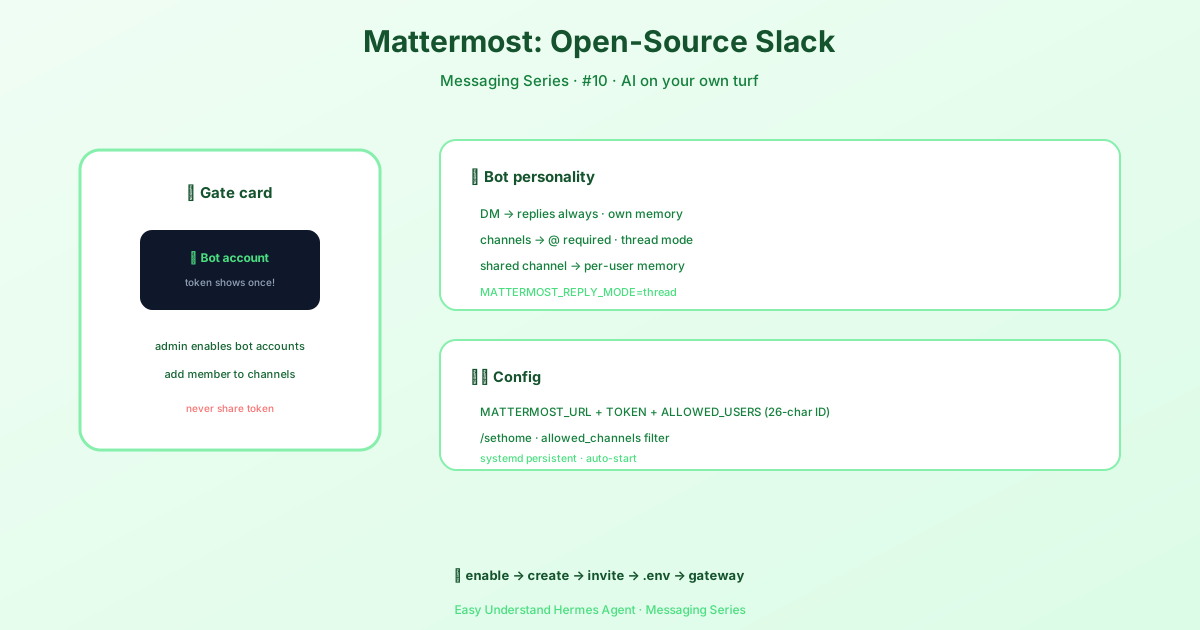
Mattermost: Chat with Your Hermes Agent at Work
If your team runs Mattermost, you already know the appeal: it looks and feels like Slack, but the server — and the data — stay on your own infrastructure. Hermes Agent plugs into that as a bot, connecting over Mattermost’s REST API (v4) plus a WebSocket for real-time events, so your assistant can answer in DMs and team channels without anything leaving your network.
There’s no extra library to install: the adapter uses aiohttp, which already ships with Hermes. It works with both Mattermost Team Edition (free) and Enterprise Edition.
How Hermes Behaves in Mattermost
| Where you talk to it | What happens |
|---|---|
| DMs | Hermes answers every message — no @mention needed. Each DM gets its own session. |
| Channels | Hermes answers when you @mention it. Without a mention, it ignores the message. |
| Threads | With MATTERMOST_REPLY_MODE=thread, replies nest under your message and stay isolated from the parent channel. |
| Shared channels | Session history is isolated per user by default, so two people in one channel don’t share a transcript. |
That last behaviour is controlled by group_sessions_per_user in config.yaml:
group_sessions_per_user: true # each person keeps their own contextSet it to false only if you deliberately want one shared conversation for the entire channel. A shared session means everyone shares context growth and token costs, and one person’s long tool-heavy task can bloat or interrupt someone else’s run.
Step 1: Enable Bot Accounts (Admin Side)
Bot accounts must be switched on for the server before you can create one:
- Log in to Mattermost as a System Admin.
- Go to System Console → Integrations → Bot Accounts.
- Set Enable Bot Account Creation to true, then click Save.
No admin access? Ask your Mattermost administrator to enable bot accounts and create one for you.
Step 2: Create the Bot Account
- Click the ☰ menu (top-left) → Integrations → Bot Accounts → Add Bot Account.
- Fill in the details: Username such as
hermes, Display Name such asHermes Agent, and a Role —Memberis sufficient. - Click Create Bot Account, then copy the token immediately — it’s displayed only once. Lose it and you’ll have to regenerate it from the bot account settings.
⚠️ Never share the token or commit it to Git. Anyone holding it has full control of the bot.
Prefer the agent to post as your own user rather than a separate bot? Create a personal access token under Profile → Security → Personal Access Tokens → Create Token.
Step 3: Invite the Bot to Channels
The bot only responds in channels it belongs to:
- Open the channel → click the channel name → Add Members.
- Search for the bot username (for example
hermes) and add it.
For DMs, simply open a direct message with the bot — no invite needed.
Step 4: Find Your Mattermost User ID
Hermes uses your User ID — not your username — to decide who is allowed to talk to the bot:
- Click your avatar (top-left corner) → Profile.
- The dialog shows your User ID: a 26-character alphanumeric string such as
3uo8dkh1p7g1mfk49ear5fzs5c. Click it to copy.
You can also read it from the API:
curl -H "Authorization: Bearer YOUR_TOKEN" \
  https://your-mattermost-server/api/v4/users/me | jq .id
Your User ID is not the
@usernameyou see in messages. Pasting the username is the most common reason a bot stays silent.
Step 5: Configure Hermes
Run the guided setup and choose Mattermost when prompted — it asks for the server URL, bot token, and your User ID:
hermes gateway setupOr wire it up by hand in ~/.hermes/.env:
# Required
MATTERMOST_URL=https://mm.example.com
MATTERMOST_TOKEN=your-bot-token
MATTERMOST_ALLOWED_USERS=3uo8dkh1p7g1mfk49ear5fzs5c

# Multiple allowed users (comma-separated)
# MATTERMOST_ALLOWED_USERS=3uo8dkh1p7g1mfk49ear5fzs5c,8fk2jd9s0a7bncm1xqw4tp6r3e

# Optional: reply in a thread instead of flat messages (default: off)
# MATTERMOST_REPLY_MODE=thread

# Optional: respond without an @mention (default: true = mention required)
# MATTERMOST_REQUIRE_MENTION=false

# Optional: channels where no @mention is needed (comma-separated channel IDs)
# MATTERMOST_FREE_RESPONSE_CHANNELS=channel_id_1,channel_id_2
Then start the gateway:
hermes gatewayThe bot connects to your Mattermost server within a few seconds. Send it a DM, or @mention it in a channel where it’s been added, to test.
Step 6: Optional Behaviour Switches
| Setting | What it does |
|---|---|
MATTERMOST_REPLY_MODE |
off (default) posts flat messages; thread nests replies under your message and keeps busy channels tidy. |
MATTERMOST_REQUIRE_MENTION |
true by default. Set to false to respond to all channel messages (DMs always work). |
MATTERMOST_FREE_RESPONSE_CHANNELS |
Channel IDs that skip the mention requirement even when mentions are required. |
MATTERMOST_HOME_CHANNEL |
Where proactive messages go — cron output, reminders, notifications. Or type /sethome in a channel. |
mattermost.allowed_channels |
Restrict the bot to a list of channel IDs; messages from anywhere else are dropped. DMs are exempt. |
mattermost.channel_prompts |
Inject an ephemeral system prompt per channel — applied on every turn, never saved to transcript history. |
When the bot is @mentioned, the mention is stripped from the message before processing, so @hermes summarize this thread arrives as a clean instruction.
Troubleshooting
| Symptom | Likely cause | Fix |
|---|---|---|
| Bot ignores you in channels | It isn’t in the channel, or your User ID isn’t in MATTERMOST_ALLOWED_USERS |
Add the bot to the channel, verify the 26-character User ID, restart the gateway |
| Bot can’t post | Invalid token, or the bot lacks permission in that channel | Check MATTERMOST_TOKEN, confirm the account is active and a channel member |
| Constant disconnects | WebSocket drops, server restarts, or proxy/firewall issues | The adapter reconnects with exponential backoff (2s → 60s); for nginx, make sure WebSocket upgrade headers are configured |
| Nothing happens at all | Gateway not running, or the URL/token is wrong | Check the hermes gateway output, and that MATTERMOST_URL includes https:// with no trailing slash |
Test a token directly with:
curl -H "Authorization: Bearer YOUR_TOKEN" \
  https://your-server/api/v4/users/me
Securing the Bot
Always set MATTERMOST_ALLOWED_USERS. Without it, the gateway denies all users by default as a safety measure — and authorized users get full access to the agent’s capabilities, including tool use and system access, so keep the list tight. For a broader look at hardening a deployment, see the official security guidance.
What’s Next?
Once the gateway is up, Mattermost behaves like any other Hermes channel: slash commands, file uploads, voice notes, cron output delivered to your home channel — all on infrastructure you control. If you’d rather use the hosted option, the Slack integration covers the Socket Mode route; if you run gateways on several machines, Hermes Relay connects them.
📖 Official Docs
This article is based on the official Hermes Agent documentation:Official docs › user-guide/messaging/mattermost