Hermes Relay — Connect Multiple Agent Instances
Hermes Relay lets gateways enroll and reach each other across machines: what enrollment does, when it helps, and how to turn it off.
Think of Hermes Relay like a phone booth that calls you back — you don’t need to give out your home address, you just dial out once, and the other side can reach you anytime through that same line.
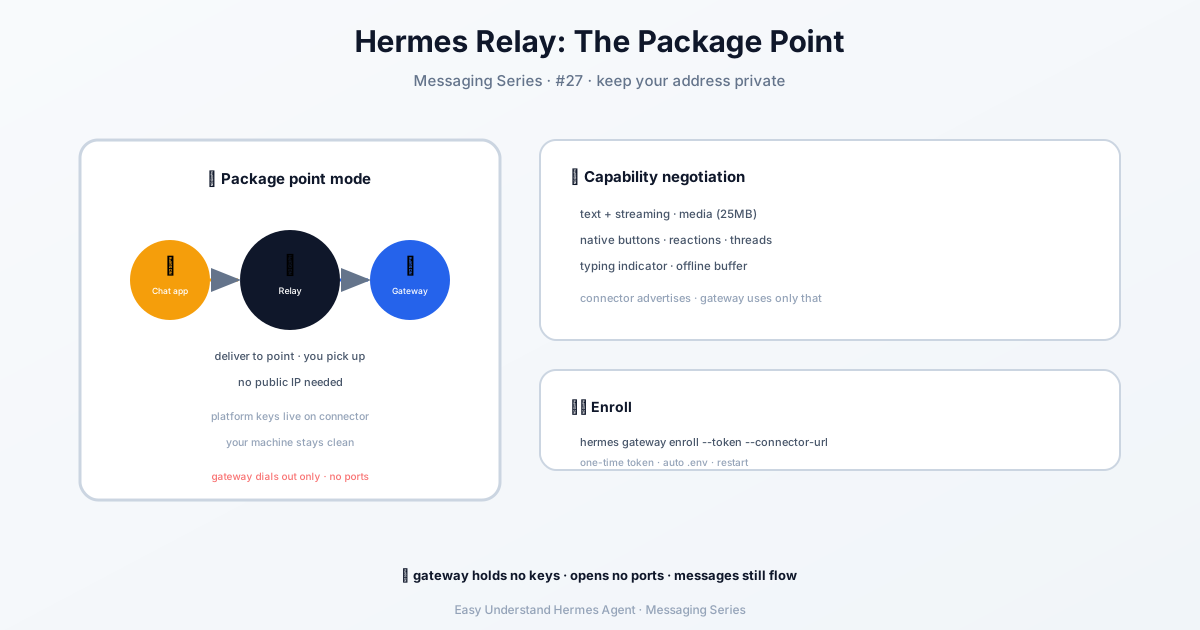
What Is Hermes Relay?
Hermes Relay is a connector system for the Hermes Agent gateway. It lets your gateway talk to messaging platforms like Discord, Telegram, or Slack without holding any of their bot tokens or passwords.
Instead, a separate service (the “connector”) owns those credentials. Your gateway simply dials out to the connector over a single secure WebSocket connection — and then all messages flow back and forth through that one open line.
Why Is That Useful?
Here are the big wins, in plain words:
- No open ports needed. Your gateway works even behind a home router or a cloud firewall. It only makes outgoing connections, so you don’t have to expose anything to the internet.
- No bot secrets on your machine. The connector keeps all platform tokens. If your gateway is stolen, the attacker gets nothing useful.
- One gateway, many platforms. The connector tells your gateway what it can do (message length, markdown, editing, threads, etc.) at the moment they connect. No hardcoded rules — it just adapts.
When to use it: If you’re running your own bots directly, skip Relay and use the native adapters (Telegram, Discord). Relay is for setups where a shared or hosted connector manages the platform side — like multi-tenant hosting or when you simply don’t want tokens on your box.
How to Enroll Your Gateway
Enrolling is a one-time setup. You run a single command, and Hermes does the rest.
First, make sure you have an enrollment token (minted by your connector provider). Then run:
hermes gateway enroll \
  --token <enrollment-token> \
  --connector-url wss://connector.example.com/relay
Here’s what happens step by step:
- Hermes checks your existing login (
~/.hermes/auth.json) to prove which organization you belong to. - If you’ve set up your own identity provider (for air-gapped or self-hosted setups), it uses that instead.
- It sends the enrollment token to the connector’s
/relay/enrollendpoint over TLS. - The connector verifies the token is valid, single-use, and matches your tenant.
- It then mints a per-gateway secret and a delivery key — and returns them once.
- Hermes saves these into
~/.hermes/.env:
GATEWAY_RELAY_ID
GATEWAY_RELAY_SECRET
GATEWAY_RELAY_DELIVERY_KEY
That’s it. Your gateway is now “enrolled” and can dial out to the connector whenever it needs to.
What Happens Next?
Once enrolled, your gateway will:
- Dial out to the connector URL you provided
- Receive a capability descriptor (what the fronted platform can do)
- Start exchanging normalized messages and actions over that same socket
No inbound ports, no extra credentials, no platform-specific code.
Turning Relay Off
Relay activates whenever a connector relay URL is configured. To keep a profile off the relay even when the deployment injects a URL, disable the platform in config.yaml:
platforms:
  relay:
    enabled: false
An explicit enabled: false wins: the gateway won’t resolve an identity token, provision or rewrite GATEWAY_RELAY_* credentials, register the relay adapter, or send the relevance policy — even with gateway.relay_url or GATEWAY_RELAY_URL set. Omitting enabled keeps URL-based activation, and a gateway.json enabled: false is only advisory, so put the opt-out in config.yaml. Restart the gateway after changing it; an open relay socket is not torn down.
Summary & Practical Tip
Summary: Hermes Relay is a clean way to connect your gateway to messaging platforms without owning their credentials or opening any ports. It’s perfect for shared hosting, NAT environments, or any setup where you want to keep secrets off your main machine.
Practical tip: Always keep your enrollment token single-use and short-lived. If you ever need to rotate credentials, just re-run the enroll command with a fresh token — and remember to delete the old GATEWAY_RELAY_SECRET from your .env file before updating it. A little hygiene goes a long way.
📖 Official Docs
This article is based on the official Hermes Agent documentation:Official docs › user-guide/messaging/relay