Yuanbao — Tencent AI Assistant
easy-to-understand guide based on official docs
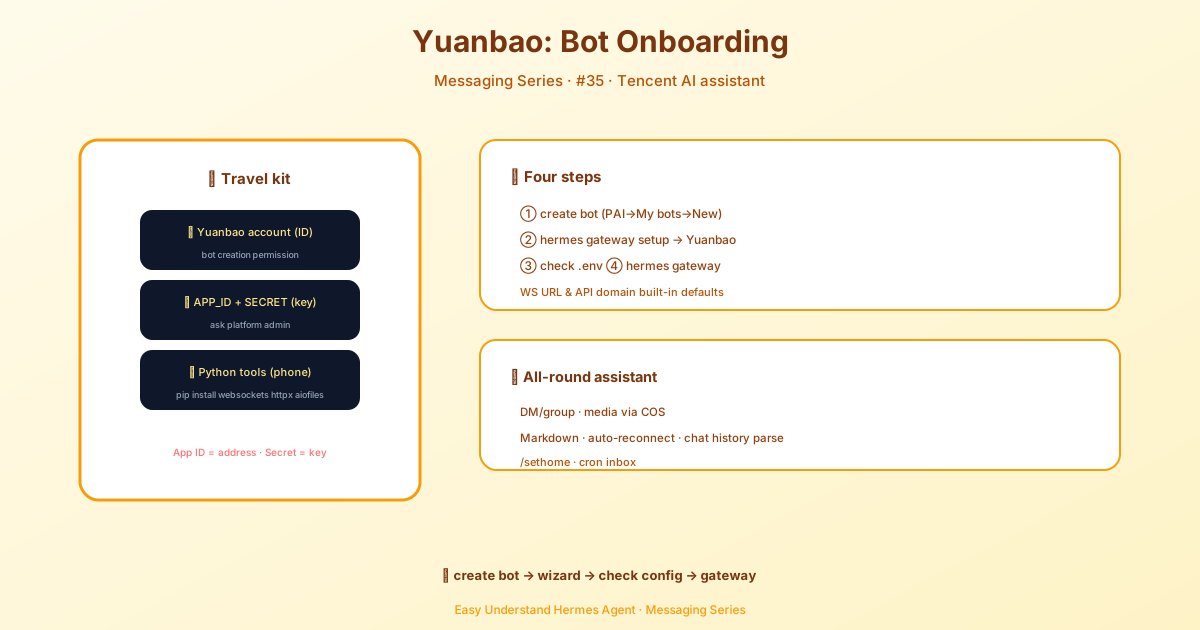
Yuanbao — Tencent AI Assistant
Yuanbao is Tencent’s enterprise messaging platform, and now Hermes can plug right into it. Think of it as bringing your AI agent into the same chat app your team already uses at work. Whether you’re in a one-on-one chat or a group conversation, your Hermes agent can listen, respond, and even handle files and images.
The best part? The setup is surprisingly simple. You just need a bot, two keys, and a couple of Python packages. Let’s walk through it.
What You’ll Need
Before we start, make sure you have:
- A Yuanbao account with permission to create bots
- Your Yuanbao APP_ID and APP_SECRET (you can get these from your platform admin)
- Python packages:
websockets,httpx, and (for media)aiofiles
Install them with one command:
pip install websockets httpx aiofilesStep 1: Create Your Bot
- Download the Yuanbao app from https://yuanbao.tencent.com/
- Open the app and go to PAI → My Bot
- Create a new bot — it’s just a few clicks
- Copy the APP_ID and APP_SECRET that are generated
That’s your bot’s identity. Keep these safe.
Step 2: Run the Setup Wizard
Hermes has a handy interactive setup that does most of the work for you:
hermes gateway setupWhen prompted, select Yuanbao. The wizard will ask for your APP_ID and APP_SECRET, then save everything automatically. You don’t need to worry about WebSocket URLs or API domains — sensible defaults are already baked in.
Step 3: Check Your Environment Variables
After setup, peek into ~/.hermes/.env to make sure everything looks right:
# Required
YUANBAO_APP_ID=your-app-id
YUANBAO_APP_SECRET=your-app-secret
YUANBAO_WS_URL=wss://api.yuanbao.example.com/ws
YUANBAO_API_DOMAIN=https://api.yuanbao.example.com

# Optional: home channel for cron/notifications
YUANBAO_HOME_CHANNEL=direct:bot_account_id
YUANBAO_HOME_CHANNEL_NAME="Bot Notifications"
There are a few optional variables too, like YUANBAO_BOT_ID and YUANBAO_ROUTE_ENV, but you can leave those alone for now.
Step 4: Start the Gateway
hermes gatewayThat’s it. Your Hermes agent is now live on Yuanbao, authenticated with HMAC signatures, and ready to chat.
What the Adapter Can Do
This isn’t a bare-bones integration. The Yuanbao adapter is packed with features:
- Real-time WebSocket — messages flow both ways instantly
- C2C and group chats — talk to the bot directly or in a team channel
- Media support — images, files, and voice messages via Tencent Cloud Object Storage
- Typing indicators — the bot shows “typing…” while it thinks
- Auto-reconnection — if the connection drops, it backs off and retries
- Message deduplication — no double-processing of the same message
- WeChat forwarded chat-history — if someone forwards a WeChat conversation into Yuanbao, the bot can read the whole thread, including nested forwards
- Stickers and emoji — because work chats need fun too
Setting Your Home Channel
The home channel is where your bot sends scheduled notifications and cron job results. You can set it manually:
- Start a chat with your bot in Yuanbao
- Send
/sethome - The bot confirms: “Home channel set to [chat_name] with ID [chat_id]”
There’s also an auto-sethome feature: if no home channel is configured, the first person to message the bot automatically becomes the home channel owner. Handy for quick testing.
You can also set it in the .env file:
YUANBAO_HOME_CHANNEL=direct:user_account_id
YUANBAO_HOME_CHANNEL_NAME="My Bot Updates"
Using Cron Jobs
Once your home channel is set, cron jobs deliver results there. For example:
/cron "0 9 * * *" Check server statusThis sends a server status update to your Yuanbao home channel every day at 9 AM.
Chat ID Formats
Yuanbao uses simple prefixes to tell conversation types apart:
| Chat Type | Format | Example |
|---|---|---|
| Direct message (C2C) | direct:<account> |
direct:user123 |
| Group message | group:<group_code> |
group:grp456 |
Final Thoughts
Yuanbao might be an enterprise tool, but Hermes makes it feel like a personal assistant. The setup wizard handles the boring parts, the adapter handles the technical heavy lifting, and you get a fully functional AI agent in your team’s messaging platform.
All the standard Hermes commands work too — /new for a fresh conversation, /model to switch models, and more. So if you’re already using Yuanbao at work, this is the fastest way to bring AI into your daily workflow.
📖 Official Docs
This article is based on the official Hermes Agent documentation:Official docs › user-guide/messaging/yuanbao