What’s New in Hermes WhatsApp Setup
WhatsApp Business Cloud API — easy-to-understand guide based on official docs
What’s New in Hermes WhatsApp Setup
If you’ve been following our Hermes Agent series, you know we love making things simple. Today, we’re diving into the updated WhatsApp setup — and there’s a big change under the hood.
Hermes now connects to WhatsApp through a built-in bridge based on Baileys. Think of it as emulating a WhatsApp Web session. No Meta developer account, no Business verification, no public URL — just you, your phone, and a QR code.
Quick start: Run
hermes gateway setupand pick WhatsApp for a guided walkthrough.
Two WhatsApp Integrations — Know the Difference
Before we go further, let’s clear up a common point of confusion. There are two ways to connect WhatsApp to Hermes:
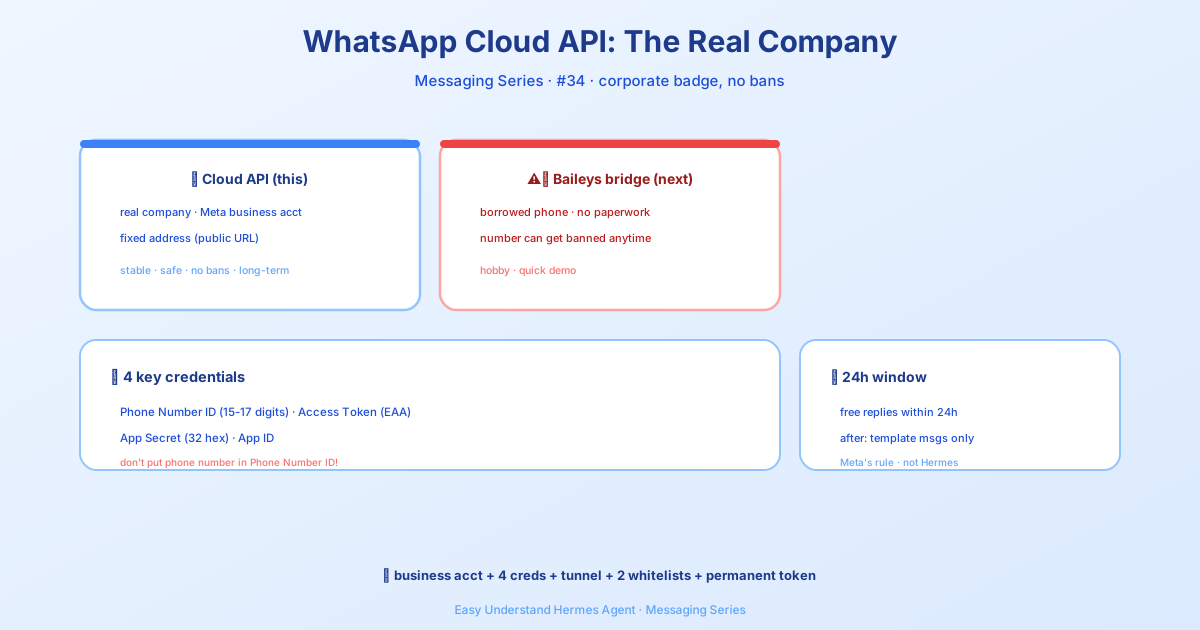
| Integration | Best for | Requires |
|---|---|---|
| Baileys bridge (this guide) | Personal bots, quick testing, no public URL | Just a phone with WhatsApp |
| WhatsApp Business Cloud API | Real business bots, stability, zero ban risk | Meta Business account, public webhook URL |
The Baileys bridge is unofficial — it carries a small ban risk. The Business Cloud API is the official Meta-supported path. You can even run both in parallel on different phone numbers if you need to.
⚠️ Two Important Warnings
Ban risk: WhatsApp doesn’t officially support third-party bots outside the Business API. To stay safe:
- Use a dedicated phone number for the bot (not your personal one)
- Don’t send bulk or spam messages — keep it conversational
- Don’t automate outbound messages to people who haven’t messaged you first
Protocol updates: WhatsApp periodically updates its Web protocol, which can temporarily break third-party bridges. If your bot stops working after a WhatsApp update, just pull the latest Hermes version and re-pair.
Two Modes — Pick Your Style
| Mode | How it works | Best for |
|---|---|---|
| Separate bot number (recommended) | Dedicate a number to the bot; people message it directly | Clean UX, multiple users, lower ban risk |
| Personal self-chat | Use your own WhatsApp; message yourself to talk to the agent | Quick setup, single user, testing |
Prerequisites
- Node.js v18+ and npm — the bridge runs as a Node.js process
- A phone with WhatsApp installed (for scanning the QR code)
Good news: the current Baileys-based bridge does not require Chromium or Puppeteer anymore. Much lighter.
Step 1: Run the Setup Wizard
hermes whatsappThe wizard will:
- Ask which mode you want (bot or self-chat)
- Install bridge dependencies if needed
- Display a QR code in your terminal
- Wait for you to scan it
To scan the QR code:
- Open WhatsApp on your phone
- Go to Settings → Linked Devices
- Tap Link a Device
- Point your camera at the terminal QR code
Once paired, the wizard confirms the connection and exits. Your session is saved automatically.
Tip: If the QR code looks garbled, make sure your terminal is at least 60 columns wide and supports Unicode.
Step 2: Getting a Second Phone Number (Bot Mode)
For bot mode, you need a number not already registered with WhatsApp. Three options:
| Option | Cost | Notes |
|---|---|---|
| Google Voice | Free | US only. Verify WhatsApp via SMS through the Google Voice app. |
| Prepaid SIM | $5–15 one-time | Activate, verify, then the SIM can sit in a drawer. Make a call every 90 days to keep it active. |
| VoIP services | Free–$5/month | TextNow, TextFree, etc. Some numbers are blocked by WhatsApp — try a few. |
After getting the number:
- Install WhatsApp on a phone (or use WhatsApp Business app with dual-SIM)
- Register the new number
- Run
hermes whatsappand scan the QR code from that account
Step 3: Configure Hermes
Add this to your ~/.hermes/.env file:
# Required
WHATSAPP_ENABLED=true
WHATSAPP_MODE=bot                          # "bot" or "self-chat"

# Access control — pick ONE:
WHATSAPP_ALLOWED_USERS=15551234567         # Comma-separated numbers (country code, no +)
# WHATSAPP_ALLOWED_USERS=*                 # OR allow everyone
# WHATSAPP_ALLOW_ALL_USERS=true            # OR set this flag (same as *)
Allow-all shorthand: Setting WHATSAPP_ALLOWED_USERS=* allows all senders — equivalent to WHATSAPP_ALLOW_ALL_USERS=true. To use the pairing flow instead, remove both variables and rely on the DM pairing system.
Optional settings in ~/.hermes/config.yaml:
unauthorized_dm_behavior: pair

whatsapp:
unauthorized_dm_behavior: ignorepair(global default) sends unknown DM senders a pairing code.ignorekeeps WhatsApp silent for unauthorized DMs — usually better for a private number.
Group chats (bot mode)
Groups are gated by group policy, not the DM allowlist. WHATSAPP_GROUP_POLICY / whatsapp.group_policy defaults to pairing, which forwards nothing from groups. Set it to allowlist and list the group JIDs you want in WHATSAPP_GROUP_ALLOWED_USERS / whatsapp.group_allow_from (comma-separated, e.g. 120363001234567890@g.us), or use open to admit every group the bot is in. Senders are then checked like any other gateway user: if WHATSAPP_ALLOWED_USERS is set, a participant must be on it (or paired); with no sender allowlist, allowlist trusts the group list alone, while open still needs the participant paired or WHATSAPP_ALLOW_ALL_USERS=true.
By default the bot answers every admitted group message. Set require_mention: true / WHATSAPP_REQUIRE_MENTION=true to answer only @mentions, replies to the bot, or /commands.
Then start the gateway:
hermes gateway              # Foreground
hermes gateway install      # Install as a user service
sudo hermes gateway install --system   # Linux: boot-time system service
Session Persistence & Re-pairing
The bridge saves its session under ~/.hermes/platforms/whatsapp/session. That means:
- Sessions survive restarts — no re-scanning every time
- Session data includes encryption keys and device credentials
- Do not share or commit this directory — it grants full access to the account
If the session breaks (phone reset, WhatsApp update, manual unlink), you’ll see connection errors in the logs. Fix it by running:
hermes whatsappThis generates a fresh QR code for re-pairing.
That’s the new WhatsApp setup in a nutshell. Quick, lightweight, and no Meta paperwork. Next up in the series: we’ll compare this bridge side-by-side with the WhatsApp Business Cloud API — stay tuned!
📖 Official Docs
This article is based on the official Hermes Agent documentation:Official docs › user-guide/messaging/whatsapp