WeChat — AI in Everyone's App
WeChat — AI in Everyone's App — easy-to-understand guide based on official docs
Think of this as teaching your WeChat to talk to a super-smart assistant—except the assistant lives in the cloud, and you don’t need to build a single server to make it work.
What Is This All About?
Hermes Agent is an open-source AI agent framework. In plain English: it lets you connect your favorite messaging apps to AI tools that can answer questions, automate tasks, or even manage your calendar.
This guide focuses on WeChat—the personal messaging app billions of people use daily. With Hermes, you can make your WeChat chat with an AI bot, all through a simple QR code login. No complicated webhooks, no public IP address, no server setup.
What You Need Before Starting
- A personal WeChat account (the one on your phone)
- Python installed on your computer
- A terminal (Command Prompt on Windows, Terminal on Mac/Linux)
That’s it. No paid API keys, no cloud hosting.
Step 1: Install the Required Packages
Open your terminal and run:
pip install aiohttp cryptographyIf you installed Hermes with the “messaging” extra, you can also run:
cd ~/.hermes/hermes-agent && uv pip install -e ".[messaging]"This just adds extra tools for showing the QR code nicely in your terminal.
Step 2: Run the Setup Wizard
The easiest way to connect your WeChat is through the built-in wizard:
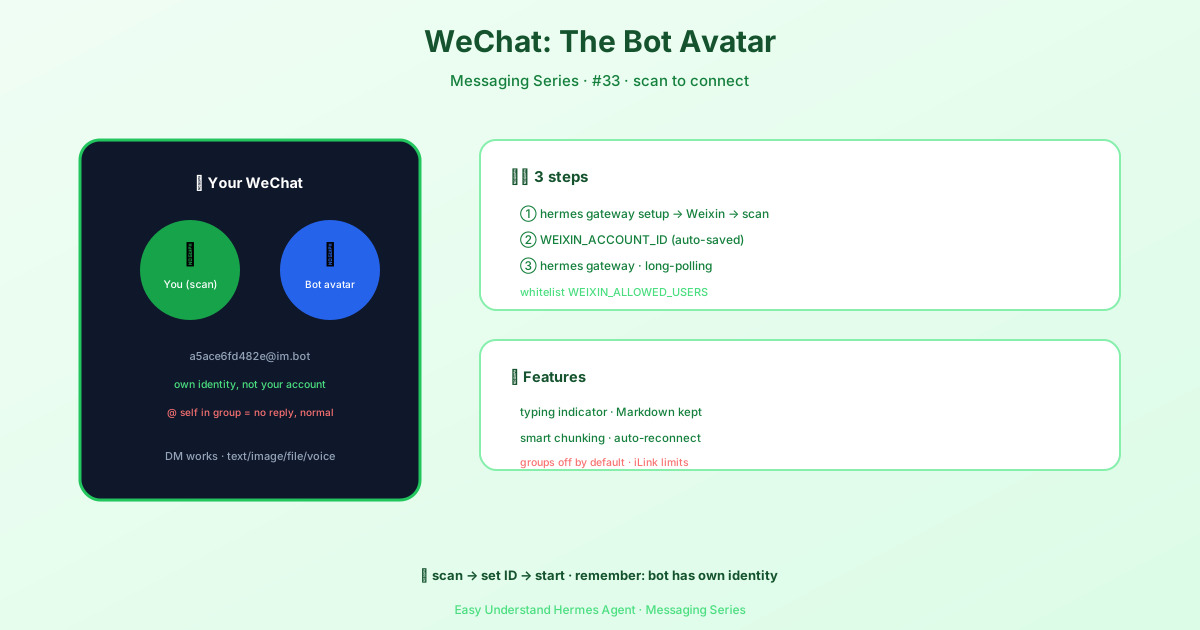
hermes gateway setupWhen asked, choose Weixin. The wizard will:
- Ask WeChat’s iLink Bot API for a QR code
- Show that QR code in your terminal (or give you a URL)
- Wait for you to scan it with your phone’s WeChat app
- Save your login credentials automatically
After you confirm the login on your phone, you’ll see:
WeChat connected successfully, account_id=your-account-idYour account ID is saved for you.
Step 3: Set Up Your Environment Variables
Now you need to tell Hermes which account to use. Open your ~/.hermes/.env file and add:
WEIXIN_ACCOUNT_ID = your-account-idYou can also control who can talk to your bot:
WEIXIN_DM_POLICY = open
WEIXIN_ALLOWED_USERS = user_id_1,user_id_2openmeans anyone can message the botallowed_userslets you restrict it to specific people
One thing to know: WEIXIN_ALLOWED_USERS is an inbound filter, not an invite system. Everyone who wants to talk to the bot messages the connected iLink bot contact directly, and Hermes only replies if their Weixin user ID is on your list. A simple flow: pair once with hermes gateway setup, have each person DM the bot, grab their user ID from the gateway logs, add it to the list, then restart the gateway.
A Quick Reality Check (Important!)
This adapter connects to an iLink bot identity, not your personal WeChat account directly. That means:
- The bot is a separate identity from your personal account
- It works reliably for direct messages; group chats often don’t work at all
- It’s not designed for mass broadcasting or spamming
In practice, iLink usually doesn’t deliver ordinary WeChat group events to the bot, so group messages may never reach Hermes no matter what policy you set. The default group policy is disabled, and the gateway logs a WARNING at startup if you change it. If you only need DMs, you’re fine.
So treat it like a helpful coworker, not a megaphone.
Your First Chat
Once everything is set up, start the gateway:
hermes gateway startThen open WeChat on your phone, find the bot contact, and send a simple message like “Hello.” Within seconds, you should get a reply from your AI assistant.
From there, you can ask it to summarize news, draft emails, or even set reminders—all without leaving WeChat.
One quirk worth knowing: if a proactive send (like a cron job or notification) fails with ret=-2 errmsg=prepare failed or unknown error, it usually means the peer’s context_token went stale because they haven’t messaged the bot recently. The adapter treats this as a stale session, not a rate limit, and re-sends once without the token so the message still arrives. If iLink still says prepare failed (or there was no token to drop—a freshly paired bot), the send fails with iLink sendmessage session not ready … the user must send the bot a message first (or re-pair). Only other -2 responses trigger the rate-limit cooldown.
Summary and a Practical Tip
You now have a personal AI assistant living inside WeChat, connected through a free, open-source tool. The whole setup takes less than ten minutes and requires zero cloud infrastructure.
Practical tip: Start with a small group of friends or a test chat before inviting real contacts. This lets you learn how the bot behaves, adjust your permission settings, and avoid any awkward early mistakes. Once you’re comfortable, open the floodgates and let your WeChat do the talking.
📖 Official Docs
This article is based on the official Hermes Agent documentation:Official docs › user-guide/messaging/weixin