WeCom — Company AI Assistant
WeCom — Company AI Assistant — easy-to-understand guide based on official docs
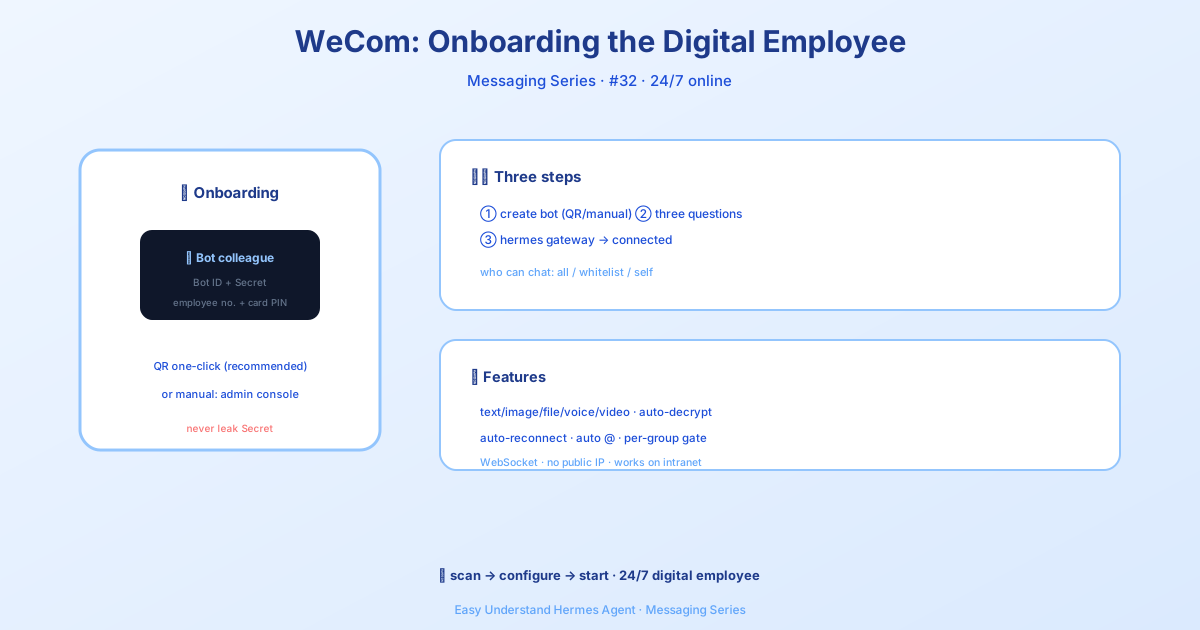
WeCom — Company AI Assistant
If your company lives inside WeCom (Enterprise WeChat), you probably spend all day in it — chatting with colleagues, sharing files, and coordinating projects. Wouldn’t it be nice if your AI assistant lived right there too?
Good news: Hermes now connects directly to WeCom, so you can talk to your AI from the same app you already use for work. No extra tabs, no switching contexts. Just open a chat and ask.
What’s New in This Version
The WeCom adapter got a major upgrade. Here’s what changed:
- Scan-to-create setup — Hermes can now create your bot automatically. Just run one command and scan a QR code with your phone.
- Native streaming — replies appear token-by-token in a single bubble, with a typing indicator, just like chatting with a human.
- Per-group sender allowlists — you can now control exactly who can talk to the bot inside each group.
- Stream keepalive — for long-running tasks, Hermes sends keepalive frames so the reply stream doesn’t time out.
Why WeCom?
WeCom is Tencent’s enterprise messaging platform — think of it as Slack or Teams, but deeply integrated with WeChat. The best part? Hermes connects through WeCom’s AI Bot WebSocket gateway, which means:
- No public endpoint needed — no opening ports, no webhook configuration, no firewall headaches.
- Real-time bidirectional communication — messages flow both ways instantly over a persistent connection.
- Auto-reconnect — if the connection drops, Hermes backs off and reconnects automatically.
Getting Started
Step 1: Create Your AI Bot (The Easy Way)
Run this command:
hermes gateway setupSelect WeCom, and Hermes will display a QR code in your terminal. Scan it with your WeCom mobile app, and the wizard will:
- Create a bot application with the correct permissions
- Automatically grab the Bot ID and Secret
- Guide you through access control setup
That’s it. No clicking through admin consoles.
Step 2: Configure Hermes
If you prefer manual setup, add this to ~/.hermes/.env:
WECOM_BOT_ID=your-bot-id
WECOM_SECRET=your-secret

# Optional: restrict who can DM the bot
WECOM_ALLOWED_USERS=user_id_1,user_id_2

# Optional: home channel for cron/notifications
WECOM_HOME_CHANNEL=chat_id
Step 3: Start the Gateway
hermes gatewayDone. Your AI is now live in WeCom.
Access Control That Makes Sense
You probably don’t want everyone in your company pinging the bot. Hermes gives you three levels of control:
DM Policy — who can send direct messages:
| Value | What it means |
|---|---|
open |
Anyone can DM (default) |
allowlist |
Only users in allow_from |
disabled |
No DMs at all |
pairing |
Setup mode |
Group Policy — which groups the bot responds in:
| Value | What it means |
|---|---|
open |
All groups (default) |
allowlist |
Only groups in group_allow_from |
disabled |
No groups |
Per-Group Sender Allowlists — the new fine-grained control. You can now say “this bot works in the engineering group, but only Alice and Bob can talk to it”:
platforms:
  wecom:
    enabled: true
    extra:
      bot_id: "your-bot-id"
      secret: "your-secret"
      group_policy: "allowlist"
      group_allow_from:
        - "group_id_1"
        - "group_id_2"
      groups:
        group_id_1:
          allow_from:
            - "user_alice"
            - "user_bob"
        "*":
          allow_from:
            - "user_admin"
What the Bot Can Do
Once connected, your WeCom AI can:
- Send and receive images, files, voice, and video — with automatic AES decryption for inbound attachments
- Render Markdown — rich text responses, not plain text walls
- Preserve reply threads — quote context keeps conversations coherent
- Stream responses natively — the thinking bubble appears immediately, and the reply renders token-by-token
One Thing to Keep in Mind
Keep your Bot Secret private. Anyone with it can impersonate your bot. Treat it like a password — don’t commit it to git, don’t share it in chats.
Ready to Try?
If your team lives in WeCom, this is the easiest way to bring AI into your daily workflow. Run hermes gateway setup, scan the QR code, and start chatting with your company AI assistant in minutes.
📖 Official Docs
This article is based on the official Hermes Agent documentation:Official docs › user-guide/messaging/wecom