第26篇:API Server——把 Hermes 变成服务
Hermes 功能详解第26篇:API Server。用 HTTP API 调用 Hermes。
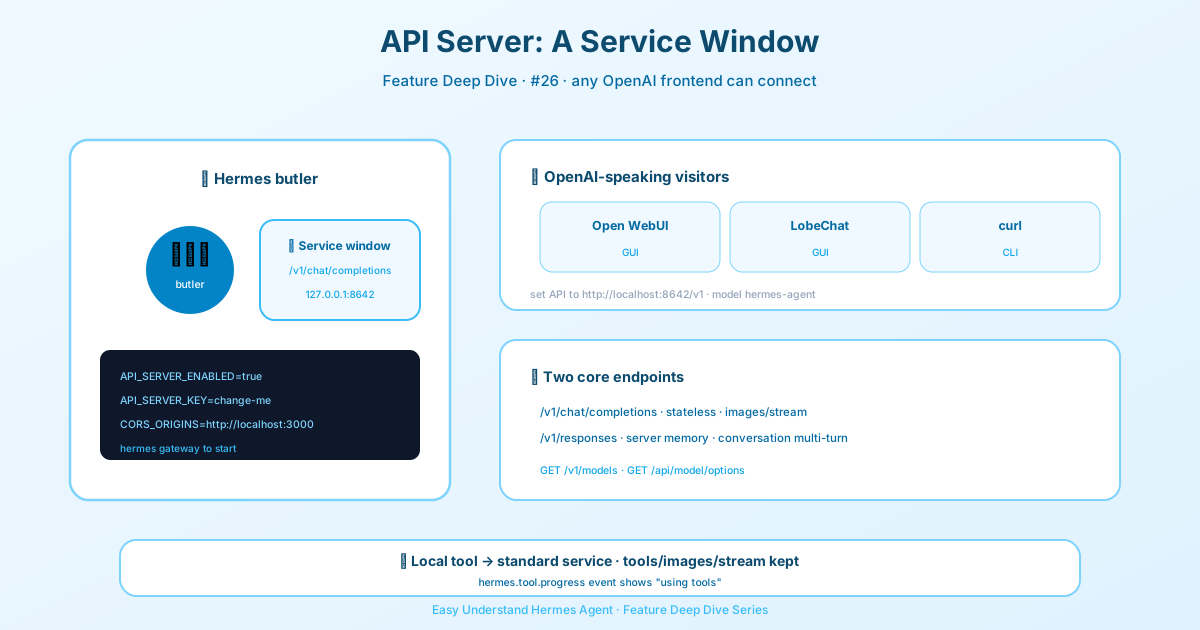
第26篇:API Server——把 Hermes 變成服務
嘿,朋友們!今天咱們來玩點刺激的——把 Hermes 從「命令列小助手」升級成「7x24小時線上服務」。沒錯,就是那個傳說中的 API Server,讓 Hermes 變成一個 OpenAI 相容的 HTTP 介面。
為啥要這麼幹?
想像一下:你辛辛苦苦調教好的 Hermes,帶著全套工具(終端機、檔案操作、網頁搜尋、記憶、技能),現在能直接接入 Open WebUI、LobeChat、LibreChat、NextChat、ChatBox 等幾百種前端。這些前端只要會說 OpenAI 的「方言」,就能把 Hermes 當後端用,而且工具呼叫的進度條還能即時顯示,酷不酷?
💡 小貼士:Hermes 自己需要配置好模型提供商和工具後端才能幹活。如果你有 Nous Portal 訂閱,跑一次
hermes setup --portal就全搞定了——300+ 模型加上網頁/圖片/TTS/瀏覽器工具,一步到位。
三步起飛
第一步:開啟 API Server
打開 ~/.hermes/.env,加上這幾行:
API_SERVER_ENABLED=true
API_SERVER_KEY=change-me-local-dev
# 可選:如果瀏覽器要直接訪問 Hermes
# API_SERVER_CORS_ORIGINS=http://localhost:3000
第二步:啟動閘道
hermes gateway看到這行就說明成功了:
[API Server] API server listening on http://127.0.0.1:8642第三步:連接前端
把任何 OpenAI 相容的客戶端指向 http://localhost:8642/v1 就行。先用 curl 試試:
curl http://localhost:8642/v1/chat/completions \
  -H "Authorization: Bearer change-me-local-dev" \
  -H "Content-Type: application/json" \
  -d '{"model": "hermes-agent", "messages": [{"role": "user", "content": "Hello!"}]}'
兩個核心介面
1. POST /v1/chat/completions —— 標準 OpenAI 聊天格式,無狀態,每次請求都帶上完整對話歷史:
{
  "model": "hermes-agent",
  "messages": [
    {"role": "system", "content": "You are a Python expert."},
    {"role": "user", "content": "Write a fibonacci function"}
  ],
  "stream": false
}
2. POST /v1/responses —— 新版 Responses 格式,支援伺服器端記憶!用 previous_response_id 就能串聯多輪對話,上下文(包括工具呼叫)全由伺服器管理:
{
  "model": "hermes-agent",
  "input": "What files are in my project?",
  "store": true
}
下一輪直接帶上 "previous_response_id": "resp_abc123" 就行,省心!
圖片輸入?沒問題!
兩種介面都支援圖片。使用者訊息裡用陣列傳 text 和 image_url 部分,遠端 URL 和 base64 的 data:image/... 都行:
{
  "model": "hermes-agent",
  "messages": [
    {
      "role": "user",
      "content": [
        {"type": "text", "text": "What is in this image?"},
        {"type": "image_url", "image_url": {"url": "https://example.com/cat.png", "detail": "high"}}
      ]
    }
  ]
}注意:上傳檔案(file / file_id)和非圖片的 data: URL 會回傳 400 unsupported_content_type。
串流輸出 & 工具進度
設定 "stream": true 就能開啟 SSE 串流回應。Chat Completions 用標準的 chat.completion.chunk 事件,外加 Hermes 自訂的 hermes.tool.progress 事件——前端能即時顯示「Agent 正在呼叫終端機工具…」的進度,體驗拉滿!
Responses 介面則用 OpenAI 原生事件類型(response.created、response.output_text.delta 等),工具呼叫會以 function_call 和 function_call_output 形式出現在串流裡,結構化展示工具 UI 毫無壓力。
最後說兩句
API Server 讓 Hermes 從「單機工具」變成了「服務基礎設施」。前端隨便換,後端不用動。而且工具呼叫已經在伺服器端執行完畢,回傳的結果都是 "status": "completed",客戶端只管展示,不用操心執行邏輯。
趕緊試試吧!把 Hermes 變成你的私人 AI 後端,配上 Open WebUI 之類的漂亮前端,那感覺,真香!
📖 官方文档
本文根据 Hermes Agent 官方文档编写,原文见:官方文档 › user-guide/features/batch-processing