API Server — Hermes as a Service
API Server — Hermes as a Service — easy-to-understand guide based on official docs
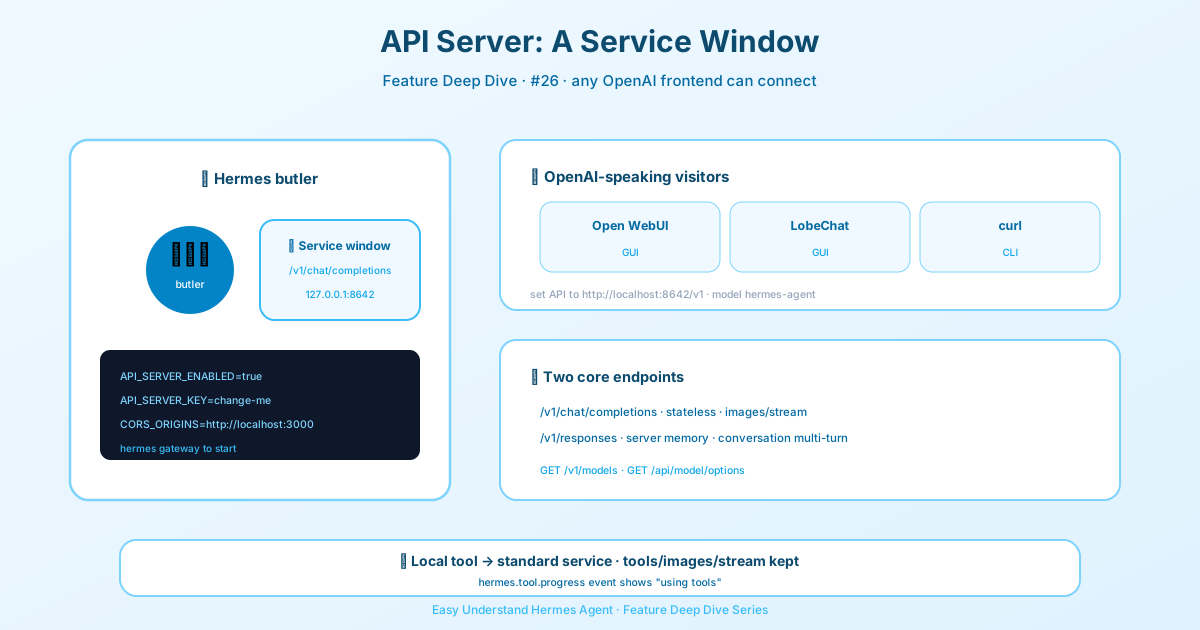
API Server — Hermes as a Service
Imagine this: you’ve built this incredibly powerful agent with Hermes. It can run terminal commands, search the web, manage files, and remember things. But it’s stuck inside your terminal. What if you could plug it into a beautiful chat interface like Open WebUI or LobeChat?
That’s exactly what the API Server does. It turns your Hermes agent into an OpenAI-compatible HTTP endpoint. Since so many frontends speak the OpenAI language, they can connect to Hermes and use it as their backend. Your agent keeps its full toolset, and frontends get a fully tool-equipped assistant.
One Backend, Everything Included
Before we dive in, here’s a pro tip. The API server needs a configured provider and tool backends to be useful. A Nous Portal subscription handles both — you get 300+ models plus web, image, TTS, and browser tools via the Tool Gateway. Just run hermes setup --portal once, and your frontend gets a complete, tool-equipped backend.
Quick Start: Three Simple Steps
1. Enable the API Server
Open your ~/.hermes/.env file and add these lines:
API_SERVER_ENABLED=true
API_SERVER_KEY=change-me-local-dev
# Optional: only if a browser must call Hermes directly
# API_SERVER_CORS_ORIGINS=http://localhost:3000
2. Start the Gateway
Run this command:
hermes gatewayYou’ll see a message like:
[API Server] API server listening on http://127.0.0.1:86423. Connect a Frontend
Point any OpenAI-compatible client at http://localhost:8642/v1. Here’s a quick test with curl:
curl http://localhost:8642/v1/chat/completions \
  -H "Authorization: Bearer change-me-local-dev" \
  -H "Content-Type: application/json" \
  -d '{"model": "hermes-agent", "messages": [{"role": "user", "content": "Hello!"}]}'
Or connect Open WebUI, LobeChat, or any other frontend. Check out the Open WebUI integration guide for step-by-step instructions.
Two Powerful Endpoints
Hermes supports both the classic Chat Completions API and the newer Responses API.
POST /v1/chat/completions
This is the standard OpenAI format. It’s stateless — you send the full conversation history in each request.
{
  "model": "hermes-agent",
  "messages": [
    {"role": "system", "content": "You are a Python expert."},
    {"role": "user", "content": "Write a fibonacci function"}
  ],
  "stream": false
}
You can also send images inline. Just use an array for content with text and image_url parts. Both remote URLs and data:image/... URLs work:
{
  "model": "hermes-agent",
  "messages": [
    {
      "role": "user",
      "content": [
        {"type": "text", "text": "What is in this image?"},
        {"type": "image_url", "image_url": {"url": "https://example.com/cat.png", "detail": "high"}}
      ]
    }
  ]
}
Note: uploaded files and non-image data URLs will return a 400 unsupported_content_type error.
Streaming with Tool Progress
When you set "stream": true, Hermes sends Server-Sent Events (SSE). You get standard chat.completion.chunk events, plus a custom hermes.tool.progress event. This lets frontends show what the agent is doing in real time — like “running terminal command” — without polluting the final assistant text.
Every SSE stream also sends a : keepalive comment line whenever nothing has been sent for 10 seconds, so long tool calls don’t trip client idle timeouts. Standard SSE clients ignore these lines; custom parsers should skip lines starting with :.
Reasoning output
When the model produces reasoning, Chat Completions streams it as choices[0].delta.reasoning_content chunks — the DeepSeek-style field that Open WebUI and similar clients render as a thinking block. Answer text stays in delta.content. Non-streaming requests return it on choices[0].message.reasoning_content. You can opt out on the input side with model_options.reasoning.enabled: false.
POST /v1/responses
The Responses API is newer and more powerful. It supports server-side conversation state via previous_response_id. This means the server stores the full conversation history, including tool calls and results, so multi-turn context is preserved without the client managing it.
{
  "model": "hermes-agent",
  "input": "What files are in my project?",
  "instructions": "You are a helpful coding assistant.",
  "store": true
}
The response includes structured tool calls that were already executed server-side:
{
  "id": "resp_abc123",
  "object": "response",
  "status": "completed",
  "model": "hermes-agent",
  "output": [
    {"type": "function_call", "status": "completed", "name": "terminal", "arguments": "{\"command\": \"ls\"}", "call_id": "call_1"},
    {"type": "function_call_output", "status": "completed", "call_id": "call_1", "output": "README.md src/ tests/"},
    {"type": "message", "role": "assistant", "content": [{"type": "output_text", "text": "Your project has..."}]}
  ]
}
Reasoning shows up here too, as spec-native reasoning output items that arrive before the message and are echoed in response.completed. Support is advertised as features.reasoning_streaming: true on GET /v1/capabilities.
When streaming, mid-turn assistant commentary — progress preambles or text a model writes alongside its tool calls — arrives as its own completed message item with "phase": "commentary". It’s never merged into the final answer, so clients can render it as live progress and skip it when assembling the reply. Set display.interim_assistant_messages: false to suppress it.
Multi-Turn Made Easy
To continue a conversation, just pass the previous response ID:
{
  "input": "Now show me the README",
  "previous_response_id": "resp_abc123"
}
The server reconstructs the full context automatically. No more managing conversation history on the client side. Each response’s output lists only that turn’s items, never earlier turns’ tool calls, so the stored history doesn’t grow by a second copy every turn.
You can also use a named conversation instead of tracking response IDs — the server chains each request to the latest response in that conversation:
{"input": "Hello", "conversation": "my-project"}
{"input": "What's in src/?", "conversation": "my-project"}
Ready to Build?
The API Server turns Hermes from a personal tool into a service. Whether you prefer the simplicity of Chat Completions or the stateful power of Responses, your agent is now ready to serve any frontend you love. Go build something amazing!
📖 Official Docs
This article is based on the official Hermes Agent documentation:Official docs › user-guide/features/api-server