ACP — Communication Protocol Between Agents
ACP — Communication Protocol Between Agents — easy-to-understand guide based on official docs
ACP: How AI Agents Talk to Each Other
Imagine two coworkers who speak different languages—one uses emails, the other uses sticky notes. They’ll never get anything done unless they agree on a common way to pass messages. That’s exactly what ACP does for AI agents.
What Is ACP?
ACP stands for Agent Communication Protocol. It’s a set of rules that lets two AI agents (or an agent and a tool) talk to each other in a clear, structured way—like a universal translator for machines. Instead of each agent guessing what the other means, they follow a shared “language” of requests and replies.
Think of it as the handshake before a conversation. One agent says, “I need this data,” and the other replies, “Here you go, in this exact format.” No confusion, no lost context.
Why Do We Need It?
Without ACP, every agent would need custom code to understand every other agent. That’s like writing a new dictionary for every pair of friends. ACP solves this by creating one standard that everyone can use.
For example, in Hermes Agent, you might have:
- A planner agent that decides what to do.
- A worker agent that actually does the task.
- A memory agent that stores past results.
ACP lets them pass messages back and forth without you writing glue code for each pair.
How Does It Work in Practice?
Here’s a simple example. Suppose you ask Hermes to “book a meeting and send a summary.” The planner agent sends a message to the calendar agent:
{
  "type": "request",
  "action": "create_event",
  "params": {
    "title": "Project Sync",
    "time": "2025-05-01T10:00:00Z"
  }
}
The calendar agent replies:
{
  "type": "response",
  "status": "success",
  "data": {
    "event_id": "12345"
  }
}
Now the planner knows the event is created. It can then send another message to the email agent with the event ID. No one is confused.
Key Rules of ACP
- Every message has a type – either
requestorresponse. - Every request has an action – like
create_eventorget_weather. - Every response has a status –
successorerror. - Data is structured – using JSON, so it’s easy to read and parse.
That’s it. Simple, but powerful.
A Real-World Analogy
Think of ordering food at a restaurant. You (the user) give your order to the waiter (planner agent). The waiter writes it on a ticket (ACP message) and hands it to the chef (worker agent). The chef cooks the dish and puts the plate in the pass (response). The waiter picks it up and brings it to you. Everyone knows the ticket format, so the kitchen runs smoothly.
Running Hermes as an ACP Server
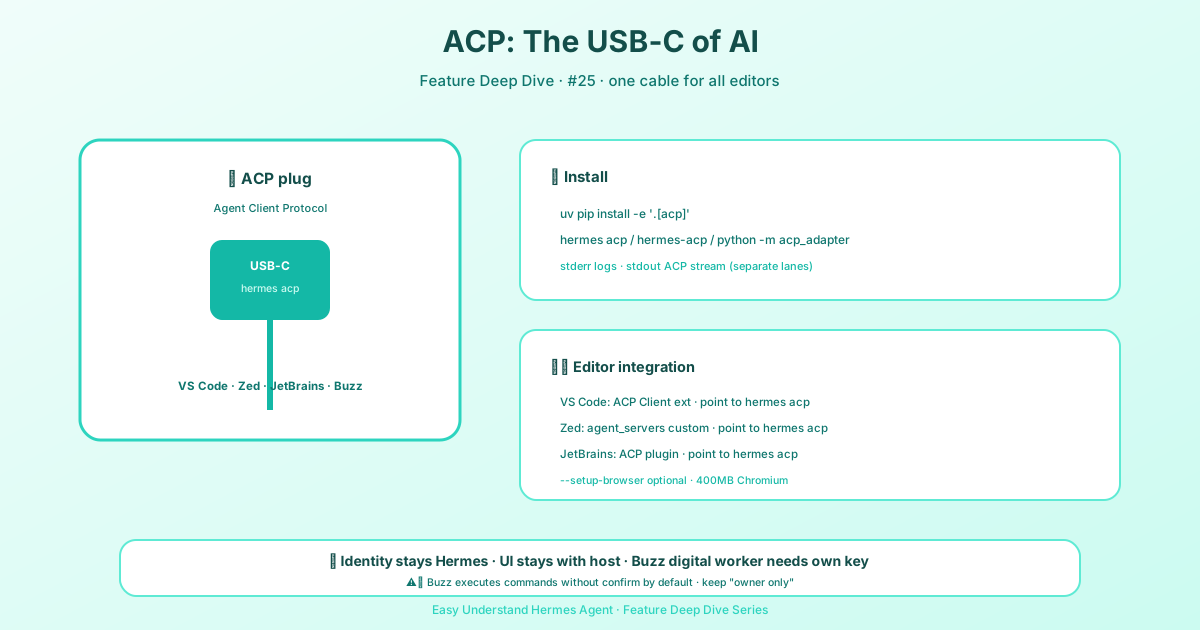
Hermes can also act as an ACP server, so ACP-compatible hosts—editors like VS Code, Zed, or JetBrains—can talk to it over stdio. Install the ACP extra from your Hermes checkout:
cd ~/.hermes/hermes-agent && uv pip install -e '.[acp]'Then start it with any of these:
hermes acphermes-acppython -m acp_adapterHermes logs to stderr, keeping stdout free for ACP traffic. For a quick non-interactive check, run hermes acp --version or hermes acp --check.
Browser tools (browser_navigate, browser_click, etc.) need an extra step because they rely on the agent-browser npm package and Chromium, which aren’t in the Python wheel:
hermes acp --setup-browser           # interactive (prompts before ~400 MB download)
hermes acp --setup-browser --yes     # accept the download non-interactively
The terminal-auth flow (hermes acp --setup) also offers this as a follow-up question after model selection, so most users never need to run --setup-browser directly. The bootstrap is idempotent—re-running it is fast and skips work that’s already done.
Approvals in ACP Mode
Dangerous terminal commands can be routed back to the editor as approval prompts. ACP approval options are simpler than the CLI flow:
- allow once
- allow always
- deny
Whether you actually see a prompt is up to the host. A host is free to answer the request programmatically instead of showing it to you, in which case these options exist on the wire but never reach a human. Buzz Desktop does this, so treat that path as unattended execution regardless of your approvals setting.
On timeout or error, the approval bridge denies the request. The wait is approvals.timeout from config.yaml (default 300 s), the same knob the CLI and gateway prompts use—raise it if your editor keeps approval cards open longer.
Summary and Practical Tip
ACP is the invisible glue that lets AI agents cooperate without chaos. It’s all about clear, structured messages—nothing more, nothing less.
Practical tip: When building your own agents in Hermes, always define your message types and actions before writing the logic. Start with a simple JSON template like the one above, and test with two agents first. Once that works, add more. You’ll save hours of debugging later.
Now go talk to your agents—they’ll understand each other just fine.
📖 Official Docs
This article is based on the official Hermes Agent documentation:Official docs › user-guide/features/acp