Kanban Worker Lanes — Division of Labor
Kanban Worker Lanes — Division of Labor — easy-to-understand guide based on official docs
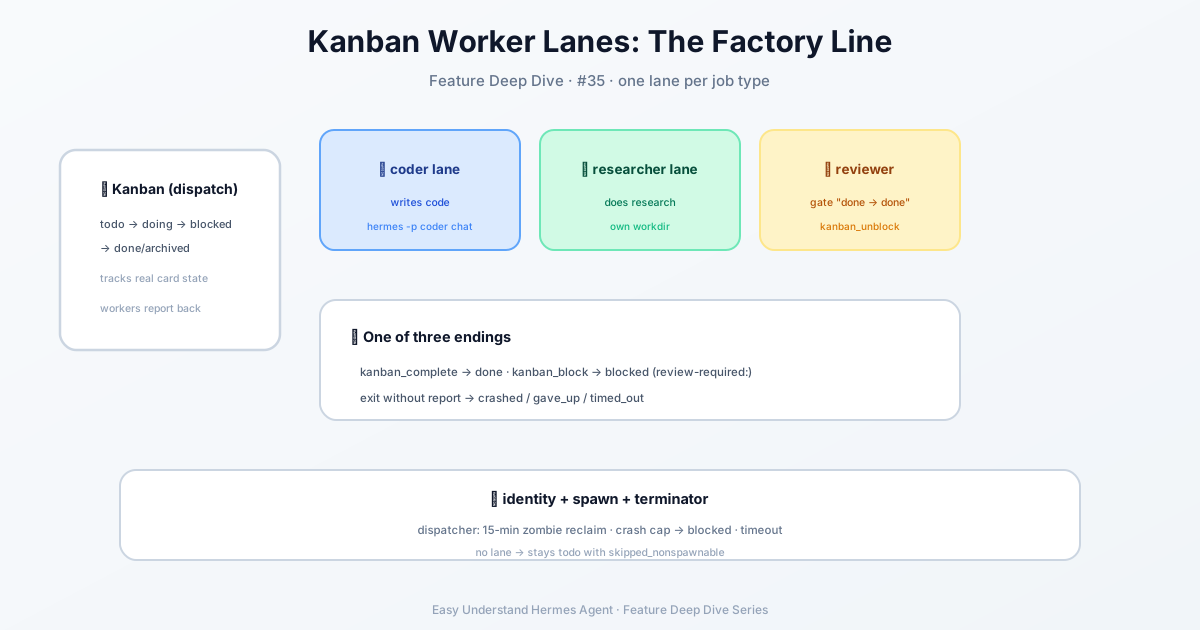
Think of a busy kitchen: the head chef doesn’t cook every dish, they write orders on a whiteboard, and each station — grill, salad, plating — picks up what they need and marks it done. That’s exactly how Hermes Kanban works for AI agents.
What Is a Kanban Board?
It’s a shared task board for all your AI assistants. Every task lives in a single database file (~/.hermes/kanban.db), so any agent can view, claim, or update tasks at any time. Unlike asking one agent to “call” another (that’s delegate_task), the Kanban board survives crashes, timeouts, and bad luck — tasks don’t vanish just because one agent died mid-conversation.
Two Doors, One Board
You can use the board in two ways, but they always see the same data:
- Agents use it via tools — they call
kanban_show,kanban_create,kanban_complete, etc. No manual work from you; they just read and write the board. - You use it via the terminal — type
hermes kanbanor/kanbanin chat to see and manage tasks yourself.
# View all tasks
hermes kanban list

# Create a new task
hermes kanban create "Write weekly report" --assignee weekly-reporter

# Mark a task done
hermes kanban complete 42
Why Not Just delegate_task?
| Aspect | delegate_task |
Kanban |
|---|---|---|
| Style | Like a phone call: wait for reply | Like email: drop it and move on |
| Failure | Task lost if agent crashes | Task stays; can retry or reassign |
| Human input | Not possible | Comment, block, or unlock anytime |
| Participants | One agent at a time | Multiple agents can work the same task |
The key difference: Kanban is “fire-and-forget.” The task persists until someone marks it complete. Even if an agent crashes halfway, another can pick up the card and continue.
A Quick Warning About Linking Cards
If a worker is blocked on a task and creates a support card to fix the missing piece, don’t link the support card as a child of the blocked task. That link would gate the support card behind the very task it’s meant to unblock, so neither ever runs. Instead, just mention the parent task’s id in the support card’s body. If you do create a bad link, hermes kanban unlink <parent> <child> releases it.
What Is Kanban Good For?
- Research teams: several agents gather data, one analyst synthesizes, one writer drafts the final piece
- Scheduled jobs: every morning, an agent generates a brief and appends it to a running log
- Engineering pipelines: break work into cards → parallel development → peer review → merge
- Batch management: one agent manages 50 social accounts, each with its own card
A Practical Tip for Beginners
Don’t over-engineer at first. Start with one simple scenario: create a task, let one agent complete it, and watch the status change from your terminal. Once that feels natural, try two agents — one collects information, the other writes the summary. Remember: the real power of Kanban is “tasks never get lost, and you can always check status,” not complex automation.
Summary: Kanban upgrades AI collaboration from “phone calls” to “whiteboard management” — more reliable, more flexible, and always open for human intervention. Next time you feel your AI agents are tripping over each other, give them a shared board.
📖 Official Docs
This article is based on the official Hermes Agent documentation:Official docs › user-guide/features/kanban