Tutorial 22: Subagent Delegation
Tutorial 22: Subagent Delegation — easy-to-understand guide based on official docs
This is part of the Hermes Agent official tutorial series. View all tutorials
Imagine you’re the team lead on a project. You could do everything yourself, but that’s slow. Instead, you hand out specific tasks to your teammates, give them the details they need, and wait for them to report back. That’s exactly what Subagent Delegation does for Hermes Agent — it lets your main agent hire temporary “workers” to handle tasks in the background.
Step 1: Understand the Basic Idea
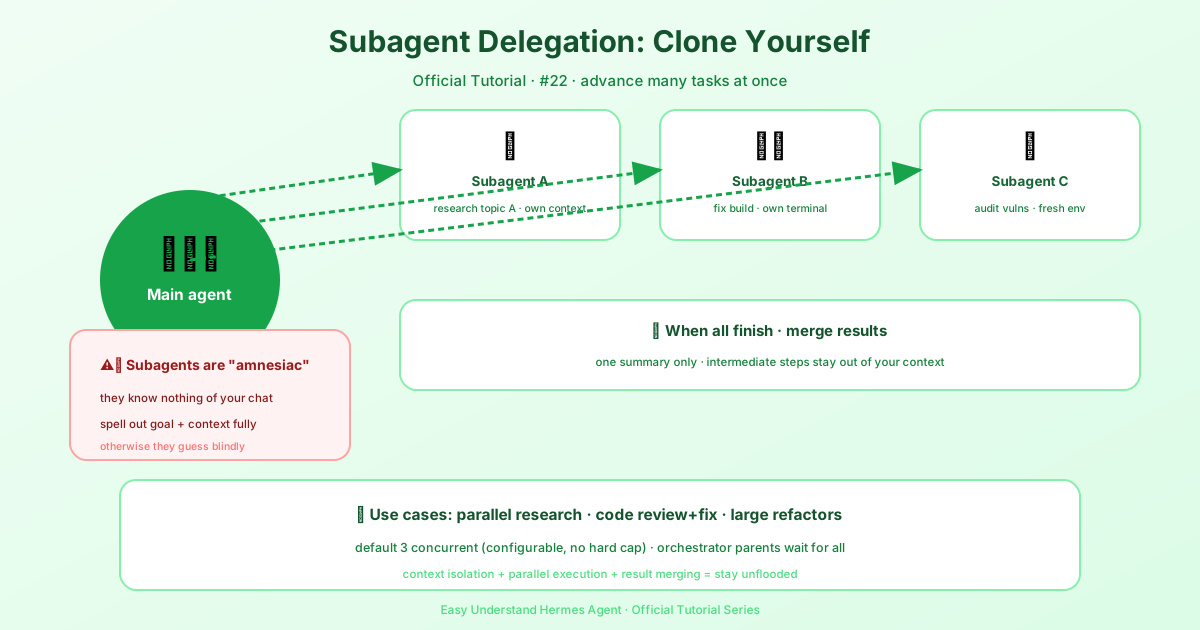
When you call delegate_task, Hermes creates one or more child agents (subagents). Each child:
- Gets a completely fresh conversation — it knows nothing about your chat history.
- Has access to the same tools as the parent agent.
- Runs in its own isolated terminal session.
- Returns only a final summary to the parent.
Think of it like sending a colleague to research a topic. They don’t sit through your entire meeting — you just hand them a note with the task and context, and they come back with a report.
Background terminal processes belong to the agent that starts them: closing a child during delegation teardown terminates its remaining processes, including work started in earlier turns, without stopping processes owned by the parent or sibling agents. A child should wait for its builds, tests, and other bounded background commands before returning its final summary; start a CI watcher or server in the parent session if it must continue after the child finishes, since returning a process ID does not transfer ownership to the parent.
Step 2: Delegate a Single Task
The simplest use case: one task, one subagent.
delegate_task(
    goal="Debug why tests fail",
    context="Error: assertion in test_foo.py line 42"
)
The goal tells the subagent what to do. The context gives it everything it needs to do it.
Step 3: Delegate Multiple Tasks in Parallel
Need several things done at once? Pass a list of tasks. By default, Hermes runs up to 10 subagents concurrently (you can change this — there’s no hard limit).
delegate_task(tasks=[
    {"goal": "Research topic A", "context": "Focus on recent primary sources"},
    {"goal": "Research topic B", "context": "Compare the leading explanations"},
    {"goal": "Fix the build", "context": "Project root: /home/user/project"}
])
Each subagent works independently. The parent waits for all of them, then combines the results.
Step 4: The Golden Rule — Subagents Know Nothing
This is the most important point, so listen up:
Subagents start with zero knowledge of your conversation.
If you say “Fix the error” without explaining what “the error” is, the subagent will be lost. You must pass all necessary context in the goal and context fields.
Here’s a bad example:
# BAD - subagent has no idea what "the error" is
delegate_task(goal="Fix the error")
And the good version:
# GOOD - subagent has all context it needs
delegate_task(
    goal="Fix the TypeError in api/handlers.py",
    context="""The file api/handlers.py has a TypeError on line 47:
    'NoneType' object has no attribute 'get'.
    The function process_request() receives a dict from parse_body(),
    but parse_body() returns None when Content-Type is missing.
    The project is at /home/user/myproject and uses Python 3.11."""
)
Think of the context as a briefing document. The more specific you are, the better the subagent’s work will be.
One exception: when the parent has a resolved workspace directory, every subagent’s system prompt embeds that workspace’s project context files (.hermes.md > AGENTS.md chain > CLAUDE.md > .cursorrules — the same discovery, priority, and size caps as the main agent’s system prompt; SOUL.md is excluded). Subagents working in a repo operate under the repo’s own conventions without having to rediscover them.
Step 5: Use It for Real-World Workflows
Parallel Research
Gather information on multiple topics at once:
delegate_task(tasks=[
    {
        "goal": "Research the current state of WebAssembly in 2025",
        "context": "Focus on: browser support, non-browser runtimes, language support"
    },
    {
        "goal": "Research the current state of RISC-V adoption in 2025",
        "context": "Focus on: server chips, embedded systems, software ecosystem"
    },
    {
        "goal": "Research quantum computing progress in 2025",
        "context": "Focus on: error correction breakthroughs, practical applications, key players"
    }
])
Code Review + Fix
Hand off a full review-and-fix job to a fresh context:
delegate_task(
    goal="Review the authentication module for security issues and fix any found",
    context="""Project at /home/user/webapp.
    Auth module files: src/auth/login.py, src/auth/jwt.py, src/auth/middleware.py.
    The project uses Flask, PyJWT, and bcrypt.
    Focus on: SQL injection, JWT validation, password handling, session management.
    Fix any issues found and run the test suite (pytest tests/auth/)."""
)
Structured Output with output_schema
Each task can carry an optional output_schema, a JSON Schema object the child’s final answer must validate against. The child sees the schema up front as an output contract (“return ONLY the JSON value — no prose, no code fence”); when the answer comes back the parent validates it, and on failure sends the child exactly one bounded correction turn carrying the validation errors verbatim (the schema is not re-pasted). The task’s result then gains schema_valid (true/false) and, on failure, schema_errors.
A contract miss after the retry does not discard the child’s work: the result keeps status: completed with the child’s raw final text in summary, schema_valid: false, the schema_errors, and a schema_note saying the text is unvalidated. The parent extracts what it needs from the raw text instead of re-running a task that may have taken an hour. Prose or a code fence around otherwise-valid JSON (object or array) is tolerated by the validator. Keep schemas forgiving: require only the fields you will actually read, and tasks without an output_schema are unaffected.
delegate_task(
    tasks=[{
        "goal": "Check which of these three endpoints return 200",
        "context": "https://a.example, https://b.example, https://c.example",
        "output_schema": {
            "type": "object",
            "properties": {
                "healthy": {"type": "array", "items": {"type": "string"}},
                "failing": {"type": "array", "items": {"type": "string"}}
            },
            "required": ["healthy", "failing"]
        }
    }]
)
Forwarding Images to a Subagent
Text context is not enough when the task is inherently visual — a screenshot the user sent, a design mock, a rendered chart. Each task accepts an optional images list (up to 8 entries; local file paths, http(s) URLs or data:image/... URLs):
delegate_task(tasks=[{
    "goal": "Compare the rendered dashboard against the design mock and list layout deviations",
    "context": "The app runs at http://localhost:3000; the repo is at /home/user/dash.",
    "images": ["/home/user/mocks/dashboard-v2.png",
               "https://cdn.example.com/current-render.png"],
}])
Delivery follows the same routing as user-attached images (agent.image_input_mode):
- Vision-capable child model — the images arrive as native multimodal content on the child’s first turn: local files are embedded as data URLs (subject to the same read guard as every other file read), remote and
data:URLs pass through verbatim. The child sees the actual pixels. - Non-vision child model — the goal gains
[Image attached at: <path>]hint lines and the child is told to inspect them withvision_analyze.
Forwarding is best-effort: unreadable paths are skipped with a log line, and any failure in the image plumbing falls back to the plain text goal — it can never break a spawn. Images are for things the child must see; put text file paths in context as usual.
Summary
Subagent delegation is your way to parallelize work in Hermes Agent. Remember these key points:
- Use
delegate_taskfor one task or a batch of tasks. - Always provide full context — subagents start from scratch.
- Up to 10 concurrent subagents by default, configurable if you need more.
- Each subagent returns a structured summary — what it did, what it found, files changed, issues encountered.
It’s like having a team of assistants who only know what you tell them — so tell them everything they need.
Next up: Tutorial 23 — Kanban: a shared, persistent board for multi-agent collaboration.
📖 Official Docs
This article is based on the official Hermes Agent documentation:Official docs › user-guide/features/delegation