Tutorial 29: Security Deep Dive
Tutorial 29: Security Deep Dive — easy-to-understand guide based on official docs
Tutorial 29: Security Deep Dive
Welcome back! Today we’re going to talk about something super important: security. If you’ve been following along with our tutorials, you know that Hermes Agent is powerful. And with great power comes great responsibility—which is why Hermes has a seriously robust security model built right in.
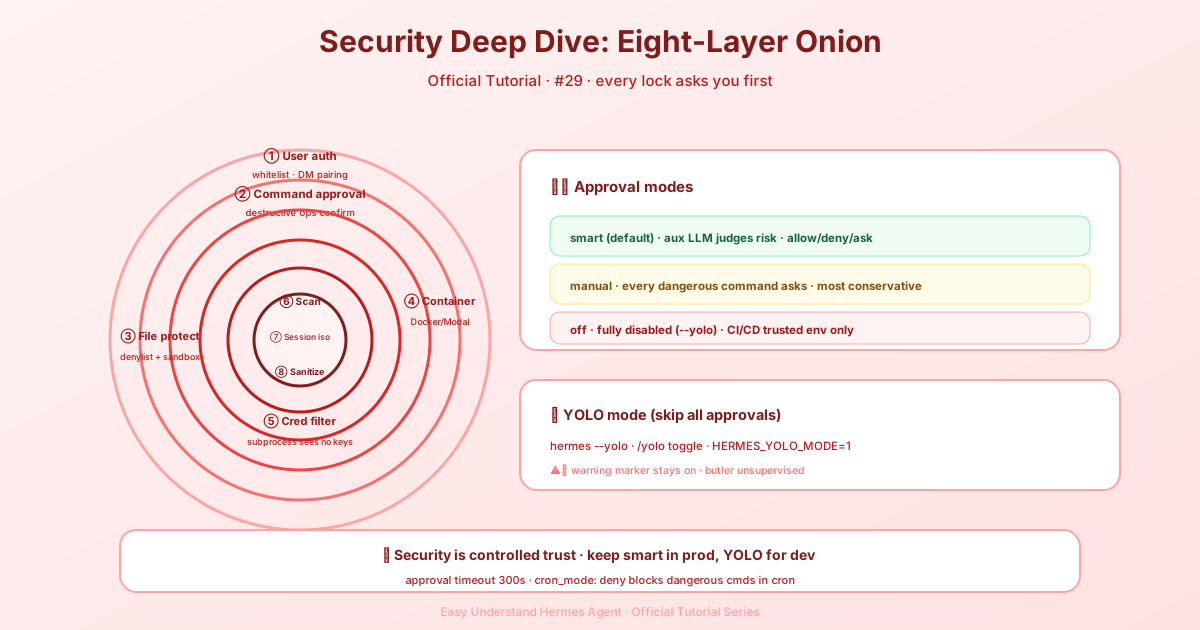
Think of it like a castle with eight layers of defense. Each layer protects you from a different kind of threat, from sneaky prompt injections to accidental destructive commands. Let’s walk through the highlights.
The Eight Layers of Defense
Hermes doesn’t rely on just one security measure. Instead, it layers them up:
- User authorization — Only approved people can talk to the agent.
- Dangerous command approval — A human must approve risky operations.
- File write safety — Protects against unwanted file modifications.
- Container isolation — Runs tasks in sandboxes like Docker.
- MCP credential filtering — Keeps secrets away from subprocesses.
- Context file scanning — Detects prompt injection in project files.
- Cross-session isolation — Sessions can’t peek into each other’s data.
- Input sanitization — Prevents shell injection via working directory parameters.
That’s a lot of protection! But the star of the show is the Dangerous Command Approval system. Let’s dig into that.
How Command Approval Works
Before Hermes runs any command, it checks it against a list of dangerous patterns. If there’s a match, you get to approve or deny it. But here’s the cool part: you can configure how that approval works.
In your ~/.hermes/config.yaml, you’ll find the approvals section:
approvals:
  mode: smart                     # smart | manual | off
  timeout: 300                    # seconds to wait for user response
  cron_mode: deny                 # deny | approve
  single_query_mode: deny         # deny | approve
  unattended_mode: deny           # deny | approve
  mcp_reload_confirm: true        # /reload-mcp asks before invalidating cache
  destructive_slash_confirm: true # /clear, /new, /reset prompt first
There are three modes:
| Mode | What it does |
|---|---|
| smart (default) | Uses an auxiliary LLM to judge risk. Safe commands auto-approve, dangerous ones auto-deny, and uncertain ones ask you. |
| manual | Always asks you for approval on dangerous commands. |
| off | Disables all checks. Equivalent to --yolo. Use with extreme caution! |
The cron_mode, single_query_mode, and unattended_mode settings are especially handy. They control what happens when a cron job, a one-shot -q session, or an unattended webhook/API session hits a dangerous command. Since there’s no human waiting to answer, the default is deny—the command gets blocked instantly, and the agent has to find another way.
One more thing about prompts: if an approval prompt times out, it can’t be reopened. The pending entry is discarded and the agent is told not to retry on its own within that turn. To run the operation after all, just send a new message asking for it—the agent issues a fresh tool call and you get a fresh approval card. A timeout isn’t counted as a denial, so asking again is never penalized.
YOLO Mode: The Big Red Button
Sometimes you just want to let the agent run wild. That’s what YOLO mode is for. It bypasses all approval prompts for the current session.
You can activate it three ways:
- CLI flag:
hermes --yoloorhermes chat --yolo - Slash command: Type
/yoloduring a session to toggle it on/off - Environment variable: Set
HERMES_YOLO_MODE=1
The /yolo command is a toggle, so typing it again turns it off:
> /yolo
  ⚡ YOLO mode ON — all commands auto-approved. Use with caution.

> /yolo
  ⚠ YOLO mode OFF — dangerous commands will require approval.
When YOLO is active, Hermes makes sure you don’t forget. You’ll see a red banner at session start and a ⚠ YOLO indicator in the status bar, updated live as you toggle.
⚠️ Warning: YOLO mode disables all dangerous command checks—except the hardline blocklist. Only use it when you fully trust what’s being generated, like well-tested scripts in disposable environments.
New in This Update
Two new settings deserve a special shout-out:
-
mcp_reload_confirm— Whentrue,/reload-mcpasks before rebuilding the MCP tool set. This matters because rebuilding invalidates the provider prompt cache, meaning the next message re-sends full input tokens (costs more!). Users who click “Always Approve” flip this tofalse. -
destructive_slash_confirm— Whentrue, destructive commands like/clear,/new,/reset, and/undoprompt before discarding your conversation. On Telegram, Discord, and Slack, you get native yes/no buttons. In the TUI, you can force-skip the modal withHERMES_TUI_NO_CONFIRM=1.
Supervised-Gateway Lifecycle Restriction
There’s one more guard worth knowing about, and it can’t be turned off. The terminal tool refuses to stop or restart the gateway from inside its own supervised process, because a self-restart can kill the tool mid-run and trigger a supervisor/auto-resume loop. User approval, YOLO mode, and force=True do not bypass this guard.
The guard also blocks process killers aimed at the interpreter image the gateway runs as—things like taskkill /F /IM python.exe, Stop-Process -Name python, pkill -9 python3, killall python, or pgrep python | xargs kill. A supervised gateway is a python process, so those commands would take it (and the agent’s own turn) down. Kills scoped to a process the agent owns still pass: the proc_* id of a background job, or an explicit PID like kill <pid>. Other image names (say, notepad.exe) are unaffected. This guard is active under every generated launcher—systemd, launchd, s6, and the Windows Scheduled Task—via the HERMES_SUPERVISED_CHILD marker they export.
On macOS, executed launchctl submit and launchctl bootstrap commands are restricted regardless of the job label, so for authorized LaunchAgent maintenance, use a separate shell outside the running gateway.
Wrapping Up
Hermes Agent takes security seriously, and now you know exactly how it protects you. The key takeaway? Start with smart mode, keep the defaults, and only switch to YOLO when you’re absolutely sure.
Next time, we’ll explore more advanced features. Until then, stay safe out there!
📖 Official Docs
This article is based on the official Hermes Agent documentation:Official docs › user-guide/security