A2A Two-Machine Deployment: Delegate Tasks Between Hermes Agents on Two Computers
Hermes Messaging Platform Integration, Part 40: A2A Cross-Machine Deployment Steps and Real-World Pitfalls.
One Hermes on a computer is swamped, and you want another Hermes on a different machine to lend a hand—that’s what A2A is for. But what pitfalls await during deployment? Real users have already stepped on them for you.
When Do You Actually Need Two Machines
First, ask yourself: do you really need two computers, or do you just want two agents to cooperate?
If both agents live on the same machine, delegation or a kanban board is enough—like in the same office, you just shout over to the colleague at the next desk; no need to make a phone call. A2A is built for “cross-machine / cross-process / cross-framework” scenarios: your desktop and server each run a Hermes instance, with their own memory, tools, and login credentials. That’s when you need the A2A bridge.
Getting Started
Step 1: Enable the A2A platform on both machines. Choose A2A during Hermes installation, or edit the config file to set gateway.platforms.a2a.enabled to true. The default port is 9900. This step is like installing a secured front door on each computer.
Step 2: Configure tokens (the door keys). On the server side, set A2A_PEER_TOKENS or A2A_BEARER_TOKEN. If you’re just testing locally, you can skip tokens, but the door will only open for 127.0.0.1—like access cards only issued to residents of the same building.
Step 3: Expose the address. For cross-machine communication, you must set A2A_HOST, e.g., 0.0.0.0 or a LAN IP. This step moves the door from an “internal corridor” to a “street-facing position,” so the other computer can find you.
Step 4: Pair peers. On the client side, configure a2a_agents, or directly use a2a_discover("http://server-address:9900") to view the other party’s Agent Card—like exchanging business cards first to confirm who they are and what skills they have.
Step 5: Verify. Enable the a2a toolset and use a2a_call to send a simple task. Watch out for timeouts: the client default is 330 seconds, and the server reply window is 300 seconds. For long tasks, increase these values, or the task will be judged as timed out halfway through. After completion, check the audit log at ~/.hermes/a2a_audit.jsonl.
Real Case 1: What a Successful Deployment Looks Like
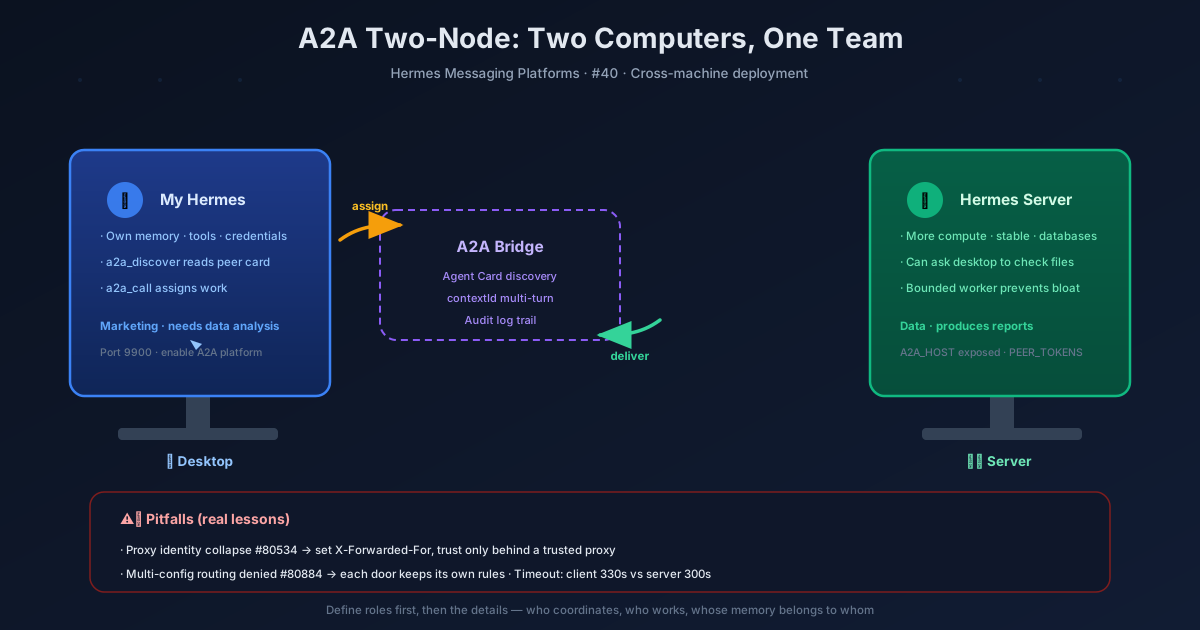
The official docs paint an ideal scenario: your desktop Hermes hands off a task to the server Hermes—the server has more compute power, a more stable network, and a fuller database. Conversely, the server Hermes can delegate tasks like “check local files” to the desktop side. Each side has its own memory and tools, does its own work, discovers each other’s skills via Agent Card, and conversations are keyed by contextId, supporting multi-turn exchanges.
This is like two departments in a company: the marketing department (desktop) needs a data analysis report, sends an email to the data department (server), the data department finishes it and sends it back, and both sides keep their own archives without interfering with each other.
Real Case 2: A Failed Deployment
There’s a real case in the community (#82910): a user deployed two nodes on two macOS machines—a user-facing gateway plus a worker. Sounds similar to the success case above, but it went sideways, and the team eventually took the deployment offline.
The problem was that the roles of “coordinator” and “worker” weren’t clearly separated. The parent agent (coordinator) piled too much into its own session: every step the worker took, every intermediate result, every thought process flowed back into the parent session, causing context bloat—the parent agent was flooded with information and grew increasingly sluggish. Cross-agent transcription dragged down overall performance, and complex tasks triggered recovery loops that dug deeper and deeper.
The lesson is clear: A2A cross-machine collaboration requires designing role boundaries first—who coordinates, who does the work, and whose memory belongs to whom. Don’t dump everything into the parent session; the worker should have its own “little notebook.”
Deployment Pitfall Checklist
Reverse Proxy Identity Collapse (#80534/#80779): If you use nginx, K8s Ingress, or a CDN as a reverse proxy, all peers share the same bearer token, and identities collapse into the proxy address. The fix is to have the proxy pass X-Forwarded-For and derive real identities after a trusted proxy. This is like the building front desk receiving packages on your behalf—the actual recipient must be written on the package, or everything piles up at the front desk.
Multi-Config File Routing Rejected (#80884/#80956): If you run multiple configs with multiplex_profiles, inbound A2A messages routed to secondary profiles may be rejected by the gateway authorization layer. The fix is to capture the immutable adapter security context at startup, preserving each profile’s own authentication, trust, binding, and Agent Card policies. Every door needs its own access rules; you can’t share one set.
Timeout Settings: Default 330 seconds client vs 300 seconds server—remember to adjust for long tasks. Otherwise, it’s like a long-distance phone call getting cut off mid-sentence.
Bounded Worker Mode (#82503): This is the official remedy for context bloat. Non-root served A2A routes can run configured subprocesses or versioned RPC workers with bounded output, process tree reaping, cancellation, and exactly-once termination—the worker finishes its job and clocks out, without dumping the entire process into the parent session.
What This Means for Users
A2A two-machine deployment isn’t as simple as “connecting two computers.” It’s like opening a branch office: the storefront (Agent Card), access control (token), division of labor (who coordinates, who works), and the warehouse (each side’s memory) all need careful thought. A successful deployment lets both machines play to their strengths; a failed one drowns the coordinator in information.
Remember three things: define role boundaries first, then worry about technical details; handle identity issues with reverse proxies; adjust timeouts for long tasks, and use bounded workers for complex ones. Do these, and the Hermes instances on two computers can truly become good colleagues—not teammates that drag each other down.
📖 Official Docs
This article is based on the official Hermes Agent documentation:Official docs › user-guide/messaging/a2a